Authorizing Access to a NetDocuments Account
For Upland AccuRoute Desktop, Queue Client and NetDocuments users only
You must authorize use of the NetDocuments account if you have an AccuRoute Server, Desktop, and/or Queue configuration.
Note: Contact your Administrator if you need assistance.
Desktop and/or Queue Client users must reauthorize their NetDocuments accounts.
To authorize the NetDocuments account
- Start the Desktop or Queue Client.
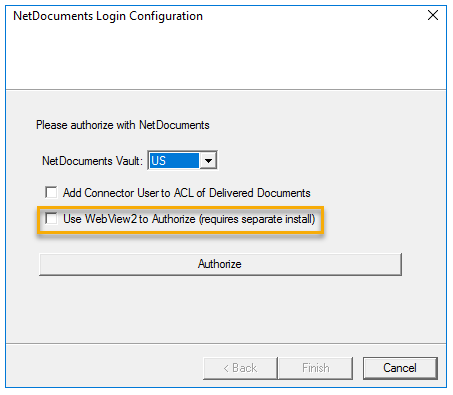
- Select Tools > Configure DMS > NetDocuments. The NetDocuments Login Configuration dialog box appears.
Expand to view more information.
 NetDocuments Browser Control WebView2
As a result of the Internet Explorer (IE) deprecation taking place among businesses, changes have been made to browser control functionality in an effort to support new and on-going
Note: This only applies to users whose companies are deprecating the use of IE.
AccuRoute has upgraded its browser control functionality to Microsoft Edge Webview2 Evergreen x86. Errors will occur when using NetDocuments and the deprecated IE browser control functionality during authorization. Ensure WebView2 has been installed.
Note: You will not be able to profile documents if you are not able to authorize successfully.
The following message appears if WebView2 has not been installed.
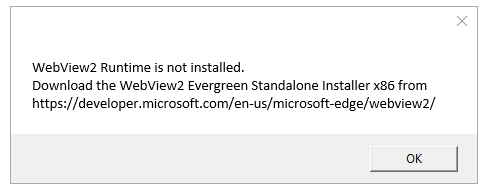
Note: You must download WebView2 if your Administrator has not done so at the Client level. Contact your Administrator for assistance if necessary.
-
Select the following option (choose only if your company is deprecating the use of Internet Explorer).
Use WebView2 to Authorize
The Use WebView2 to Authorize option is available in all instances where authorization and login to NetDocuments is required if your company has decided to deprecate the use of IE and you have installed WebView2. See NetDocuments Browser Control WebView2 for more information.
- Ensure the correct NetDocuments vault is selected and click Authorize. The NetDocuments Authorize/Login dialog box appears.
- Type your Desktop Client username and password in the appropriate boxes and click Login.
- Click Allow.
- Click Finish.