Prerequisites
Network Security and Ports
- BA Insight products communicate with your network to perform various tasks.
- BA Insight AutoClassifier requires the following network connectivity:
Internal Communication
-
- HTTP or HTTPS access to the AutoClassifier Engine website and web services.
- Specific ports are selected by the user during installation.
- Specific ports are selected by the user during installation.
- Default Ports:
The following ports must be open:- Admin site port: 1967
- Tika port: 9998
- Clustering port: 9997
- Crawl Adapter port: 8888
- Lucene (optional): 1968
- Connectivity to SQL database and Microsoft Active Directory.
- HTTP or HTTPS access to the AutoClassifier Engine website and web services.
External Communication
-
- HTTPS access to the AutoClassifier 0365 Add-in service.
- Must be accessible from a location external to the network.
- Must have a valid SSL certificate.
- HTTPS access to the AutoClassifier 0365 Add-in service.
Installation Prerequisite Checklist
Requirement |
Description |
Completed |
|
|---|---|---|---|
| Server hosting AutoClassifier |
|||
|
|
Operating System |
Microsoft Windows Server
|
|
| Windows Server Roles and Features |
Must have Web Server (IIS) role enabled with the following Server Roles:
Features:
|
|
|
| .NET Framework |
|
|
|
| Web Browser Support | |||
|
|
Supported
|
Unsupported Browsers Unsupported web browsers may or may not work with AutoClassifier. These browsers include:
These browsers have not been tested and are unsupported by BA Insight. |
|
| Java Requirements | |||
|
|
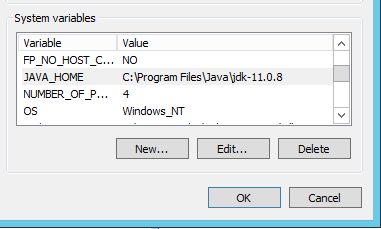
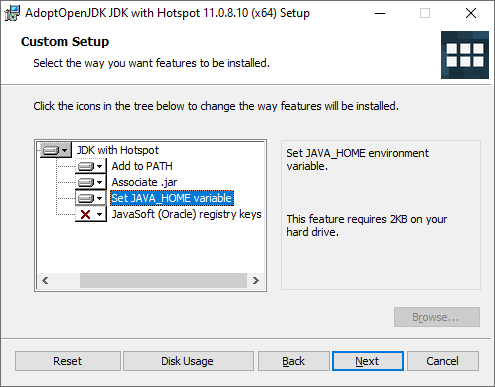
Java To satisfy the AutoClassifier Engine Java requirement, you must install and configure either:
|
|
|
|
|
|
|
|
| Adapter Crawlers Supported |
|||
|
|
Elasticsearch |
AutoClassifier v6.0 supports Elasticsearch version 7 and later.
|
Elasticsearch URL: Elasticsearch Username: Elasticsearch Password: |
| SharePoint Online |
AutoClassifier v6.0 supports SharePoint Online.
|
SharePoint Online URL: SharePoint Online Username: SharePoint Online Password: |
|
| SharePoint 2013/16/19 |
AutoClassifier v6.0 supports SharePoint 2013/16/19.
|
SharePoint 2013/16/19 URL: SharePoint 2013/16/19 Username: SharePoint 2013/16/19 Password: |
|
| Database Requirements |
|||
|
|
SQL Server |
In large environments where a database team is responsible for creating and maintaining databases, BA Insight recommends you follow your standard internal practice for database creation, and then assign the appropriate user account the appropriate permissions as defined below.
|
|
| Azure SQL |
A SQL account with dbOwner permissions on the SQL database for use with AutoClassifier.
When using Azure SQL, it is strongly recommended to connect to an already existing database (empty or not). If the database does not exist, AutoClassifier will automatically create the database for you with database parameters that are not in your control and might generate unexpected costs. To correctly control the database dimensions and costs for the AutoClassifier database, you should manually create the database and configure AutoClassifier to connect to it. |
|
|
| Account Requirements |
|||
|
|
Database Access |
Either a SQL account, or the above service acccount, must have the permissions listed under Database Requirements, above. |
Windows user account: Permissions: |
|
|
Service Account |
The service account must have local administrator privileges on the server that houses AutoClassifier. For multi-server deployments, the service account must be a Domain acccount. |
|
|
|
SharePoint Account (for SharePoint backends/integrations) |
If you are using AutoClassifier with SharePoint (Online or On-Premise), the SharePoint App user account (app@sharepoint) must be added to the SharePoint Term Store (under Site Settings). |
|
AutoClassifier Add-In
Before installing the AutoClassifier Add-In, ensure the following conditions are satisfied:
- Domain Account for running the IIS Site.
- This account also requires the ability to run as a Windows Service
- This account also requires the ability to run as a Windows Service
- AutoClassifier Engine is installed.
- Web server certificate is installed.
- Latest Windows updates are required.