About the File Share Connector
Overview
The BA Insight File Share Connector makes it possible to surface content from File Shares using the SMB v2 and v3 protocols and secured via Active Directory users and groups into a single consolidated search index, along with content from other repositories.
For more information about the File Share connector features and abilities, see https://www.bainsight.com/connectors/file-share-connector-sharepoint-azure-elasticsearch/.
- For example, you cannot index files from both File Share and Microsoft Teams with the same ConnectivityHub instance.
- This can cause issues with security trimming.
- Two separate ConnectivityHub instances are required in this case.
- If you want to use multiple Azure AD based connectors (MS Teams, MS Sharepoint Online) and AD based connectors (Fileshare), see the Limitations topic, below.
Cross-connector Security
File Share connector reads the permissions set on the file share and its files during indexing.
For these permissions to be processed correctly, the Target directory in ConnectivityHub must match the directory used to secure the file share.
For instance, if the file share is secured via:
- On-Premise Active Directory domain: ConnectivityHub Target directory must be that same domain.
- Azure Active Directory domain services: ConnectivityHub Target directory must be "Active Directory" and point to your Azure Active Directory exposed as a Domain Service (Azure AD DS).
Custom security can also be set within the Connector Framework or ConnectivityHub based on business rules if matching the original security is not required.
Example: Azure File Share
The BA Insight FileShare connector can index an Azure File Share as long as Azure File Share and ConnectivityHub are connected to the same Azure Active Directory Domain Services (AAD DS) instance.
For more information about AD DS: https://docs.microsoft.com/en-us/azure/active-directory-domain-services/overview
Microsoft Azure Active Directory Domain Services
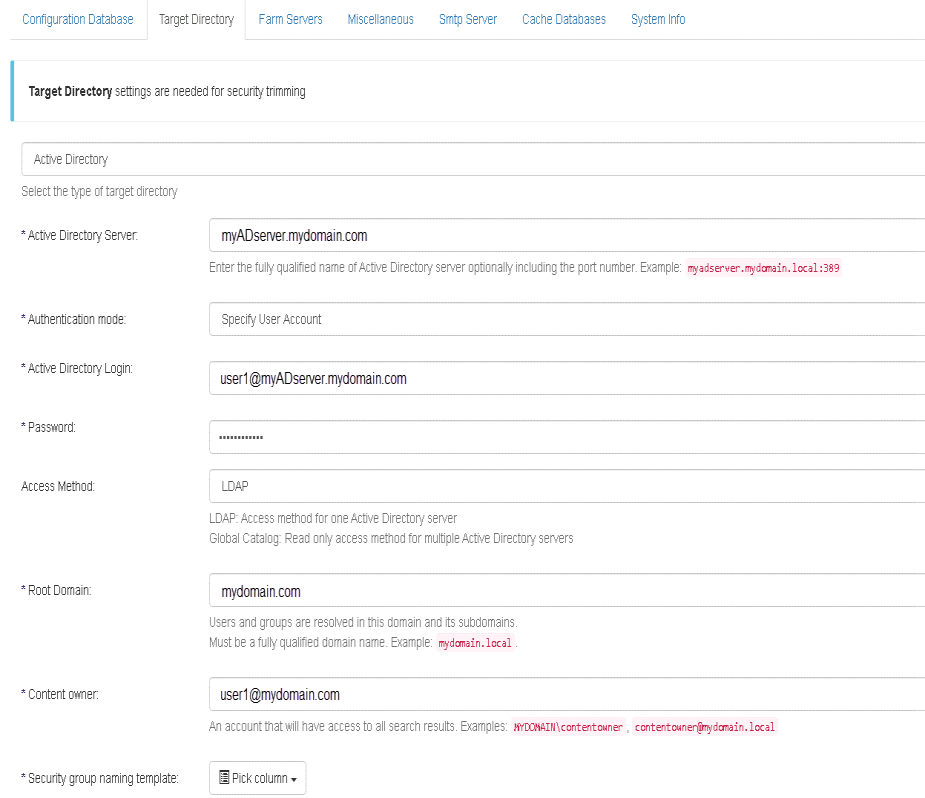
If your file share is secured though Azure Active Directory Domain Services, ConnectivityHub must be configured to use the Azure AD Domain Service as a Target directory for users/groups translation.
See the example below.
Example: Azure AD Domain Service in ConnectivityHub
Shown in the example below is an instance of a ConnectivityHub with the Target directory configured to use an Azure AD Domain Service.
Cross-connector Limitations
If you use another BA Insight connector in addition to File Share connector (FileNet, Exchange, Exchange Online, SharePoint Online, and/or Teams) and you want to connect to Azure AD for security identities resolution, use one of the following AD options:
- A local AD for all BA Insight connectors
- Will synchronize your local AD with your Azure AD
- Deploy two instances of ConnectivityHub (hosted on two different servers):
- Instance 1: Configured with an Active Directory (AD). Use it to crawl with File Share connector
- Instance 2: Configured with Azure AD target directory. Use it to crawl other BA Insight connectors, that use Azure AD for security trimming.
Note: If the BA Insight connector Target Directory is misconfigured, the users/groups securing the items will not resolve: records are visible only to the content owner.