How to Configure Your Confluence Cloud Connector Using Web.config
Confluence On-Premise Connector
Like all BA Insight connectors, the Confluence connector has a web.config file that can be used to make specific, advanced modifications to your connector.
Caution! Modify your connector's web.config file only when necessary.
This file does not contain settings that are commonly changed.
Make changes to this file with caution.
Location of Web.config File
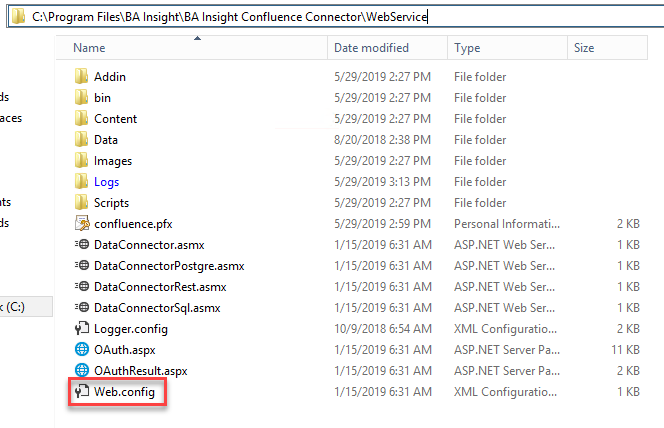
The web.config file is located at <ConnectorRoot>\WebService\Web.config.
Web.config File Details
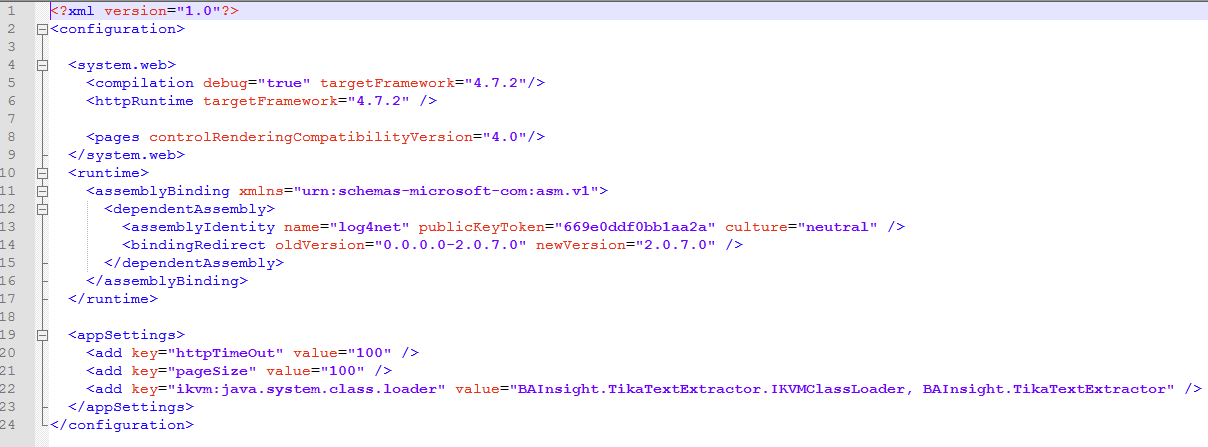
The Confluence connector web.config file is shown below.
- The application settings can be found around line 20.
.NET Framework
- The .NET Framework version is set by the property
targetFrameworkon lines 5 and 6 in the example below. - To use the connector as it is, you must have .NET Framework version 4.7.2 installed.
- If you have a higher .NET version and you want to keep it, then after installing the connector you must update the .net version in web.config:
- Change the property
targetFrameworkto match the installed version of .NET Framework installed on your host machine.
Settings Reset
Keep in mind that the web.config file resets each time the connector is (re)installed.
Confluence Cloud Connector
Like all BA Insight connectors, the Confluence connector has a web.config file that can be used to make specific, advanced modifications to your connector.
Modify your connector's web.config file only when necessary.
This file does not contain settings that are commonly changed. Make changes to this file with caution.
Location of Web.config File
The web.config file is located at <ConnectorRoot>\WebService\Web.config.
Web.config File Details
The Confluence connector web.config file is shown below.
The application settings can be found around line 20.