How to Configure Your SharePoint 2013/16/19 Connector Using Web.config
Like all BA Insight connectors, the SharePoint 2013/16/19 connector has a web.config file that can be used to make specific, advanced modifications to your connector.
Note: Setting "EnableSourceSystemAPILogging" to "True" causes the connector to crash.
The connector does not support this feature.
Modify your connector's web.config file only when necessary.
This file does not contain settings that are commonly changed.
Make changes to this file with caution.
Location of Web.config File
The web.config file is located at <ConnectorRoot>\WebService\Web.config.
Web.config File Details
The appSetting element of web.config file contains all the connector specific settings. See below:
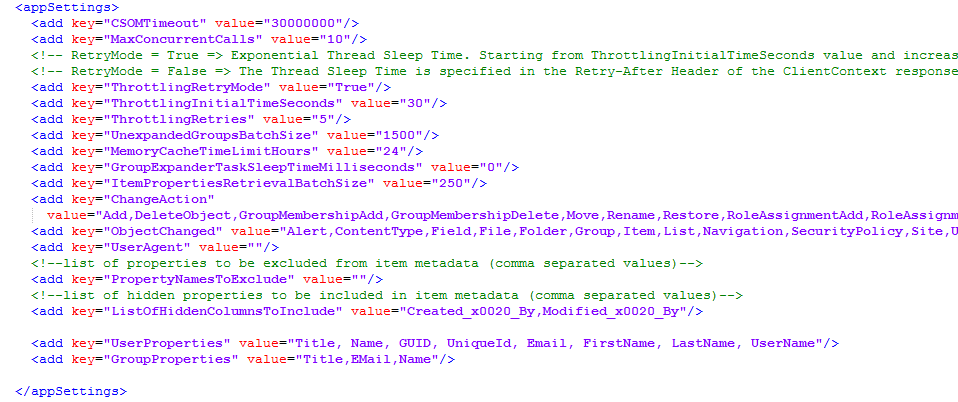
- CSOMTimeout
- Max timeout for SharePoint CSOM calls
- MaxConcurrentCalls
- Maximum parallel threads when processing in parallel
- ThrottlingRetryMode
- Retry CSOM calls if Throttled by SharePoint
- ThrottlingInitialTimeSeconds
- Amount of time to wait before retrying CSOM call when throttled
- ThrottlingRetries
- Amount of retries before treating CSOM as failed
- MemoryCacheTimeLimitHours
- Time cache items can remain in Memory
- ChangeAction
- AuditLog retrieval events to retrieve on incremental crawl
- ObjectChange
- AuditLog object events to retrieve on incremental crawl
- PropertiesNamesToExclude
- List of metadata properties to exclude while crawling
- ListOfHiddenColumnsToInclude
- List of Hidden properties that can be returned as metadata
- UserProperties:
- User properties retrieved from SharePoint during security sync, which can be used in user mapping script.
- If the setting is empty, then all properties are retrieved.
- GroupProperties:
- Group properties retrieved from SharePoint during security sync, which can be used in group mapping script.
- If the setting is empty, then all properties are retrieved.