How to Register the Nuxeo Connector as an External App
Use the following steps to register the BA Insight Nuxeo connector in Nuxeo as an external application:
- Install the BA Insight Nuxeo Connector.
Prepare for Basic Authentication
Basic authentication doesn't require any steps before configuration.
Prepare for oAuth-Based Authentication
Use the following instructions to prepare your connector for oAuth-based authentication.
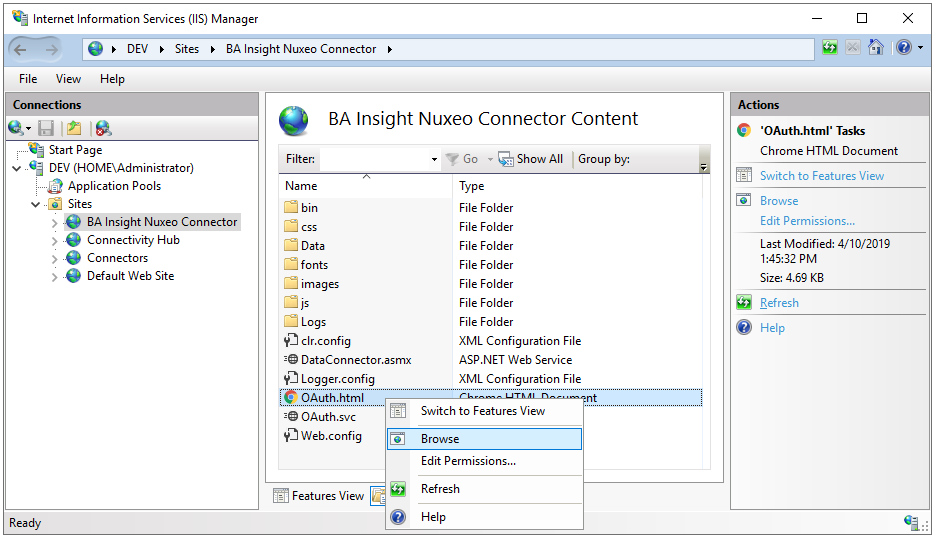
- Start IIS Management Console. Select "BA Insight Nuxeo Connector" under "Sites" on the left-side Connections pane.
- Click the Content View tab on the bottom, right-click OAuth.html and select "Browse" from the sub-menu that appears.
- The BA Insight Nuxeo Connector web page appears.
- In the appropriate fields, specify the Nuxeo URL and Nuxeo Administrator account, and then click the 'Authorize' button.
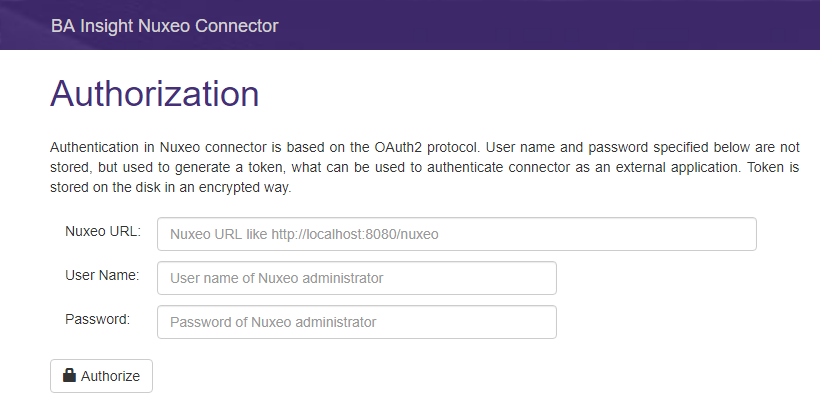
- A green message indicates that authorization was successful.