How to Set Up and Configure LDAP Connector
All BA Insight connectors can be downloaded from Right Answers under Knowledge > BA Insight > Product Downloads > Connectors.
This connector is installed with the same generic steps as any BA Insight connector.
Satisfy the Prerequisites for your connector before installing.
Configuration specifics are detailed below.
How to Configure the LDAP Connector
- Connect to web service and choose one of the two services depending on your directory authentication settings:
- Services
- Authentication: Simple Bind - The default LDAP authentication mechanism (using the LDAP BIND operation).
- Authentication: Anonymous - Use to access the LDAP server without specifying a username or password.
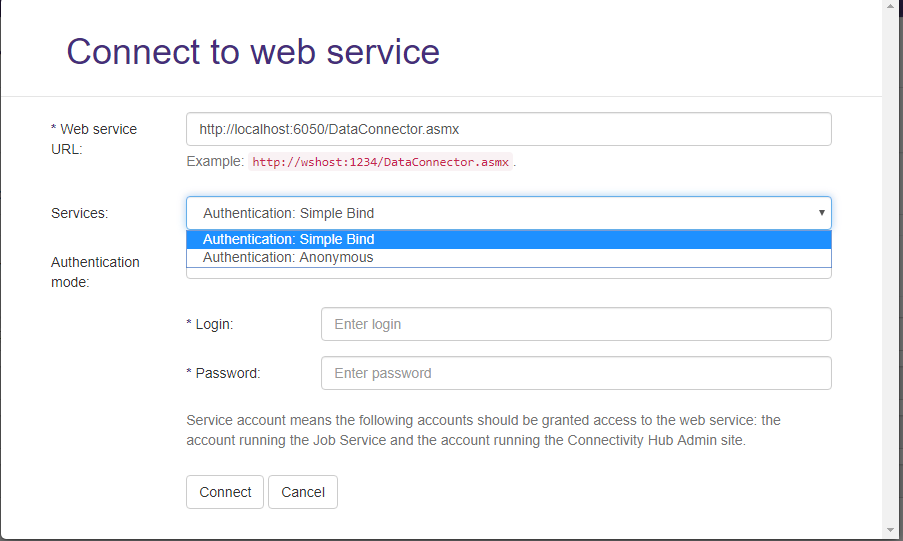
- Services
- Click Connect.
Common Connection Configuration Settings
| LDAP Server |
The DNS name of your LDAP directory server. Example: example.contoso.com:<port> |
|---|---|
| Base DN list: |
The list of Base DN to be crawled. One per line. The connector only returns the immediate children of the Base DN. It does not recursively search sub-containers. If you wish to crawl multiple levels of a hierarchy, you must specify the DN for each container Example:
|
| Search for descendants within specified base DNs: |
When checked, the connector will return records matching the enumeration query in the base DN container but also any sub container. When unchecked, the connector will only return records directly located in the base DN container |
| Properties to request per record to index. |
The first line must specify the property to use as the unique identifier for each record. Supported data types for unique identifier: Guid, Sid, UUID, string. The second line is a comma separated list of properties to return for each record. Example:
|
| Enumeration query |
LDAP query that returns a list of ids to be indexed. Example: This means: search for all entries that have:
|
Simple Bind Connection Configuration Specifics
In addition to Anonymous connection configuration there are the following settings:
| LDAP Account |
A user with read access to the LDAP service Example: |
|---|---|
| Password |
|
Content Configuration Specifics
Because the LDAP Directory may contain any kind of attribute and LDAP implementations do not necessarily have web interfaces, the following 2 fields must be configured when creating a content source bound to the LDAP connector:
| Item Url |
This is the URL for the record indexed. Search engines use this URL to make search results clickable. If you do not have a web interface, use the following examples to configure this property:
|
|---|---|
| Item Title |
Defines the title that appears in the user's search results. Common entries for this field include: |
Other Configuration Specifics
The following settings can be found in the file web.config:
| Item Cache in Minutes |
The sliding expiration time for the items cache. Default value: 90 |
|---|---|
| Client Timeout In Minutes |
The maximum amount of time that the client waits for the server to return results. |
| Provider Cache In Minutes | The sliding expiration time for the providers cache. |
For target sync, set "File types to include" to blank.
This enables every item to be crawled.
LDAP Secured
LDAPS is the only supported version of LDAP Secured (STARTTLS is not supported).
The certificate for LDAPS must be trusted on the server where the LDAP connector is deployed.
Info | Metadata
The only data type supported for metadata is string. Other data types like Guid, UUID, Sid etc. are not supported.