How to Set Up and Configure the Yammer Connector
All BA Insight connectors can be downloaded from Right Answers under Knowledge > BA Insight > Product Downloads > Connectors.
This connector is installed with the same generic steps as any BA Insight connector. Be sure to check the "Unblock" box in .zip file properties dialogue box.
Satisfy the Prerequisites for your connector before installing.
Configuration specifics are detailed below.
Application Deployment and Authorization
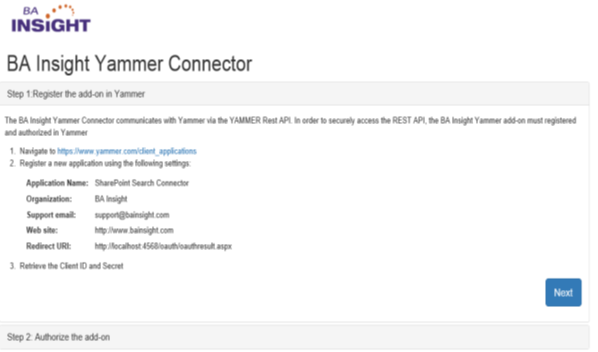
The BA Insight Yammer Connector requires an access token to communicate with the Yammer network using the Rest API.
To obtain the access token you must follow the steps described on the http://localhost:<your port number>/oauth/oauth.aspx page.
Note: Verified Administrator credentials must be used when registering and authorizing the application.
Connection Configuration Specifics
Configuration Options
The BA Insight Yammer Connector uses the repository model to determine which networks to crawl.
The required networks must be loaded and selected in the Repository page, after the network name and access token are added on the Connection configuration page.
- Active users only security sync
- Private content indexing: Enables data indexing from private groups that the Verified Admin is not a member of.
- The same setting must be activated in the Content Mode page from the Yammer Network Admin settings.
Full Crawl Export Interval
- Default value: 30 (days)
- Represents the time interval (in days) that is used when the Yammer data is exported
- This value should be increased if the crawl rates are low
- Depending on the amount of Yammer content and the network latency, higher values might result in timeouts during the enumeration process.
Configuration Requirements
You must configure the start date for your crawl from 1990 to be close to the oldest date of your content source items. This configuration helps to ensure that the Connector does not make unnecessary requests to look for older data.
For example, if you know the oldest date is around March 2016:
- Content Info tab > Crawl Start Point: In this case, you might enter a start date of 03/01/2016.
Content Configuration Specifics
The following types of data can be indexed using the BA Insight Yammer Connector:
- Users
- Groups
- Notes
- Conversations
- Files
Group Filtering
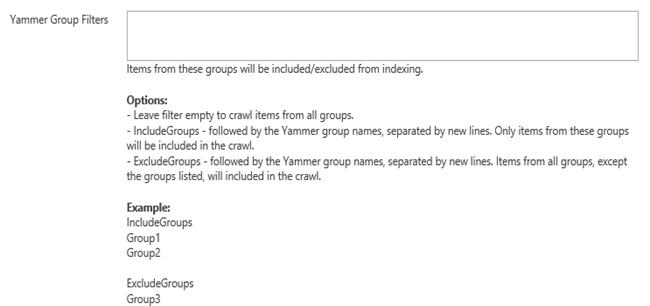
Group filtering can be added to include/exclude data that is specific to certain groups.
The group filter syntax is specified bellow: