What are Connectors?
About
The Connector information here guides you through installing your Connector and configuring it to extract content from your source systems.
This content is then transmitted to a search engine, such as Azure Search, or Elasticsearch for indexing.
For more about Connectors, see What are Connectors?
Overview
Connectors, often called "indexing connectors," extract content from source systems and transmit it to a search engine, such as Azure Search, or Elasticsearch for indexing.
- Each enterprise repository typically has a specific way to extract content (access method or API), a particular layout of content (schema), and specific security capabilities.
- Therefore, each type of system may need a connector developed specifically for it.
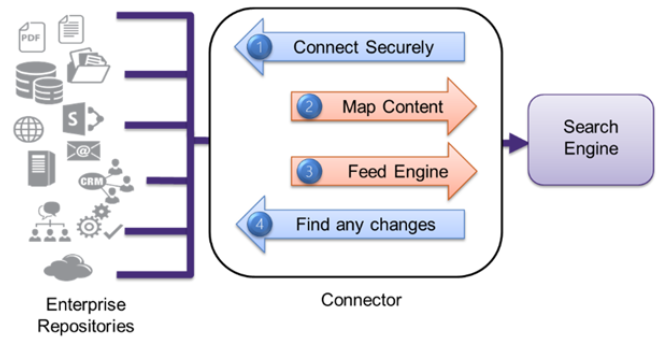
- A connector establishes a secure connection to the source system and maps the content, including metadata and attachments, from the source system schema to the search engine schema.
- It then extracts content and feeds it to the search engine in a process called crawling.
There are two main types of crawls:
- Full Crawls, which extract all desired content.
- Incremental Crawls, which extract only content which has changed since the last crawl.
Connector Functions
Indexing Connectors
BA Insight provides a wide range of Indexing Connectors.
Each connector is developed and maintained for a particular source system.
There are two types of connectors:
- SQL-based Connectors
- For source systems that expose content via an underlying database.
- These connectors use a common framework with template-based administrative screens.
- The SQL calls are available for tailoring, either for performance optimization or to support advanced scenarios.
- Web Service Connectors
- For source systems that publish APIs for content access.
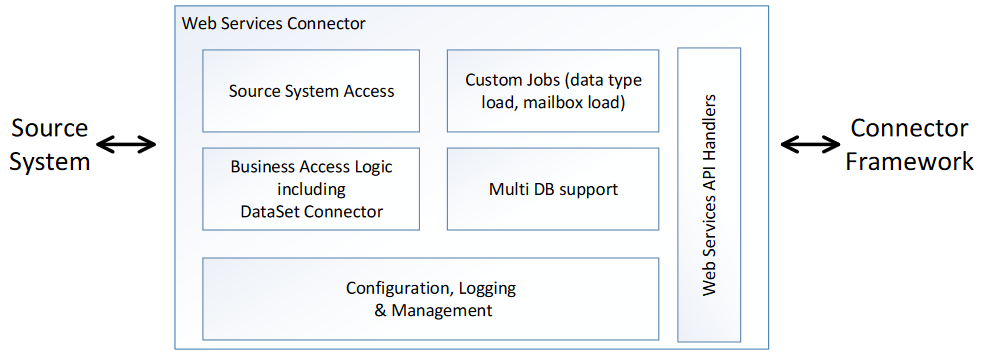
- Web service connectors include a number of functions and communicate to the Connector Framework through a published Web Services-based API.
- The structure of these connectors is shown below.
Web Service Connector Architecture
- All connectors share a high throughput, light touch approach to selecting and extracting content.
- They are all agentless: they do not require any software to be installed on the source system and can communicate over a network to remote systems.
- They only require READ access, so there is no risk of compromising source systems.
- Many of BA Insight’s Indexing Connectors also can act as Dataset Connectors.
- For example, an SQL system may have an associated file system for raw storage, or a file-based system may have an associated database holding metadata.
- In these cases, both the file and the metadata are indexed as a single item using an associated crawl.
If You Need to Create a New or Custom Connector
BA Insight has extensive experience in creating and maintaining indexing connectors, and a proven process for approaching new systems.
Connector Framework provides facilities for:
- Testing
- Troubleshooting
- Optimizing content extraction, which makes creating new connectors faster and simpler.
Connectors built on this framework also inherit many powerful features such as Targets and Smart Mapping, and present a consistent and effective interface to administrators.
There are two main facilities for creating new connectors.
- Universal SQL connector toolkit
- Supports secure indexing for any SQL-based source system with the flexibility to tailor the way database content is composed and transformed into indexed items.
- Supports secure indexing for any SQL-based source system with the flexibility to tailor the way database content is composed and transformed into indexed items.
- Web Services API
- Developers can also use this API to integrate crawling into their system or to create new connectors themselves.
- BA Insight also provides services to create custom connectors and/or mentor developers who wish to create connectors.
How to Install a Connector
Each connector has specific configuration steps. See the topic for your connector for details.
For a high-level procedure of installing any connector into BA Insight Connector Framework, see:
- How to Add a New Connector to Your Framework
- How to Install and Configure Connector Framework and Connectors