How to Configure Pipeline Stages
To configure your pipeline stage, select it from the drop-down menu as shown below.
Note: The description of each pipeline stage is shown below the Pipeline Stage field and changes, depending on the pipeline stage you select.
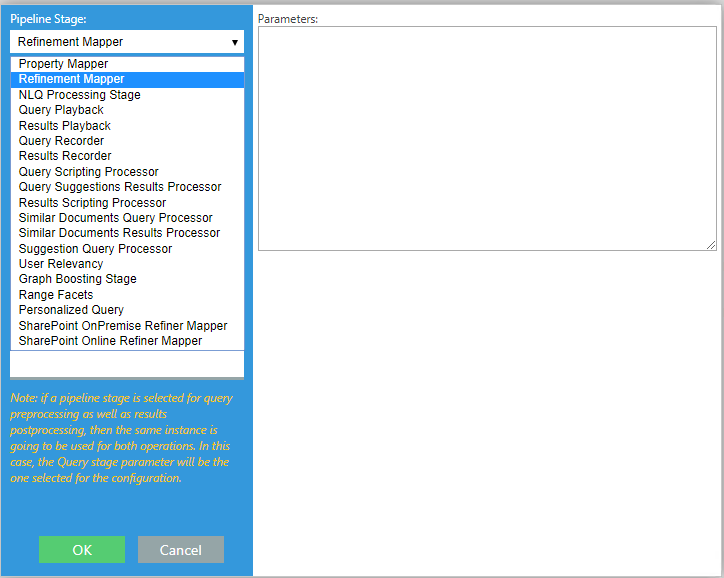
Available Pipeline Stages
Below is a sample of the many available property mapper stages.
Mapper Stages
-
Property Mapper:
-
Translates named property names to that these names map to an existing property on a specific backend.
-
In order to get results, this stage must be added to both the Query and Results stages.
-
-
Refiner Mapper:
-
Maps backend refinement names and values to match the local refinements.
-
In order to get the expected results, this pipeline stage must be added to both the Query and Results stages.
-
-
Range Facets:
-
Customize ranges for date, size, and so on.
-
This pipeline stage must be added to both the Query and Results stages.
-
SharePoint
-
SharePoint Online Refiner Mapper:
-
Maps taxonomies so that the taxonomy labels are displayed and not the GUID.
-
In order to get results, this stage must be added only as a Results pipeline stage.
-
-
SharePoint On-Premise Refiner Mapper:
-
Maps a backend refinement names and values to match the local refinements.
-
To get the expected results, this pipeline stage must be added only as a Results pipeline stage.
-
Scripting/Results Processor
-
Query Scripting Processor
-
Query Suggestions Results Processor
-
Results Scripting Processor
-
Suggestion Query Processor
-
Personalized Query: See the How to Personalize User Queries topic.
-
The stage requires the User Profile to be set.
-
Debug/Diagnostics Stage
Playback and Recorder stages:
-
Query Playback
-
Results Playback
-
Query Recorder
-
Results Recorder