How to Group Search Results Based on Field Values
Field Collapsing enables you to group search results based on field values, keeping only one entry per group.
- Collapsing is performed by selecting only the top sorted document per collapse key.
- The Elastic backend currently supports only one level of collapsing.
- For more details about collapsing see: https://www.elastic.co/guide/en/elasticsearch/reference/master/search-request-collapse.html
How to Enable Collapsing for Your Search Results
- Edit the Results.html page using a text editor.
- On the body element add the
data-collapse-specificationproperty as shown in the graphic below: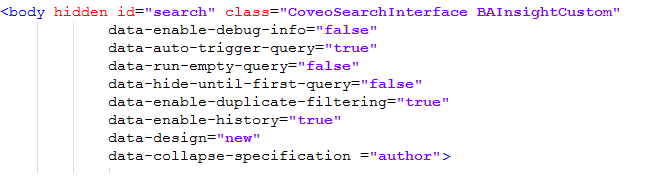
How to Enable Collapsing for Your Content by Search Web Part
- Edit the Results.html page using a text editor.
- Locate your Content-by-Search
<div>element and add thedata-collapse-specificationproperty like the one shown below. - Note that you can specify a different field for collapsing other than the one used for main results.
