SmartHub with SharePoint Online Prerequisites
Deployment Topology
The following is an example of SmartHub as it lives within a network topology.
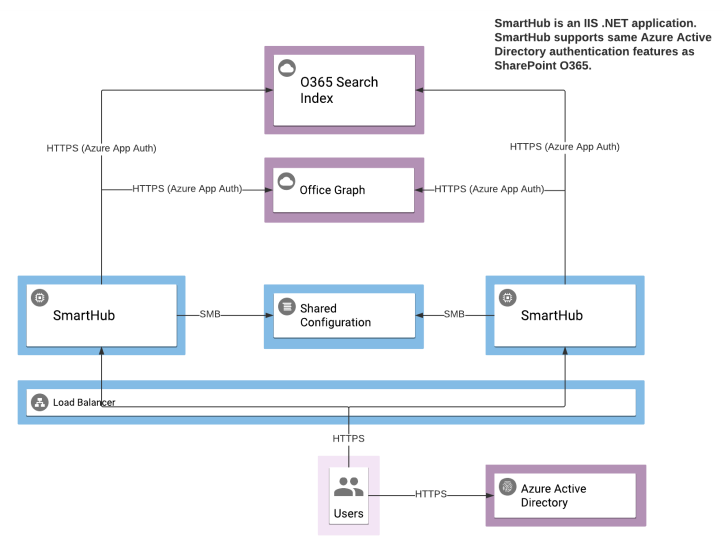
Installation Prerequisite Checklist
Requirement |
Description |
Completed |
|
|---|---|---|---|
| SmartHub Server | |||
|
|
Operating System | Microsoft Windows Server
|
¨ (Complete) |
| Windows Roles and Features | Must have Web Server(IIS) role enabled with the following Roles selected:
|
¨ (Complete) |
|
| .NET Framework |
|
¨ (Complete) |
|
|
|
Service Account (domain\user) |
Local or network service account used to run the SmartHub Application pool in IIS
|
Account credentials: (domain\user) |
|
|
Installation Account (domain\user) |
Account used to install SmartHub
|
Account credentials: (domain\user) |
| Supported Web Browsers | |||
|
|
|
*Unsupported Web Browsers Other web browsers may work with SmartHub, such as:
These browsers are not officially supported by BA Insight. |
|
| Analytics Index | |||
|
|
Elasticsearch 7.10 |
Secured or non-secured Elastic configurations supported. Note: The Elasticsearch index used for the SmartHub data does not have to be the same instance use for the search index (backend). For assistance installing a single-node instance of elastic, see: How to Install Elasticsearch for Analytics |
Elasticsearch URL: Elasticsearch Username: Elasticsearch Password: |
| Kibana 7.10 |
Kibana must be configured to use the above Elasticsearch index. Supports secured or non-secured Kibana configurations For assistance installing Kibana and running as a windows service, see: How to Install Kibana for Analytics |
Kibana URL: Kibana Username: Kibana Password: |
|
| NLQ Services (Optional) | |||
|
|
|
Only one NLQ service should be configured. Supported NLQ/AI Engines: For more information see: |
Service Endpoint:
Service Key (LUIS only): |
| Search Engine | |||
|
|
SharePoint Online |
SmartHub supports SharePoint Online as a search index. |
SharePoint Online URL: SharePoint Online Username: SharePoint Online Password: |
| Network Requirements | |||
|
|
DNS entry for SmartHub site |
This can be either an internal, or an external (public) DNS entry. Entry can point to VIP / F5 / Load Balancer / other network device. Requests should be routed to IIS on the SmartHub server over the chosen ports. |
DNS name / URL for SmartHub: |
| SSL Certificate | If running SmartHub over SSL (recommended), a signed SSL certificate for that DNS name (or appropriate wildcard cert) is required. |
Certificate name: Passphrase (if required): |
|
|
Internal Network Connectivity |
The SmartHub server must have network connectivity to the following:
|
Verified:
|
|
| External Network Connectivity | Network connectivity from the SmartHub server to the following Microsoft Azure services is required if you use the service(s):
|
Verified:
|
|