Conversational Language Understanding (CLU)
Natural Language Model
Your CLU App performs the following functions:
-
Records what questions or phrases (called "utterances") users enter into the search query
-
Interprets the question or phrase ("utterance").
-
Describes the meaning of the question or phrase
A model includes:
-
Intents:
-
Tasks or actions the user wants to perform.
-
Enter intents into your CLU app.
-
For each intent, enter examples of what a user might say/ask regarding that intent (called "utterances").
-
See the SearchForKnowledgeArticles Intent Example below.
-
-
-
-
Utterances:
-
Examples of user inputs that your app is designed to interpret.
-
Each intent requires examples of user utterances.
-
It may be a sentence, such as:
-
"Book a ticket to Paris for me"
or
-
A fragment of a sentence, like "Booking" or "Paris flight."
-
-
-
Entities:
-
A specific word or phrase inside an utterance that you want extracted, such as:
-
Names
-
Dates
-
Product names
-
Any significant group of words
-
-
The primary purpose of entities is to give the client application predictable extraction of data.
-
An optional, secondary purpose is to boost the prediction of the intent or other entities with descriptors.
-
Examples
SearchForKnowledgeArticles Intent Example
-
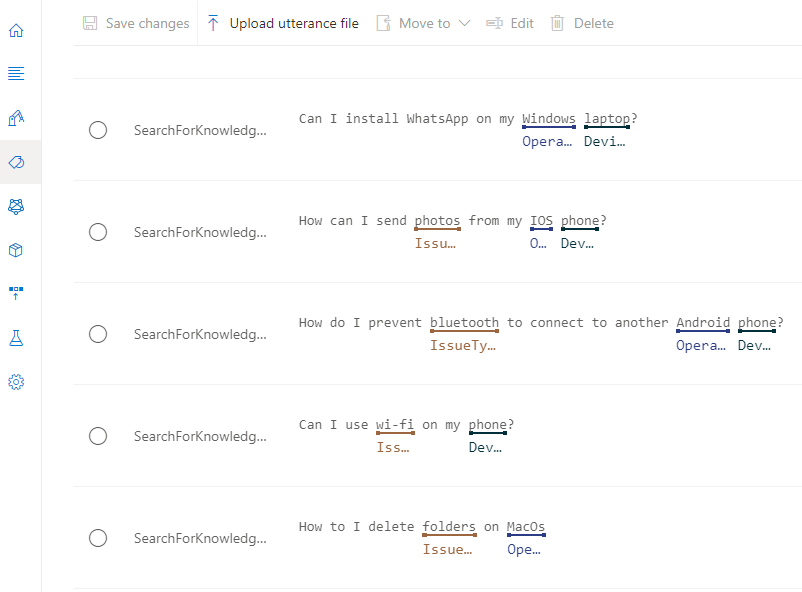
In the example below, the intent "SearchForKnowledgeArticles" is shown.
-
Every line contains an utterance.
-
Entities in each utterance are highlighted in blue.
-
Note that entities such as IssueType, OperatingSystem, and Devices are a kind of keyword that can be recognized by your app.
How to Train your CLU App
-
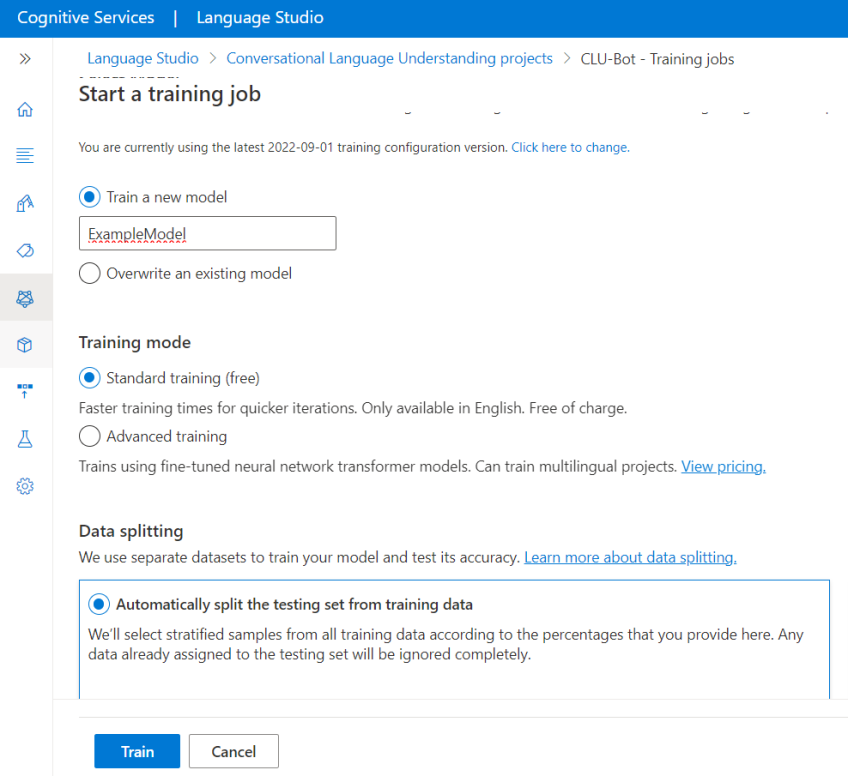
Select Training jobs from the left menu.
-
Select Start a training job
-
Enter a model name
-
Select Train
How to Deploy your CLU App
-
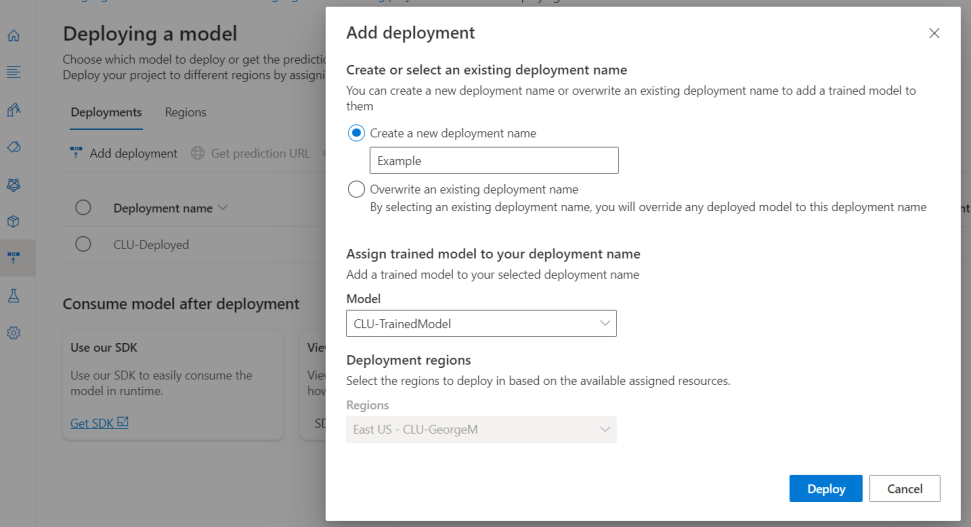
Select Deploying a model from the left menu.
-
Select Add deployment
-
Enter a deployment name
-
Select your trained model from above step
-
Select Deploy
CLU Settings
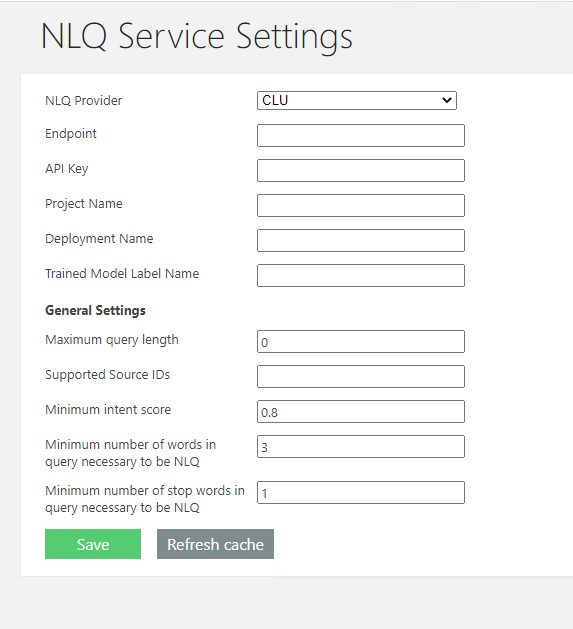
The NLQ Service Configuration page can be found by accessing the NLQ Service Settings page from the Administration page:
Note: At least 1 one the 3 words must be a stop-word.
-
Minimum intent score
-
Minimum number of words in query necessary to be NLQ
-
Minimum number of stop words in query necessary to be NLQ
The administrator needs to complete the following fields from NLQ Service Configuration page:
-
Endpoint
-
The NLQ Service Endpoint.
-
-
API key
-
The purpose of the key is authoring
-
-
Project Name
-
CLU Project Name
-
-
Deployment Name
-
CLU Deployment Name
-
-
Trained Model Label Name
-
CLU Trained Model Label Name
-
-
Maximum query length
-
Maximum query size.
-
-
Supported Source IDs
-
Enter the result source IDs, comma separated, which invoke the call to the NLQ service.
-
Example: b29924a9-ec32-4c10-8892-a544b69ee121,b09a7990-05ea-4af9-81ef-edfab16c4e31
-
-
Minimum intent score
-
Indicates the minimum prediction accuracy for intent.
-
A prediction score is between 0 and 1.
-
-
Minimum number of words in query necessary to be NLQ
-
Is an integer.
-
-
Minimum number of stop words in query necessary to be NLQ
-
Is an integer.
-
A stop word is a commonly used word (such as “the”, “a”, “an”, “in”).
-