Elastic Adapter
The Elastic Adapter integrates AutoClassifier with Elasticsearch.
Elastic Adapter Capabilities and Limitations
- Capable of pushing additional metadata to Elasticsearch Index items.
- Capable of incremental crawls, but only when specific properties are available in the Elastic Index.
- Elasticsearch Version Supported: v8.5.3 and older
How to Configure the Elastic Adapter
Use the following steps to configure the Elastic Adapter:
- Select the Elastic Adapter Source to configure.
- Complete the following fields:
- In the Server Address field, enter your Elastic Server address.
- If the Elastic Index is secured, in the User Id field, enter the user ID for the account which will be used to access content in the Elastic Index.
- If the Elastic Index is secured, in the User Password field, enter the password for the account which will be used to access content in the Elastic Index
- In the Timeout (seconds) field, enter the web service timeout value for accessing the Elastic Index. This value should be between 5 and 120 seconds. By default, this field is set to 10 seconds.
- In the Index field, click Load Indexes, then select your index from the drop-down list. The adapter is capable of crawling a single Elastic Index at a time.
- In the Elastic Query field, enter a valid Elastic query which will serve as the bases for what data from the index is crawled. For example,
"match_all":{} - In the Elastic Filter field, enter any additional Query filters which will be applied to the index. If you are adding multiple filters, you can separate them with a semi colon (";").
- In the Enumeration Scroll Size field, enter a value. The enumeration process takes advantage of the Elastic Scroll capabilities for enumeration. By default, this field is set to 500.
- In the Crawl Date Field (if available) field, enter the date-time field for your Elastic index. If the Elastic Index has a date-time field which represents the modification date/time of each item within the index, then incremental crawls are possible. Without a date-time field, you can run only Full Crawls.
- In the Crawl Full Start Date (utc) field, enter the crawl dtart date and time in the following format: dd/mm/yyyy X:XX:XX AM/PM. If a Crawl date-time field is available, then a filter will be applied when enumerating.
- In the List of Elastic properties to Retrieve field,
- In the List of Elastic Tracking Properties field,
- In the Server Address field, enter your Elastic Server address.
- in the Adapter Properties table, complete the following:
- In the Property Name column, enter a name for your adapter property.
- In the Two-Way Property column, click the checkbox to make this a two-way property.
- In the Multi-Value column, click the checkbox to make this a multi-value property.
- In the Field Type column, select the field type for the property from the drop-down list.
- Click Add.
- After adding a property, you can click Edit to edit the column values, or Delete to delete the property.
- In the Actions field, you can perform crawl actions for your adapter source. For more information, see Manually Invoking Adapter Crawls.
- Click Save.
Available Elastic Queries
MatchAll

"match_all":{}

Term

"term": {"escbase_fileextension": "doc"}

Terms

"terms": { "escbase_fileextension": ["doc","pdf"] }

Range

"range": { "escbase_lastupdateutc": { "gt": "1990-01-01T10:00:00.000Z"}}
"range": { "escbase_lastupdateutc": { "gte": "1990-01-01T10:00:00.000Z", "lte": "2021-01-01T10:00:00.000Z" }}
Example Configurations
Crawl all indexed data
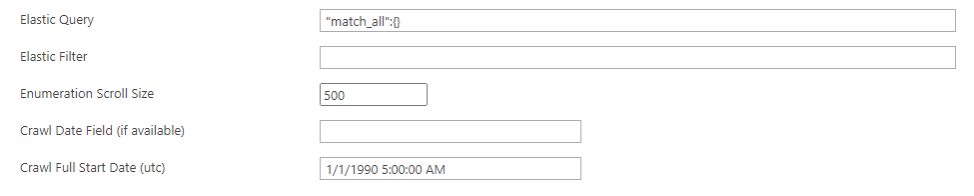
Crawl all indexed data where lastmodifieddate property is greater than the specified data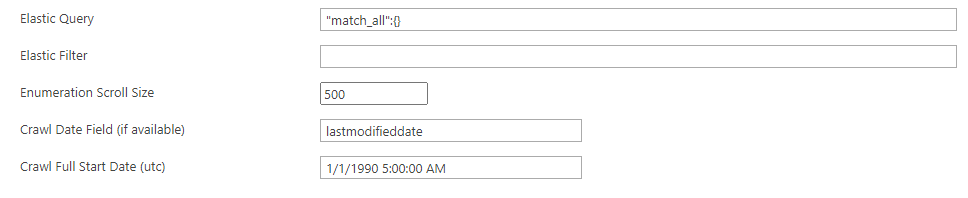
Crawl all indexed data where createddate property is between to dates
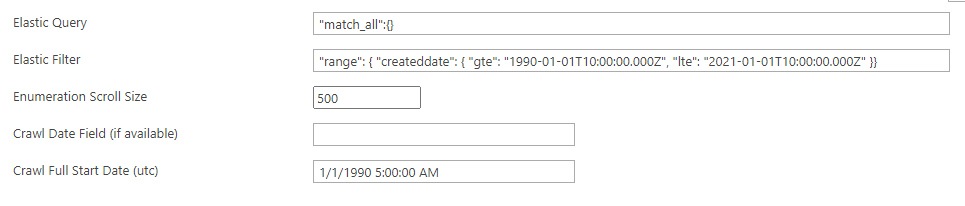
Crawl all indexed data where fileextension property contains "doc" or "pdf"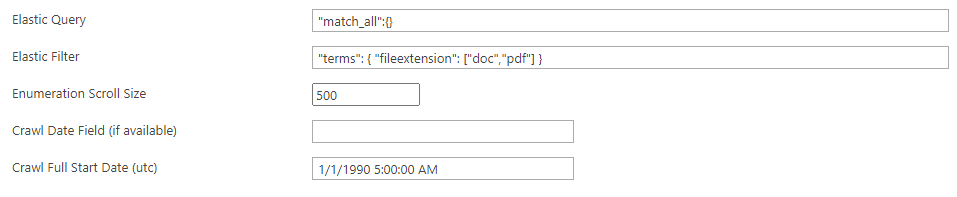
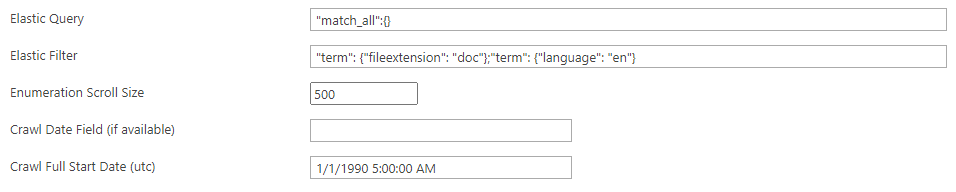
Crawl all indexed data where fileextension property contains "doc" and the language property equals "en"
Scaling
The Elastic Adapter can be scaled to increase performance
- Add more Crawl Components per Server.
- The Adapter Crawler can also be installed on multiple Servers.