Use Advanced Settings for Performance and Customization
Use the Advanced settings under Content to access settings to Improve performance and customize certain behaviors.
- In Connectivity Hub, open your SQL Content Source for editing.
- Click the Advanced tab.
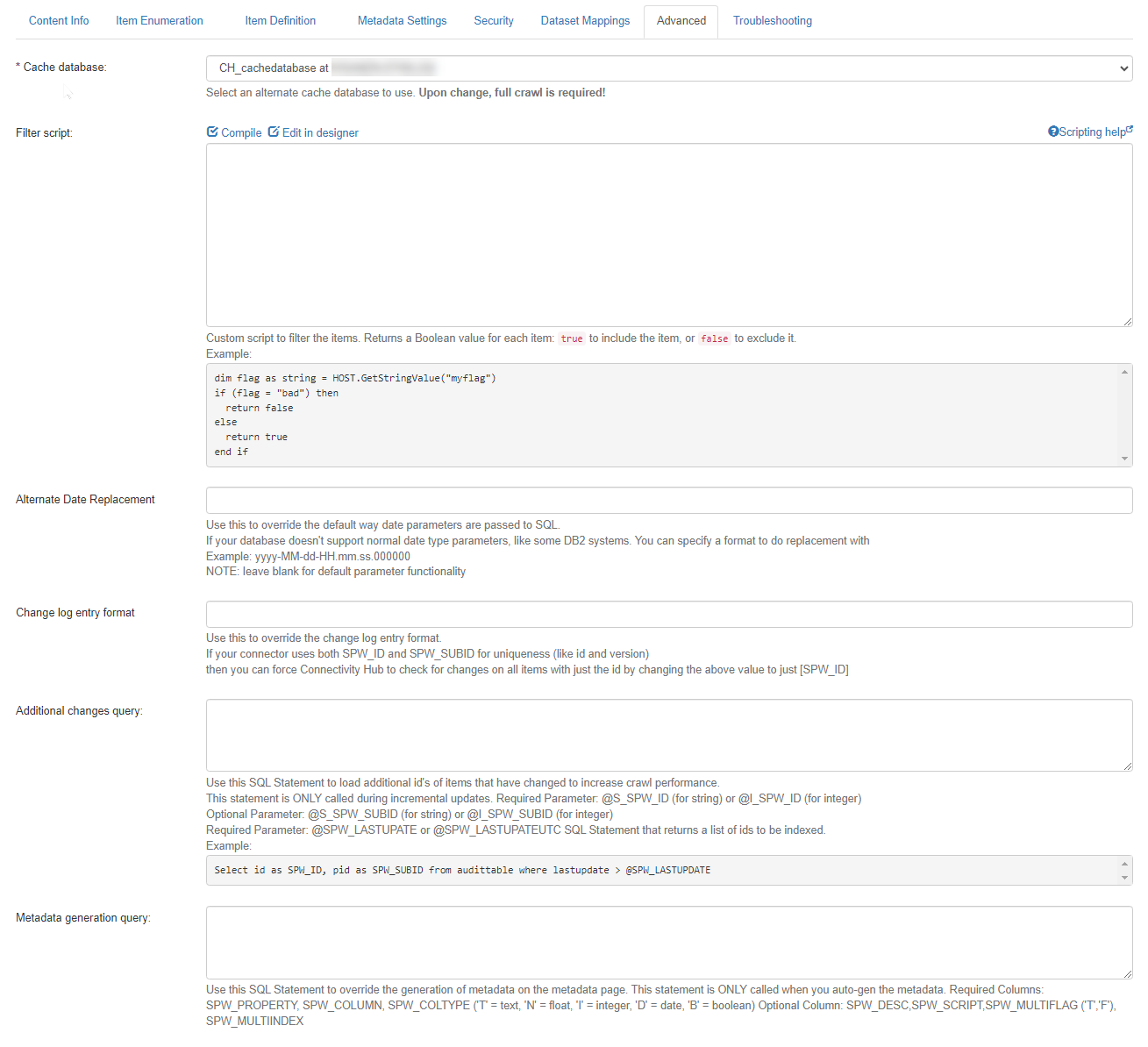
- Cache database:
- Select an alternate cache database to use.
- Changing this setting may require a complete refresh of sync jobs and a full crawl.
- Filter script:
- Enter the VB.NET Script to filter the items: return a boolean value.
true = add, false = skip.Sample:
if (flag = "bad") thenreturn falseelsereturn trueend if
- Enter the VB.NET Script to filter the items: return a boolean value.
- Alternate Date Replacement:
- Use to override the default way date parameters are passed to SQL.
- If your database doesn't support normal date type parameters, like some Db2 systems, specify a format to do perform a replacement with.
- Example:
yyyy-MM-dd-HH.mm.ss.000000.
- Example:
- NOTE: Leave this field blank for default parameter functionality.
- Change log entry format:
- Use to override the change log entry format.
- If your connector uses both SPW_ID and SPW_SUBID for uniqueness (like
IDandversion) you can force SharePoint search to check for changes on all items with just the ID by changing the value to[SPW_ID].
- Additional changes query:
- Use this SQL Statement to load additional ID's of items that have changed to increase crawl performance.
- This statement is ONLY called during incremental crawls.
- Parameters
- Required:
- [SPW_ID] or @S_SPW_ID (for string) or @I_SPW_ID (for integer).
- [SPW_LASTUPATE] or [SPW_LASTUPATEUTC]
- Optional:
- [SPW_SUBID] or @S_SPW_SUBID (for string)
- @I_SPW_SUBID (for integer)
Sample SQL Statement (returns a list of IDs to be indexed):
SELECT ID as SPW_ID, pid as SPW_SUBID from audittable where lastupdate > [SPW_LASTUPDATE]
- Required:
- Parameters
- Metadata Generation SQL:
- Use this SQL Statement to override the generation of metadata on the metadata page.
- This statement is ONLY called when you auto-generate the metadata.
- Columns
- Required: SPW_PROPERTY, SPW_COLUMN, SPW_COLTYPE ('T' = text, 'N' = float, 'I' = integer, 'D' = date, 'B' = boolean)
- Optional: SPW_DESC, SPW_SCRIPT, SPW_MULTIFLAG ('T','F'), SPW_MULTIINDEX
- Columns
- Metadata Generation Script:
- Enter VBScript to override the auto generation of metadata, the above SQL, if present, is executed and provided as available dataset:
HOST.GetDataSet() As DataSet
      HOST.AddStringMetadata(name As String,desc As String,scriptEnabled,columns As String,metascript As String)
      HOST.AddBooleanMetadata(name As String,desc As String,scriptEnabled,columns As String,metascript As String)
      HOST.AddNumberMetadata(name As String,desc As String,scriptEnabled,columns As String,metascript As String)
      HOST.AddIntegerMetadata(name As String,desc As String,scriptEnabled,columns As String,metascript As String)
HOST.AddDateMetadata(name As String,desc As String,scriptEnabled,columns As String,metascript As String) - Enter VBScript to override the auto generation of metadata, the above SQL, if present, is executed and provided as available dataset:
- Script library:
- Add VB Script functions to be used in all other scripts as library methods.
- See VB.Net Scripting
- Enrichment pipeline integration:
- Allows to post-process the results by sending them to any Enrichment Web Service post-processor.
- Click Save.