Security Trimming in SmartHub and Connectivity Hub
Security trimming ensures that users only see content they are authorized to view when using SmartHub or Connectivity Hub search. This protects sensitive information and enforces permissions consistently across systems.
Security trimming is a process that combines permissions from the source system with user identity information so that:
-
Only authorized users can see search results for content.
-
Unauthorized content is never returned in search results or visible to the user.
This is critical in environments where content comes from many different repositories — each with its own access permissions.
This overview describes how the various systems fit together to ensure that content delivered by both Upland BA Insight SmartHub and Connectivity Hub are security trimmed.
Overview
In essence:
-
Connectivity Hub writes security information into the index
-
SmartHub retrieves security information from the index
The below image depicts the various components used in security trimming and identifies two different flows:
SmartHub and Connectivity Hub flows
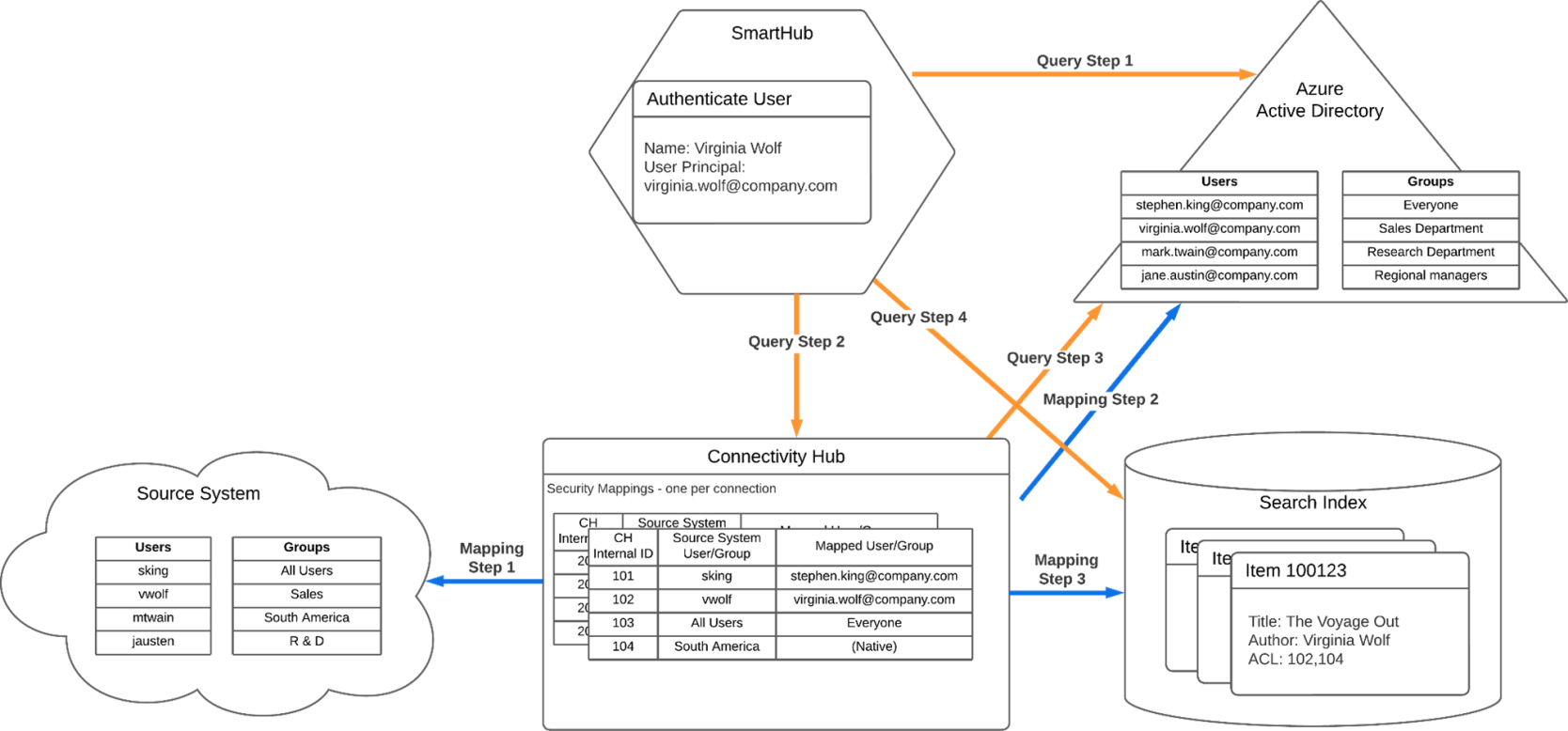
Key components of security trimming
Understanding security trimming requires knowing the responsibilities of the key components:
-
Source System: This is the original system where content and its permissions (security descriptors) come from. For examples: file shares, SharePoint, Box, OneDrive, etc. all provide access controls that must be honored.
-
Connectivity Hub: This is the indexing engine that is responsible for
-
Reading content and access permissions from the source system.
-
Mapping source users/groups to a central identity directory (e.g., Azure AD).
-
Writing access-control lists (ACLs) into the search index tied to internal identifiers.
-
-
Security Map: This is a mapping layer inside Connectivity Hub that:
-
Aligns source system users/groups with directory users/groups.
-
Ensures that permissions from different systems are normalized and comparable.
-
-
SmartHub: This is the user-facing search interface where
-
User authentication occurs.
-
Search queries are submitted.
-
Only items matching the user’s effective permissions are returned.
-
-
Azure Active Directory: This is the directory server. In the example above, it is used as the target directory in Connectivity Hub and the authentication provider.
-
Search index
-
The index where the searchable items are stored
-
This could be any of the supported indexed
-
Workflows
See the image above, SmartHub and Connectivity Hub flows.
-
The two workflows:
-
Mapping flow
-
Query flow
-
Mapping flow (index-time)
The “Mapping” flow (marked with blue arrows in the image above) is handled by Connectivity Hub during indexing:
-
Crawls source content and reads associated permissions.
-
Matches source users/groups to the directory identity system (e.g., Azure AD).
-
Writes indexed items with ACLs reflecting normalized user/group IDs.
Query flow marked by orange arrows
The “Query” flow (marked by orange arrows in the image above) is handled by SmartHub when a user issues a search: SmartHub
-
SmartHub authenticates the user against the identity provider.
-
SmartHub retrieves the user’s group memberships via Connectivity Hub.
-
SmartHub issues the search query to the index including the user’s identity and groups.
-
Only items whose ACLs permit the user (or their groups) are returned.
Flows
|
Mapping Flow |
Query Flow | |
| Step 1 | During the security sync: the connector reads the users/groups from the source system. | The user accessing SmartHub authenticates against the authentication provider |
| Step 2 |
During the security sync: Connectivity Hub matches the users and groups found in the source system with users/groups in the target directory. For groups, if a match is not found in Active Directory, Connectivity Hub stores the members of that group (Members identified from the source system) in a “native” mapping. |
At query time, the Advanced Security Module stage queries Connectivity Hub with the user’s info, to get that user’s group memberships. |
| Step 3 | At crawl time: The security descriptors for the items being crawled are read, and the corresponding internal Connectivity Hub identifier is written into the ACL property for that item in the index. | While retrieving the user’s group membership, Connectivity Hub calls the Target directory to find current directory group memberships. |
| Step 4 |
Finally, when sending the query to the search index, the query contains information to insure only items with an appropriate ACL list are returned:
|
For more information on configuring security trimming, see Secure Your Content Using the Advanced Security Module.