Conversational Search Service
About
The conversational search service is located at the following URL: http(s)://<smarthub-web-app>/_bai/v1.0/conversationalsearch
-
Replace the first part of the URL below with the address of your own SmartHub instance.
Service Description
This service exposes the following endpoints:
-
/getAllConversations
-
/getConversationParts
-
/pinConversation
-
/unpinConversation
-
/renameConversation
-
/deleteConversation
/answer
-
Scope: endpoint is used to execute conversational searches and return the AI generated responseusing a configured LLM.
-
Method: POST
-
Type: JSON-based
-
Authentication
-
Must match what is configured in SmartHub Administration.
-
If None (Public site) is configured, then no authentication header is required.
-
Otherwise, send header X-SH-Authorization: Bearer xxxxxxx (replace the placeholder with a valid token that SmartHub can use).
-
-
Request parameters
| Property | Required/Optional | Type | Description | |
|---|---|---|---|---|
| Question | Required | |||
|
UserQuestion |
Required | string | This defines the user question that will be executed. | |
|
ChatHistory |
Optional | string | This is the last x number of user questions and their AI generated answers. | |
| ChatBotName | Required | string | This is the name of the ChatBot configuration that will be used. | |
Response
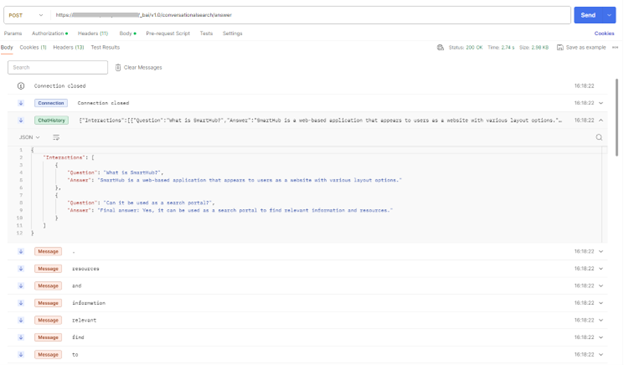
The response returns the following server-side events:
-
Connection established - notify the beginning of the connection.
-
Message – contains parts of the AI generated response.
-
Connection closed – notify that the AI generated response ended, and the connection was closed.
-
ChatHistory – contains the interactions between the user and the AI service (user questions and the AI generated response)
Example
{
    "Question": {
        "UserQuestion": "Can it be used as a search portal?",
        "ChatHistory": "{\"Interactions\": [{\"Question\": \"What is SmartHub?\",\"Answer\": \"SmartHub is a web-based application that appears to users as a website with various layout options.\"}]}"
    },
    "ChatBotName": "ChatBotChatGPT"
}
Response:
/getAllConversations
-
Scope: this endpoint is used to retrieve all saved conversations of a configured chatbot for the currently logged-in user.
-
Method: GET
-
Type: Query parameter-based
-
Authentication
-
Must match what is configured in SmartHub Administration.
-
If None (Public site) is configured, then no authentication header is required.
-
Otherwise, send header X-SH-Authorization: Bearer xxxxxxx (replace the placeholder with a valid token that SmartHub can use).
-
-
Request parameters
| Property | Required/Optional | Type | Description |
|---|---|---|---|
| conversationalBotName | Required | String | This defines the name of the chatbot |
Example: GET https://<smart_hub_address>/_bai/v1.0/conversationalsearch/getAllConversations?conversationalBotName=Conversational%20Bot
Response
The response retrieves all conversations of the logged-in user for the specified chatbot, with each conversation containing the following properties:
-
Id: The unique identifier of the conversation.
-
ConversationalBotName: The name of the chatbot associated with the conversation.
-
Title: The title of the conversation. If the user does not specify one, the first question in the conversation will be used as the title.
-
StartDate: The date and time when the conversation started.
-
Persistence: This indicates whether the conversation is pinned or not.
Example
[
     {
        "Id": "4aed49d2-9d85-4988-a605-bb6d535562b9",
        "ConversationalBotName": "Conversational Bot",
        "Title": "Provide an outline for a Contract addressing a Business partnership",
        "StartDate": "2025-12-15T14:01:11.0910791Z",
        "Persistence": false
    },
    {
        "Id": "55e48e72-9263-435a-b0b8-61ade59ddfba",
        "ConversationalBotName": "Conversational Bot",
        "Title": "An example of a great getting started contextual prompt for users",
        "StartDate": "2025-12-15T14:02:09.3476189Z",
        "Persistence": false
    }
]
/getConversationParts
-
Scope: this endpoint is used to retrieve a specific conversation for the currently logged-in user.
-
Method: GET
-
Type: Query parameter-based
-
Authentication
-
Must match what is configured in SmartHub Administration.
-
If None (Public site) is configured, then no authentication header is required.
-
Otherwise, send header X-SH-Authorization: Bearer xxxxxxx (replace the placeholder with a valid token that SmartHub can use).
-
-
Request parameters
| Property | Required/Optional | Type | Description |
|---|---|---|---|
| conversationId | Required | String | This defines the unique identifier of the conversation to retrieve. |
Example: GET https://<smart_hub_address>/_bai/v1.0/conversationalsearch/getConversationParts?conversationId=6dc87efc-4833-45a7-8cc8-085924857d93
Response
The response retrieves a specific conversation of the logged-in user, containing a chronological list of conversation interactions. Each entry represents a single exchange between the user and the chatbot and includes the following properties:
-
ConversationId: The unique identifier of the conversation.
-
ConversationalBotName: The name of the chatbot associated with the conversation.
-
DateTimeUtc: The UTC date and time when the interaction occurred.
-
Question: The user’s prompt for that interaction.
-
Title: The title of the conversation. If the user does not specify one, the value is empty.
-
Persistence – Indicates whether the conversation is pinned or not.
Example
[
     {
        "Id": "4aed49d2-9d85-4988-a605-bb6d535562b9",
        "ConversationalBotName": "Conversational Bot",
        "Title": "Provide an outline for a Contract addressing a Business partnership",
        "StartDate": "2025-12-15T14:01:11.0910791Z",
        "Persistence": false
    },
    {
        "Id": "55e48e72-9263-435a-b0b8-61ade59ddfba",
        "ConversationalBotName": "Conversational Bot",
        "Title": "An example of a great getting started contextual prompt for users",
        "StartDate": "2025-12-15T14:02:09.3476189Z",
        "Persistence": false
    }
]