Use Connectivity Hub to crawl your data and build your search index
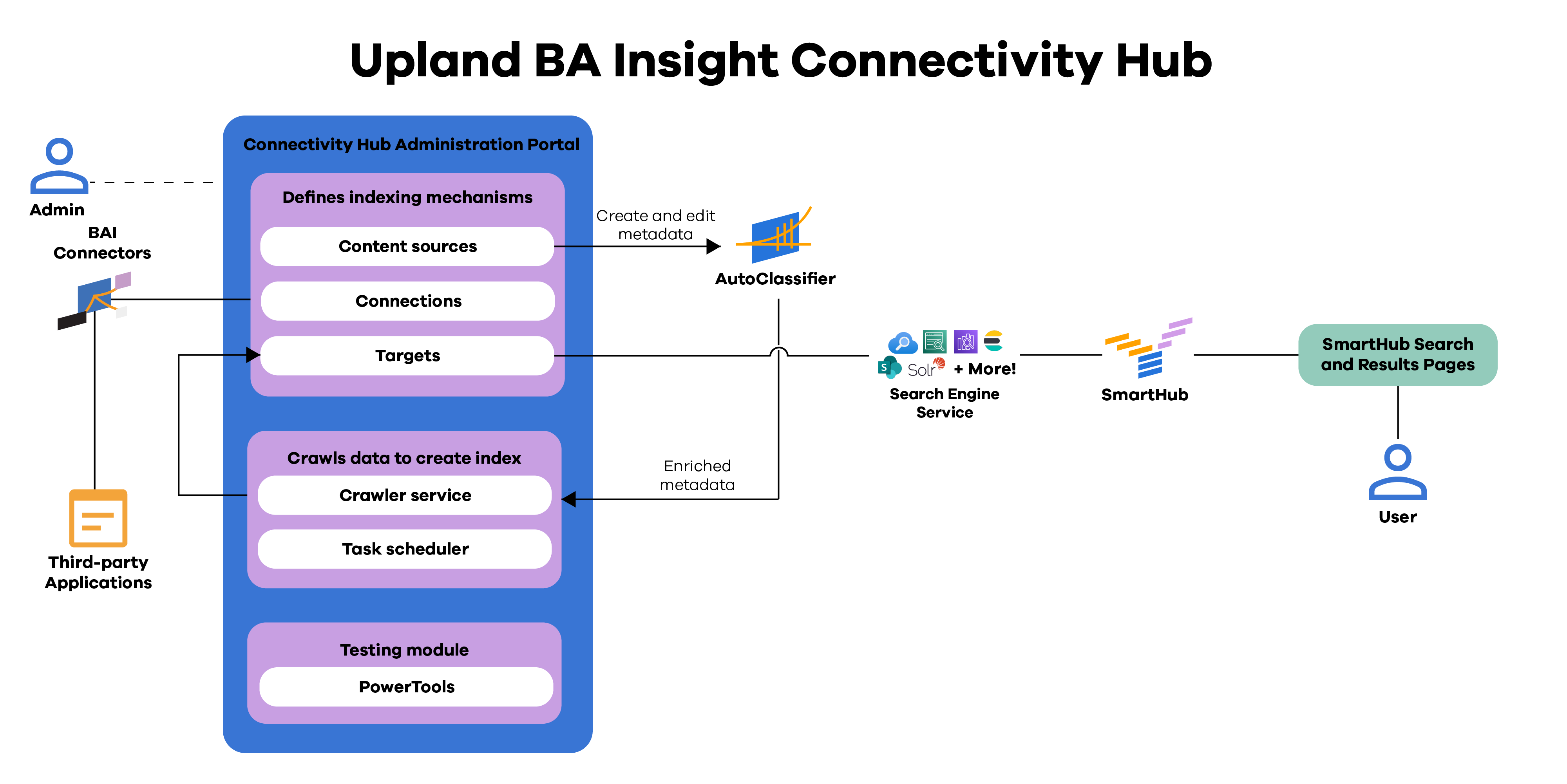
Connectivity Hub is the orchestration layer of the BA Insight platform that manages the flow of data between content sources, enrichment services, and the indexing pipeline. It serves as the central control point for configuring, scheduling, and monitoring connector operations. Through the Connectivity Hub, administrators can define how data moves from multiple repositories through the enrichment process and into a unified search index. By coordinating content acquisition, enrichment, and indexing, Connectivity Hub ensures that information from across the enterprise remains discoverable, secure, and up to date.
While BA Insight defines what content can be searched, Connectivity Hub determines how and when that content becomes searchable. It ensures ingestion is scalable, predictable, and centrally managed.
Connectivity Hub architecture
Best Practices for using Connectivity Hub
Effective configuration and operation of Connectivity Hub are essential for maintaining a stable, scalable, and performant indexing environment. The following best practices can help ensure consistent and efficient operation:
-
Use Incremental Crawls Whenever Possible: Schedule frequent incremental crawls to capture changes efficiently, and reserve full crawls for major structural or permission updates. This minimizes system load and reduces indexing time.
-
Monitor crawl health regularly: Review crawl logs and job status to catch errors early. Regular monitoring helps prevent gaps in indexed content and reduces troubleshooting time.
-
Integrate with AutoClassifier Early in the Pipeline: Send content to AutoClassifier during ingestion to generate enriched metadata before indexing. Early enrichment ensures that downstream components, such as SmartHub and Smart Previews, can take advantage of structured metadata and classifications.
-
Test Pipeline Changes Before Production: When modifying crawl schedules, pipelines, or enrichment configurations, test changes in a staging environment. Validate that metadata, content, and permissions propagate correctly before deploying to production.