Use SmartHub to retrieve and display your user's search results
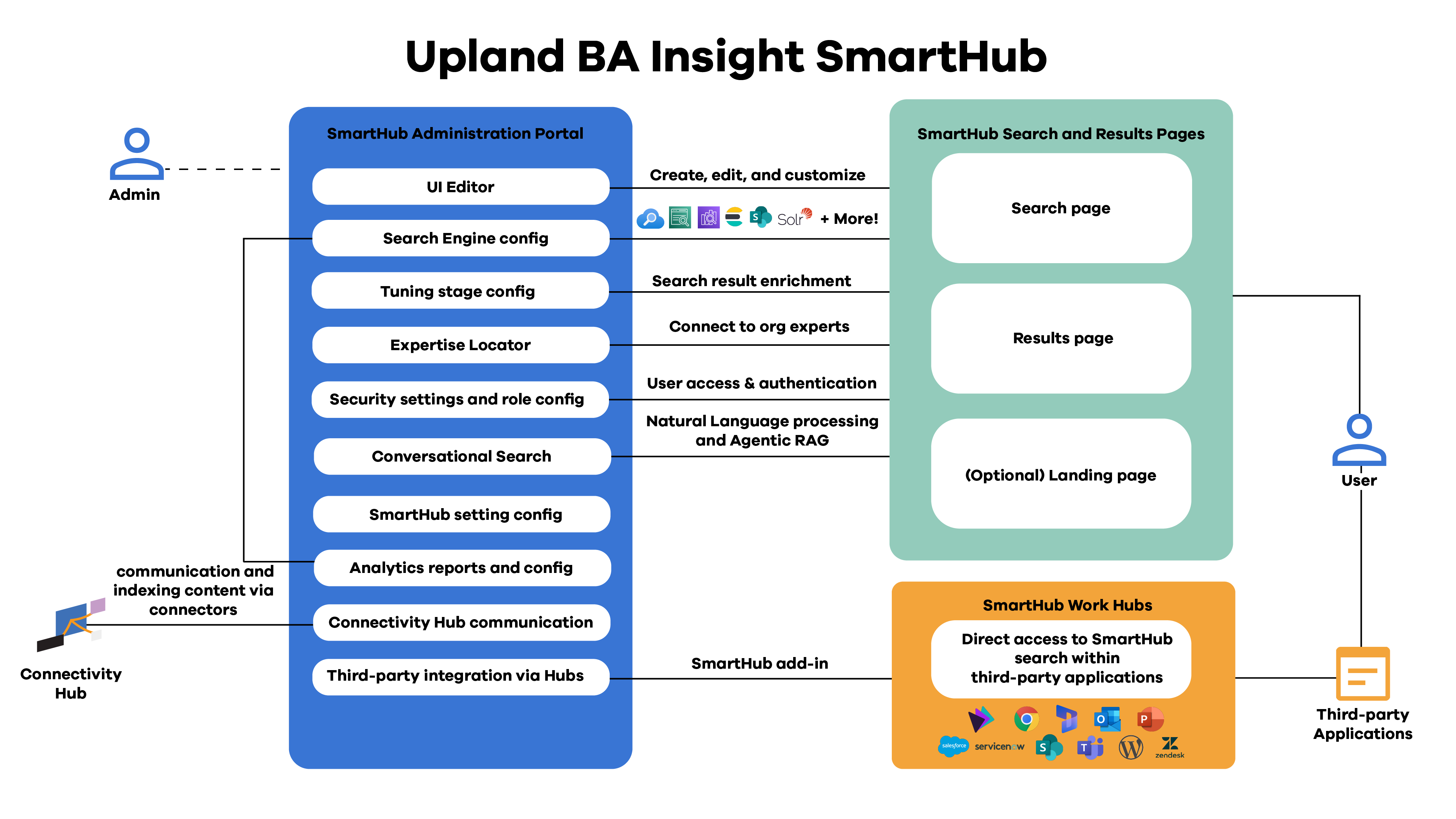
SmartHub is BA Insight’s user experience layer that delivers a unified, intelligent search interface across enterprise content. It connects directly to the organization’s search index, powered by your choice of search engine, and transforms the enriched metadata produced by AutoClassifier into an intuitive, personalized discovery experience. By combining modern search capabilities with flexible UI configuration and AI-driven insights, SmartHub provides users with a consistent way to find, preview, and act on information across multiple content sources.
SmartHub Architecture
Best Practices for Configuring SmartHub
Proper SmartHub configuration ensures that the search experience is responsive, accurate, and aligned with business needs. The following best practices can help administrators deploy and maintain SmartHub effectively:
-
Connect SmartHub to the correct search index: Ensure that SmartHub is configured to query the intended search endpoint (Elasticsearch, Azure AI Search, OpenSearch, etc.) that contains enriched data from the indexing pipeline. Incorrect index mapping can result in missing or incomplete results.
-
Leverage enriched metadata for facets: Use the fields generated by AutoClassifier and the enrichment pipeline to build dynamic facets and filters. Well-structured metadata is the foundation for intuitive and powerful navigation.
-
Align UI Components with user roles: Design SmartHub pages and result templates based on user personas. For example, legal teams may require document metadata and classifications, while engineering teams may prefer project-based filters.
-
Integrate Smart Previews: Enable Smart Previews for in-line document viewing and metadata inspection. This minimizes context switching and allows users to evaluate relevance without leaving SmartHub.
-
Monitor User Analytics: Regularly review SmartHub analytics dashboards to understand search behavior, identify common queries, and detect content gaps. Use this data to refine enrichment rules, synonyms, and ranking models.
-
Secure authentication and permissions: Configure SmartHub to use corporate identity providers for SSO, and ensure security trimming matches source system permissions propagated through the index.
-
Optimize for performance and scalability: For large-scale deployments, distribute SmartHub instances across load-balanced environments and enable caching for high-traffic scenarios.
-
Use the AutoClassifier Recorder for UI testing: Enable the Recorder component to capture user sessions, test configurations, and validate that search queries return the expected results across different roles and filters.