We’re pleased to bring you our second update of the year, which includes features to make our platform easier to use and more interactive than ever before. Now you’ll be able to target your Instagram audience with more precision, not to mention your Eloqua mailing list. You can draw data from Shopify and NetSuite to enrich your customer 360 view, verify postal addresses quickly using Experian, and quickly compare the value of campaign segments using new tabs. Meanwhile, new task completion and warning notifications will help to ensure your campaigns are running smoothly at all times. To find out more about what’s new, read on.
Engage
The release of Engage 21.2 introduces the following features and product improvements:
-
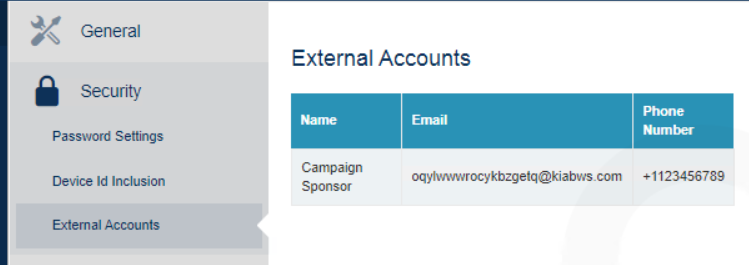
Task Reports and Notifications: The addition of a Task Run Report allows you to easily review the full status of scheduled or completed system tasks. You can pick the date range, type of objects, and status to be displayed in the report. You can also Configure Success Notifications for tasks, alerting chosen accounts via Email and SMS. These notifications may be sent to accounts that do not have Engage access but require status updates.
- Instagram Channel: Functioning in a similar manner to the Facebook Audience Channel, the Instagram Channel allows you to export Engage audiences for use within Instagram marketing campaigns.
- Eloqua Channel: The Eloqua Channel allows you to send BlueVenn audience data to the Eloqua platform.
- Multiple Router Versions: Within shared environments it is now possible to have multiple versions of the BlueVenn router installed. Each binaries for version of the router will be installed within their own directory. The client config tool allows the version of the router to be chosen when creating a new instance. By default the most appropriate version will be chosen. The upgrade process also allows the version of the router to be chosen. The version of the router in use will be shown in the Settings --> General area.
-
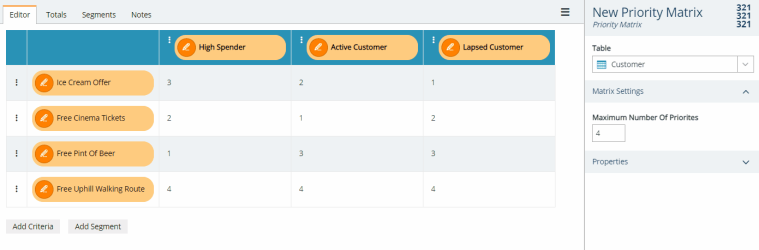
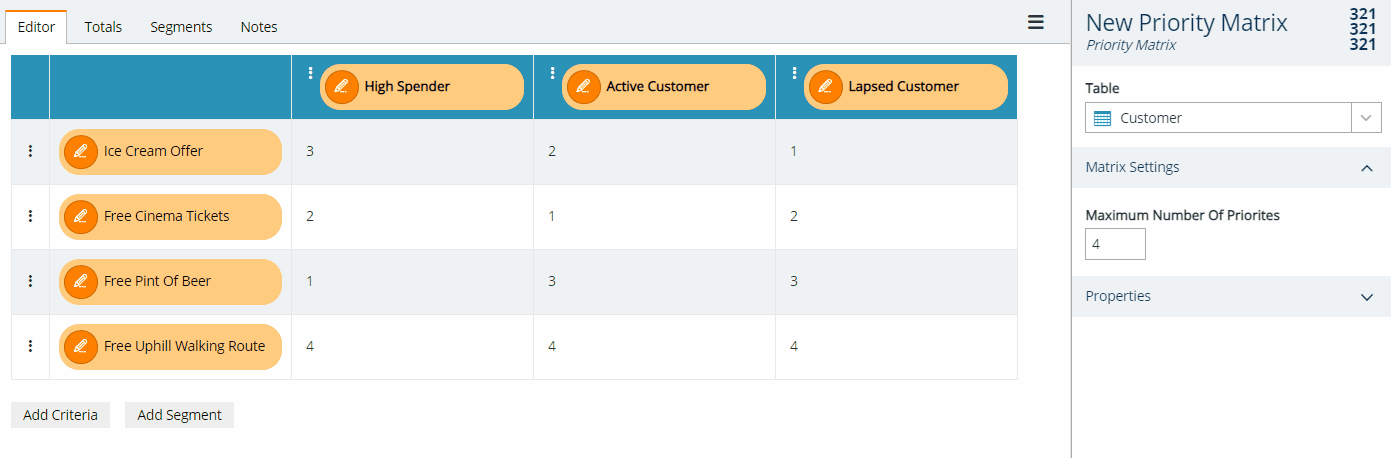
Priority Matrix: Each Priority Matrix now includes two additional tabs - Totals and Segments. The Totals tab displays the maximum number of records available when combining the criteria and segment. The Segments tab will allow you to select a segment and view the a breakdown of records by priority for a single segment. It is now also possible to drag out the records shown on each tab. Additionally, the information can be exported to a text file.
-
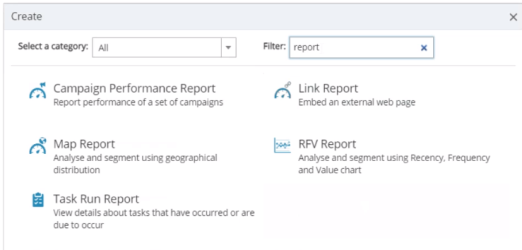
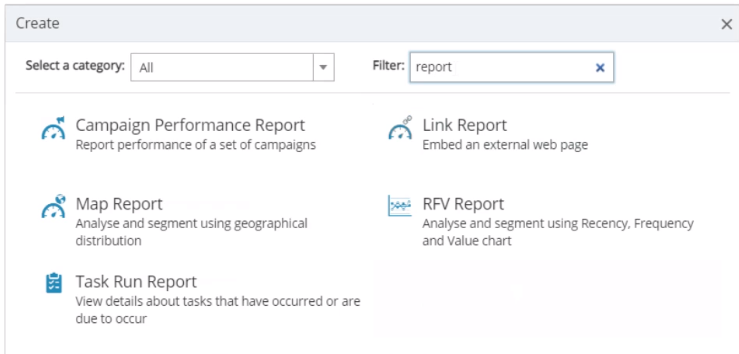
Filter on Object Creation: The Create window now includes a filter field to enter keywords when searching for a function (in addition to the existing Category dropdown), e.g. typing report into the filter field will return all the functions for reporting.
-
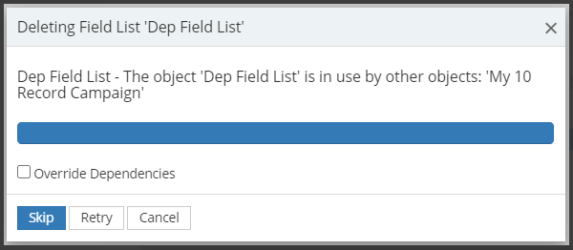
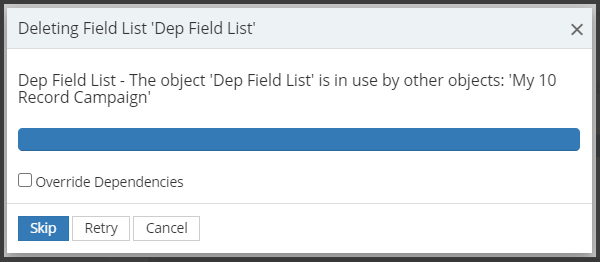
Dependency Management: When attempting to delete items that are used elsewhere in the system, Engage will warn you that the item is used by other objects, limiting the risk of deleting an item that causes a malfunction elsewhere, e.g. accidentally removing a field list needed by a campaign.
- Dedupe Step Improvements: It is now possible to set the prioritisation order on dedupe steps. For example, this would allow you to select the one individual from a household with the highest income.
- Channel Management: When creating channels, you can now copy a similar channel instead of starting from new. When copied, the new copy is disabled by default, allowing you to make modifications prior to enabling.
-
FTP Channel Improvements: FTP Channels can now have the output files compressed into a zip file before being transferred to the FTP location. An additional Do not preserve file timestamps option is available and should be used with AWS FTP connections to prevent errors being reported.
-
Simplified Search Strings: The LIKEIN function allows you to combine multiple Like/Or searches into a single line when entering expressions, e.g.
LIKEIN( [Contact.JobFunction_Upper], '|MANAGER', '|CEO', '|BOSS')
replaces
[Contact.JobFunction_Upper] LIKE '|MANAGER' OR
[Contact.JobFunction_Upper] LIKE '|CEO' OR
[Contact.JobFunction_Upper] LIKE '|BOSS'
Unify
The release of Unify 2021.2 introduces the following features and product improvements:
-
NetSuite Connector
The addition of a NetSuite connector gives you access to any entity in the organisation's NetSuite account in real time. To learn more, see Configuring a NetSuite Connector for Unify Users and Connecting Unify to Netsuite.
-
Shopify Connector
The addition of a Shopify Connector lets you leverage data within an organisation's Shopify account within the Unify platform. See Authenticating a Shopify connection to Unify.
-
ETL Improvements
The 2021.2 release adds further ETL options:
-
The option to update the pivot at load time for particular transaction types.
-
The ability to set a priority for the run order through a column on the Data Import Queue menu.
-
-
BulkMerge Optimisation & Enhancements
The following changes have been made to improve the functionality of BulkMerge:
-
Allowance for multiple Optica connectors.
-
Improved handling of multiple SQL Servers.
-
-
Experian Batch Web Service Integration
The Experian Batch Service Console has been refactored to improve performance speed and work with local data and Experian’s Batch Web Service (Experian account required). In addition, there is a new MSI Installer for the Experian Address Cleanser/Verifier App.
-
Engage Connector - API Extensions
The 2021.2 release includes enhancements for the Engage Connector to support mapping of data for Site, Organisation and Company table levels.
-
Subject Access Request (SAR) Data Classification
Profile headers now include an SAR Exclusion checkbox (disabled by default). Ticking this box allows you to exclude that profile data from a subject access report.
Note: This feature is intended to be used to hide company specific information on a profile that is not connected to a person, e.g. product cost data. Laws and regulations such as GDPR need to be taken into account when using this feature to ensure compliance with requests for personal data.
-
Template Copy (Export/Import) Functionality
Expanding the XML import/export upgrades added in 21.1, The ETL Data Templates menu now includes Export/Import functionality, further expanding the XML upgrades in the previous release.