We’re pleased to bring you our final major release of 2021, which includes features and fixes to enhance our platform, increase stability, and improve user management. For Unify, you’ll see enhancements to the ETL process, record archiving, and the system configuration report. Our Engage release sees the introduction of email sending optimization when using the BlueVenn email tool, the addition of a sending timeout for campaign communications, and the addition of group management to the tools menu.
To find out more about what’s new, read on.
Unify
The release of Unify 21.4 introduces the following features and product improvements:
-
ETL updates - changes to the UI and functionality to improve the upload and management of records.
-
Same day source - data with the same day in the source amend date will now overwrite the current data.
-
Dedupe on source URN on load - checkbox added to matching rules to allow you to dedupe transactions with the same source URN within an incoming file prior to overwriting current data.
-
Action choices for unmatched records - you can now select how an error is processed when a row does not match and the do not create flag is checked.
-
Checks and warnings for resume command - Unify now checks that the file being resumed is the last processed file and not a master file. If the resume command is used on a master file or a file that was not the last file to be processed, you will receive a notice explaining why the command cannot run.
-
Duplicate file run order improvements - selecting the run new file only option for processing duplicate files now applies to sub files when loading a multi-file set.
-
Address cleaning - PAF rules now include the option to clean un-PAF'd addresses using a basic country code lookup.
-
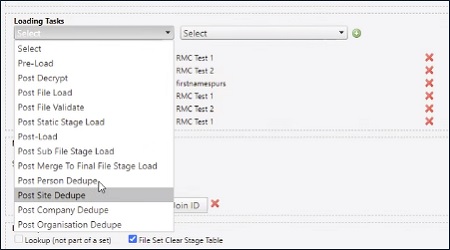
Task triggers - additional task trigger options added.
-
-
Profanities list expansion - you can now apply a profanities list check to a file. This is a shared, standard list and a default message can be shown when a field in the list is processed.
-
Record archiving - improved housekeeping for profile field with status X at all levels. Previously, this was only available at person profile level.
-
Improved purge control - you can now apply a batch size when using purge_Deleted_records to have more control over the purge action.
-
Bulkmerge fail reporting - you can now generate an email report if a regularly scheduled bulk merge fails.
-
System configuration report - the ETL template reports in the system configuration document now includes the following fields:
Matching Rules section
-
Do not create person record on non match (checkbox and drop down selection)
-
Do not create site record on non match
-
Do not create company record on non match
-
Do not create organization record on non match
-
Imply gender (drop down)
-
De-dupe transactions within file (checkbox)
Merge Filesets section
-
Final template(s)
-
Sub template(s)
-
Multi-template joins
Look Up Files section
-
Lookup (not part of a set) (checkbox)
-
Key column(s) (field selections)
-
Engage
The release of Engage 21.4 introduces the following features and product improvements:
-
Cascade segment improvements - the random percentage sampling type now allows you to enter a value up to four decimal places.
-
Campaign contact progressions - campaign communication steps now include the option to add a sending timeout command to move leads from a communication step if no send or failure response is received.
-
Campaign schedule options - the action dropdown for campaign schedule properties now includes options for clearing run and trial run history.
-
Parametric banding improvement - when creating or amending parametric banding fields, the banding window is now 4 lines deep. The pop out syntax editor is also available.
-
User group management - the tools menu has been expanded to include additional user group controls, e.g. adding and deleting groups.
-
Copy and paste properties - when opening an object e.g. campaign, you can now copy and paste the values in the properties pane, e.g. Campaign ID.
-
Voucher codes - changes to the upload process allow you to add voucher codes either with a file upload or using an external resource (FTP).
-
Email send time - You can now defer delivery of communications sent via the SendGrid channel to suit your audience. The options are to:
-
Defer to active click time.
-
Defer to active open time.
-
Defer to local time.
Note: the optimization feature must be enabled in CampaignManagementSettings by setting the EnableSendTimeOptimisation property to true. By default it is off.
-