Each Unify release includes features and fixes to enhance your platform, increase stability, and improve user management.
| Version | Released | Features and fixes |
|---|---|---|
| 22.4 | November-07 | Data import, deduplication |
| 22.3 | August-15 | Security (2FA) |
| 22.2 | August-02 | Database management, delta processing, ETL |
| 22.1 | April-29 | Database management, ETL, UI |
Unify 22.4
Data import
-
Transactions - option added on full file re-supply to not clear out existing data if supplied file is empty (by default, Unify clears existing data when a full file is supplied).
-
You can now determine how a large file is split for processing, e.g. split every 250,000 records. Resulting files are named for each increment band, e.g. mysplitfile-1.txt contains the first 250,000 records, mysplitfile-2.txt contains the second batch of 250,000 records, etc.
-
Notes added to a template are now included in exports and appear as a PostIt style note on the UI.
-
Error page now includes a summary view of the error descriptions and a count of affected columns for each error.
-
You can now export a file of rejected rows over a given date range and either download the data or re-queue the file.
-
Matching rules report added to show which rules have resulted in a successful match. Rule numbers are located on the matching rules list.
Deduplication
-
New rules added for dedupe by site, organisation, and company:
-
S2 - site name only
-
S3 - soundex of site name only
-
C2 - company name only
-
C3 - soundex of company name only
-
O2 - organisation name only
-
O3 - soundex of organisation name only
-
Unify 22.3
Security
-
Two-factor authentication (2FA) added. 2FA is off by default. Contact your Upland BlueVenn support team to enable 2FA on Unify.
Unify 22.2
Database management
-
Button added to allow you to remove a person but retain the source URN. Retaining the source URN allows Unify to flag and forget any new data with that URN.
-
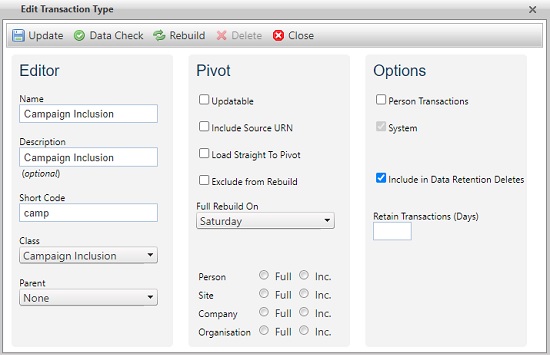
You can now determine for how many days each person and transaction type should remain in Unify according to your retention rules.
-
On the edit transaction type page, you can flag a transaction type for the data retention delete check using the data retention delete flag i.e. if any transactions exist of this type then the data retention delete cannot take place.
-
A person is set to pending delete when the set number of days for data retention delete is reached and no transaction types exist of the flagged types.
-
-
On sys_config, you can choose whether or not Unify creates transaction history detail when updating transactions.
-
Rebuilding a pivot table no longer deletes empty tables, i.e. when you run a full rebuild on an empty pivot you will still get a table as a result.
-
Option to create an Archive database added to Configurator. By default is it selected.
Note: if the path specified for the data or log file does not exist then creating a new system will fail.
Delta Processing
-
Dropdown menu added to data import to allow file delta processing to keep processing time to a minimum:
-
No delta processing - files are processed in their entirety.
-
Only full files use delta processing - only files with a _full suffix use delta processing.
-
All files use delta processing - the delta process is used on all files.
-
ETL
-
You can now preview the outcome of applying source deletion flags using the source deletion page within the data loading menu.
-
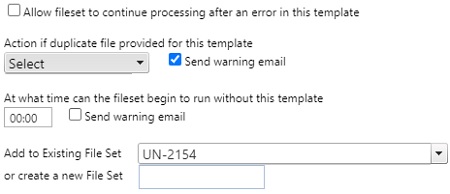
When processing a duplicate file, you can flag a process as standard and choose if warning emails need to be sent or not.
-
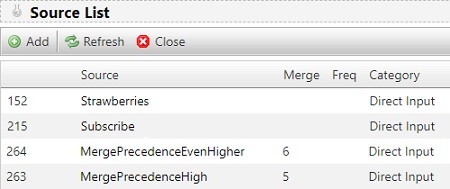
Column added to source list to show merge precedence (where set).
-
An incoming file with duplicate keys set for deduping will be deduped in the incoming file and the data within the staging table.
-
Option added to template editor page to allow partial update of an existing transaction, e.g. update a description but keep the original data in other fields by leaving those fields blank in the update file.
-
Column and icons added to the templates screen for easy identification of which levels are affected by a template.

-
Empty fields in a sample file will default to a string type.
-
Additional checkboxes added to the matching rules:
-
Add permissions without contact point being supplied.
-
Apply merge precedence rules to profile load.
-
-
Improved ETL index reorganization to reduce loading delays.
Unify 22.1
Database management enhancements
-
When a profile value is removed, it will always be removed from the profile pivot (that is used to optimise the ADS load), regardless of whether the amend date is updated on the profile table.
ETL and bulkmerge processing improvements
-
Source hierarchy precedence - when linking sources to templates, you can assign priority to the sources prior to running an ETL template or bulk merge. The source with the highest value is prioritized for the upload/merge.
Note: source hierarchy rules do not apply to transaction fields or profile snapshots.
-
profile_snapshot - person level permissions added and tables added to bulkmerge.
-
Permissions without contact details - checkboxes allow you to update permissions even when no contact details are supplied, e.g. set permission to do not contact by email without providing an email address.
-
Master/final template deletion - when deleting a final template, linked files will load via normal templates, i.e. load as if a final template had never been created.
-
Final template merge and duplicate - you can merge two columns into one using a final template and duplicate a column in the final template.
-
Soundex deduplication - new rules introduced to improve:
-
Processing speed.
-
Handling of names with special characters and multiple words, e.g. van der Graaf, O'Toole, Ellis-Bexter, etc.
-
-
Address URN dedupe - allows matching when you load a customer with different addresses but the same address URN (matching depends on the rule chosen).
-
Automapping - you can:
-
Trigger an auto-map from the column summary tab.
-
Amend an automapped field to ensure the field mapping is correct.
-
Create a new mapping to ensure the field mapping is correct when the automap has failed to find the correct mapping.
-
Save the results of the automap (all rows with the apply option checked).
-
-
Date and datetime min/max options - you can set min and max values for date and datetime data types. When you load a file, these values limit the dates and datetimes that are loaded in that field.
-
Update records using Transaction Source URN - you can load a list of transactions without a person ID for the purposes of updating existing transactions.
-
Duplicate candidate files alerts - you can now define duplicate or missing files as standard processing options, i.e. the system will only send a warning email if:
-
The column on etl_templateSet_member - tplset_sendduplicateWarning is populated with a 1.
-
The column on etl_templateSet_member - tplset_SendProcessWithoutWarning is populated with a 1.
-
-
Template flags - when a template is created, a flag is automatically applied if the template is pointing to core fields. Each level (i.e. person, site, company, organization) has its own flag.
Note: a template can have multiple flags associated with it.
-
Multi-select amend dates - If you supply the same answer value to a profile which is set as multi-select, the source ID will be the most recent source loaded and the amend date time will be the date this data loaded.
-
Address types - you can now exclude address types from being used in the dedupe rules and push address types to the bottom of the address rankings, e.g. exclude a ship-to address.
UI changes
-
Core transaction fields UI improvement - now includes a set of dropdown lists for selection of a source field to be used for that core field. Once a field is selected, you can generate a new row in the column list for the core field.
-
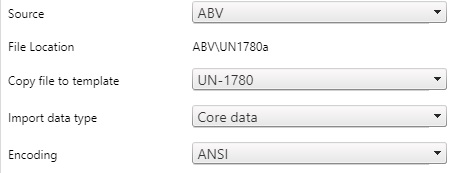
ETL template UI change (push file to next template) - dropdown menu added to the editor with a list of templates you can push a file to (current template must not be used).
-
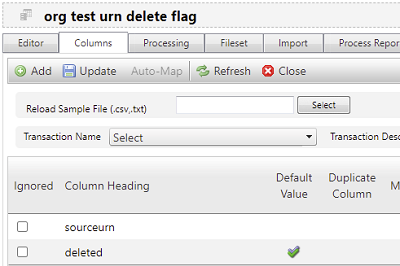
Column UI change - added a double tick icon under the default flag when an advanced default is selected, either from the drop down or text added.
-
ETL transaction type UI change- added a straight to pivot checkbox.
-
Processing rules - improved layout of rule grouping.