2023 BlueVenn Release Notes
Each Engage and Unify release includes features and fixes to enhance your platforms, increase stability, and improve user management. Should you need assistance with a product update, please contact BlueVenn support.
Note: updates to channel properties, e.g. enabling a new, optional property, must be performed by BlueVenn support before they can be used.
| Version | Released | Features and fixes |
|---|---|---|
| Engage 23.2 | April-6 | Syntax export - virtual fields, channels - Tulip |
| Unify 23.2 | April-6 | ETL - error reporting, data retention - rules |
| Engage 23.1 | February-10 | Custom codes, channel config |
| Unify 23.1 | February-10 | Administration, bulk merge, campaign wizard, data import, ETL, profiles, table mapping, transaction pivots |
Engage 23.2
Syntax export - virtual fields
To aid with off-boarding, you can now run a syntax export script that exports both committed and non-committed fields.
Contact support for assistance with exporting your data using this script.
Channels - Tulip
You may now update or delete tasks through Engage.
Unify 23.2
ETL - error reporting
Re-running a file no longer overwrites the previous error report.
Data retention - rules
A new contact point tab is now available under Unify | Data Health | Data Retention to allow you to set rules for how long old addresses should be kept.
Engage 23.1
Custom codes - active/inactive check box
Custom codes can now be activated/deactivated using a checkbox in the custom code settings.
When active, the custom code is visible in the comms step configuration options.
Note: reactivated custom codes will pick up any previously selected custom code item.
When deactivated, a custom code is no longer listed in the properties panel and is prevented from being output.
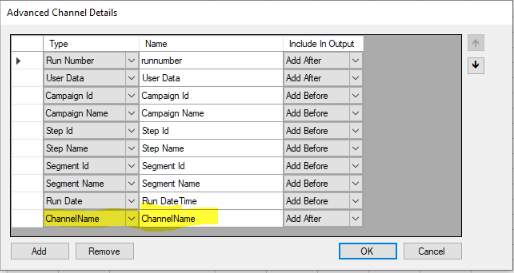
Channel config - ChannelName element
In the advanced channel details, a new ChannelName file element is available for the name of text, FTP, and AmazonS3 channels.
Channel config - Adestra workspaces
Archived Adestra workspaces and their related creatives can now be hidden from Engage.
Channel config - Salesforce assignment rules
A new channel property Use Assignment Rules has been added to the Salesforce integration channel. This property allows you to switch off assignment rules at the point of upload and have the fields set to the values held within BlueVenn and not by the rules themselves.
Note: this property defaults to true, retaining existing behaviour.
Unify 23.1
Administration - custom tables
You can now create a custom table in the admin menu. Data can be viewed in the view data tab.
Bulk merge - improved tracking
ContextID column added to database to aid in identifying bulk merge activity.
Campaign wizard - connector selection
When starting a campaign, you can now choose between Pure360 and Adestra from a dropdown in the campaign wizard.
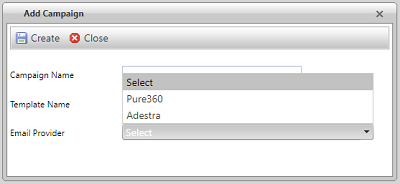
If you choose Pure360, then the wizard functionality is unchanged.
If you choose Adestra:
-
The creative step allows you to select a creative that already exists in Adestra.
-
The test step is removed.
-
The send step outputs a CSV to the Adestra connector.
Data import queue - file error messages
When attempting to load a blank file or a file that exceeds the file size limit, you will now see a warning message.

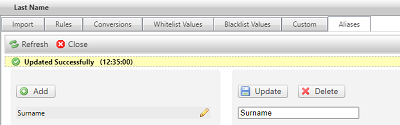
ETL - aliases
UI added for managing aliases.
ETL - full file options
The full file checkbox was replaced with a drop down with 3 options:
-
No files - none of the files are treated as a full resupply of all data.
-
All files - all files are treated as a full resupply of all data.
-
Only _full filenames - only files with a _full suffix are treated as a full resupply of all data.
ETL - transactions
Transaction source is now populated before transaction detail.
ETL - UI update
UI updated to add data type rules to the admin menu.
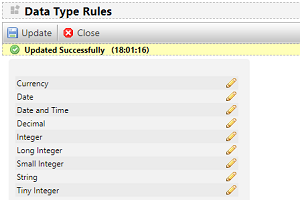
Data type rules menu allows you to set default error actions for each datatype for datatype errors, length errors and max/min value errors.
ETL - view data tab
A view data tab has been added to the File Upload details page. The tab will only be displayed if the stage table is relative to the file being viewed.
The tab will be displayed if it is a lookup table as they have their own distinct stage table or if the file is the last file that has been processed by the ETL.
Profile dates - ISO formatting
A feature switch “ISOdate format for profile” was added to the database. When enabled, loaded profile data containing dates will be stored in ISO8601 format (example: 2022-10-14 05:51:14.123).
If not enabled, dates are stored in standard SQL date format.
Profiles - address ranking
Address types are now ordered by ranking.
Table mapping - pre-populate new fields
When auto-mapping a table, the field for the mapping now pre-populates with the field name as seen on the source.
Table mapping - validate mapping
New button added to allow you to validate mappings. When clicked a new browser page opens with the results of the mapping validation.
Transaction pivots - incremental fails
Unify no longer automatically attempts a full rebuild of a pivot if an incremental build fails. In the event of a failure, a notification email is sent.