All campaigns created by all users follow the settings defined under the campaigns tab in the settings menu, allowing you to manage campaign tables, allow child tables, define additional communication history, manage global suppressions, set trial run parameters, and add custom code names.
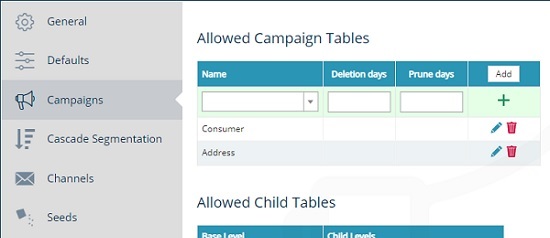
Allowed campaign tables
Define which tables are selectable in the campaign properties, i.e. adding a consumer table to the allowed campaign tables allows you to select the consumer table for your campaigns.
-
Click the add button to add a new row to the table.
-
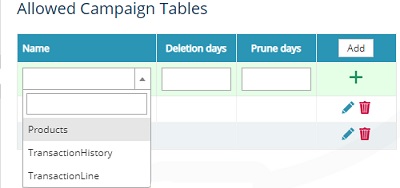
Complete the following fields.
-
Name - select a table level from your database.
-
Deletions days - set an automated deletion of campaign history, e.g. delete history after 90 days. Leave blank to never auto-delete.
-
Prune days - set an automated pruning of campaign history (partial deletion), e.g. prune history after 30 days. Leave blank to never auto-prune.
-
-
Click the + icon to save your changes.
To edit a row, click the pencil icon. To delete a row, click the trashcan icon.
Delete will remove all records that are not currently active on a campaign step. Pruning removes records in the campaign history from the following steps marked Y.
| SQL step type | Engage step name | XML type | Pruned |
|---|---|---|---|
| 1 | Audience |
Audience |
N |
| 2 | Merge |
Merge |
Y |
| 3 |
Communication |
Communication |
N |
| 4 | Volume Split |
SplitVolume |
Y |
| 5 | Yes No Split |
SplitYesNo |
Y |
| 6 |
SplitRandom |
||
| 7 | Response |
SplitResponse |
N |
| 8 | Wait |
Wait |
Y |
| 9 | Seed List |
SeedList |
Y |
| 10 |
CampaignSelection |
||
| 11 | Dedupe |
Dedupe |
Y |
| 12 | Exit |
Exit |
N |
| 13 | Field Split |
SplitFieldValue |
Y |
| 14 |
Query Split |
SplitQueryList |
Y |
| 15 |
Filter |
||
| 16 | Control |
Control |
Y |
| 17 | Tag |
Tag |
Y |
| 18 | Dynamic Split |
SplitDynamic |
Y |
| 19 | Integration |
Integration |
N |
| 20 | Link To |
JoinOut |
N |
| 21 | Link From |
JoinIn |
N |
| 22 | Implied |
ImpliedAudience |
N |
| 23 | Volume Limit |
VolumeLimit |
Y |
| 24 | Multi Variant Test |
MultiVariantTestingStep |
Y |
| 25 | Cascade | Segmenter | N |
| 26 | Triggered Audience | TriggeredAudience | N |
Allowed child tables
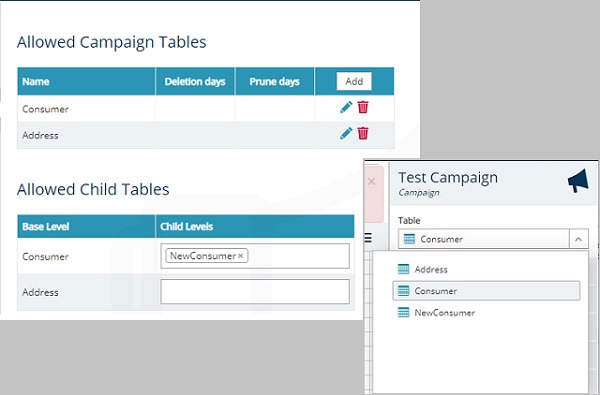
Some tables can be allocated as child tables, e.g. an external table containing data for new consumers could be configured as a child table for the main consumer field within your database. Including child tables in the allowed child tables list will make these tables available to campaigns.
If you wish to exclude a child table, click the x next to the table to remove it from the list.
Additional communication history
The allowed campaign tables will appear in the additional communication history table. Here you can select which field list associated with each table you wish to save (if any) along with your campaign history. This function is designed to store values which may change over time, e.g. lifetime spend, number of purchases, loyalty type, etc., to know what the customer was like at the time of send. Fields like “first name”, “surname”, etc. are not appropriate choices as these will provide little analytical value while consuming storage space.
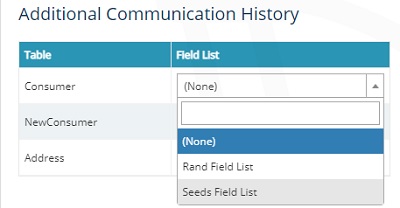
Caution: Once a Field list has been selected to be used in additional communication history, this is permanent and cannot be changed. Please consult with your team and your customer success manager before changing these settings.
Note: This feature will increase the duration of a campaign run depending on the size of the data which is being written to the history.
Global suppressions
Add rules for all campaign audiences, without exception, to exclude records from campaign audiences within the table being referenced, e.g. all opted-out contacts could be omitted here, rather than adding an exclusion to each campaign as it is created.
-
Click the edit (pen) icon in the query lozenge to open a dialog box.
-
Enter your query by typing your syntax or dragging a field list from your data view.
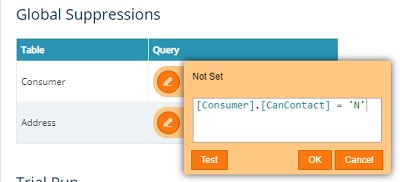
-
Click the test button to check your syntax is valid.
-
Click OK to add the suppression to all campaigns.
Trial run
Define the random sample size (percentage) applied to trial runs of all campaigns. You can also use the checkbox to allow wait steps to be ignored when trial running a campaign.
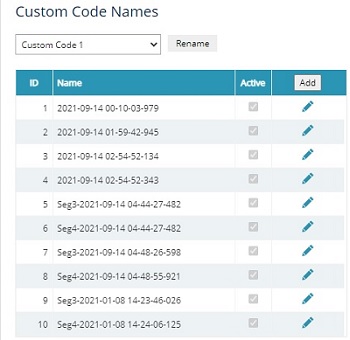
Custom code names
A unique list of codes available to each campaign for inclusion in the output. There are 5 custom code names available that can be renamed appropriately. They can contain a list of custom values identifiable by an ID in the contact history.