Within the settings menu, the defaults tab allows you to:
-
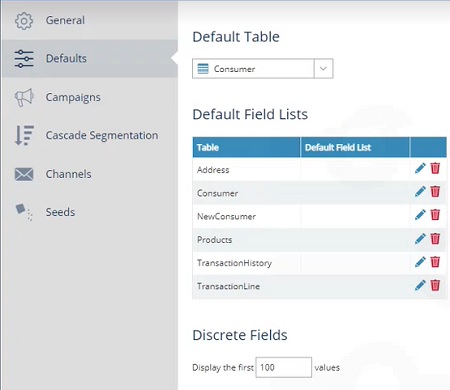
Set a default table level at which any new analysis or campaign is created. You can change the level within a campaign or analysis.
-
Set a default field list for any table in your database. When you display a selection of a particular table, the fields you see will be those in the specified field list.
Note: after making any changes to your defaults, remember to save your changes using the hamburger menu in the top-right corner.
Setting a default table
Use the dropdown menu to select one of your database tables, e.g. consumer, to be selected by default whenever opening a new campaign, selection, etc.
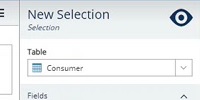
Note: You can still change the applied table within the campaign, selection, etc. using the dropdown within the properties menu. Changing the table in the properties does not affect the default table setting.
Setting a default field list
Creating field lists allows you to pre-select which fields are used within campaigns, selections, etc. You can set one of your field lists per database table to be used by default.
-
Open the defaults tab in the settings menu.
-
Locate the table to which you wish to apply a default field list in the default field lists table.
Note: the list of tables shown will depend on which tables are in your database and their naming conventions, e.g. your customers could be stored on a table labeled consumer, or individual, or customer, etc.
-
Select the table entry next to the chosen table (if the default field list is blank) or select the pen icon (if there is a default field list set and needs changing).
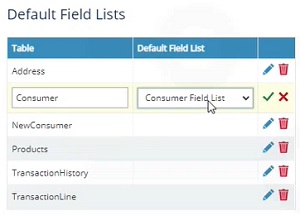
Note: if the default field list column is blank, then no default field list is currently applied for that table. Upon selecting a blank table entry, the first field list alphabetically will be selected as the default field list.
-
Use the dropdown menu to select the field list to be set as default.
-
Select the tick icon to set your new default field list, e.g. set consumer field list as the default list when using the consumer table in a campaign, selection, etc.
Upon setting a default field list, creating a new campaign, selection, etc. will result in the default field list being selected when you select your table (either manually, using the dropdown, or by setting a default table).
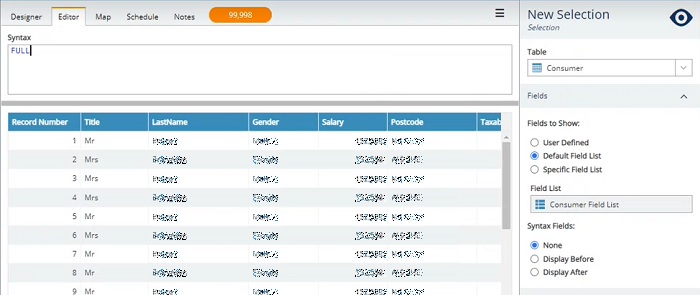
You can change the applied field list by expanding the fields properties of your campaign, selection, etc. and selecting a different option, e.g. user defined.