Engage campaigns can be as simple or as complex as you like. They can run as one-time events, be part of a series of campaigns, or repeat on a scheduled basis. One common campaign built within Engage is the birthday campaign, designed to send a discount to a customer for their birthday.
You can build a simple birthday campaign using three steps:
-
An audience query step.
-
A communication step.
-
An exit step.
Building a birthday campaign
-
Open a blank campaign canvas.
-
Drag your campaign steps onto the canvas.
-
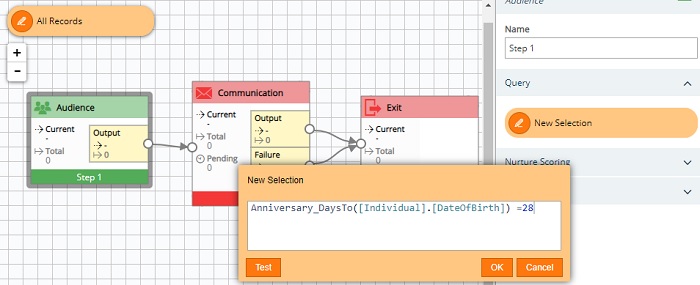
In the audience step, open the query and use the Anniversary_DaysTo syntax to define your audience, e.g. If you want your email to be sent 28 days before the customer's birthday, where the date resides in a DateOfBirth field on the Individual table, use the query:
Anniversary_DaysTo([Individual].[DateOfBirth]) =28
-
On the communication step, select your output channel and define the properties, e.g. if using Upland Adestra to send your birthday communications, select the Adestra channel and the corresponding creative template.
-
Connect the communication step outputs to an exit step to exit audience members from the campaign and make them eligible for the campaign next year.
-
Set the campaign to run on a daily schedule to pick up new audience members as the Anniversary_DaysTo value changes.