KEYVALUE appends a column from an external file to an existing table, matching on the Primary Key.
KEYVALUE(<Path qualified Filename>, <FileEncoding>('ASCII', 'UNICODE'), <SeperatorCharacter>('COMMA', 'TAB'), <EnclosingCharacter>('SINGLE','DOUBLE','NONE'), <TargetType>('INT','DECIMAL','DATE', 'TEXT', 'BIGINT', 'BOOLEAN'), <HeaderRow>('TRUE', 'FALSE') [, <ValueLength>, <DateFormat>, <InDatabaseOrder> ('TRUE','FALSE')])
Required Arguments:
-
Path qualified Filename: The full filename and path of the file to be processed. If the filename or path contains spaces this must all be enclosed in quotes.
-
FileEncoding: The type of file to be processed. Options are ASCII or UNICODE
-
SeperatorCharacter: The delimiter for the 2 columns. Options are Comma or Tab.
-
EnclosingCharacter: Normally used with a comma separated file when the data also contains commas. Options are Single (quotes), Double (quotes) or None.
-
TargetType: The data type of the field to be created.
-
HeaderRow: Tells the system whether or not to process the first row of the file.
Optional Arguments
-
ValueLength: Allows for truncation of the incoming data if required.
-
Date Format: Specifies the format of the incoming data for date fields.
-
InDatabaseOrder: Specifies if the data is in the same format as your database records.
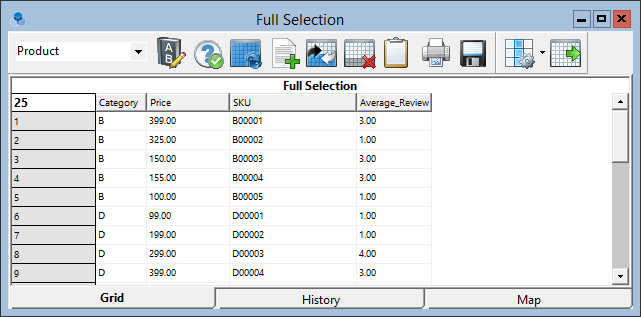
Example: Given an external file like this ...
B00001,3.000
B00002,1.000
B00003,3.000
B00004,3.000
B00005,1.000
D00001,1.000
... append the column to the Product table.
KEYVALUE("D:\Projects\Databases\ADS\GUDB2C\External Files\Product_Average_Review.txt", 'ASCII', 'COMMA','NONE','DECIMAL', 'FALSE')
Result:
Note: This function will not work when being used on tables without a Primary Key. Also, more importantly, the source file used for the KEYVALUE field must be retained in the original location for reference during the ADS refresh and any other time that the field is rebuilt.