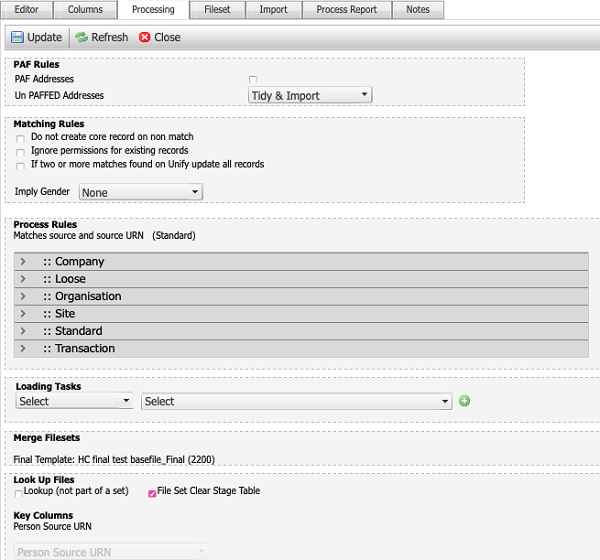
The processing tab of a data import template specification defines the deduplication rules that the template applies to input files, including: PAF rules (UK addresses), matching rules, process rules, loading tasks, merge filesets, and look up files.
PAF rules
The PAF rules allow you to decide if postcode address file (PAF) addresses are used and how to treat addresses that are not successfully processed by PAF.
-
Tidy and import – applies predefined rules to the addresses before import.
-
Leave and import – imports the addresses as-is, without further processing.
-
Do not import – ignores any addresses that don’t pass PAF. People associated with those addresses will be imported without an address.
Matching rules
The matching rules control how matching records are handled during the import.
-
Do not create core record on non match - prevents blank records from being created if a non matching source URN is detected in the feed, e.g. prevent blank people being created when a rogue transaction appears in the file.
-
Ignore permissions for existing records - tells the system to use the permissions already in the database for person records that already exist.
-
If two or more matches found on Unify update all records - updates all matching records.
-
Imply Gender - allows you to imply a gender to the record based on title or name, e.g. assume female if title is Mrs. Select None if you do not want to imply a gender.
Process rules
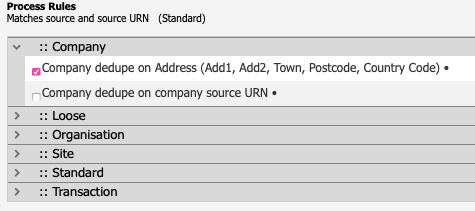
The process rules detect and handle duplicate records. In the absence of a Unify person ID in the file, deduplication rules allow the ETL process to match incoming data to records already in the database, e.g. if you wanted to deduplicate based on company address attributes, you select the Company->Company dedupe on address option.
Loading tasks
Loading tasks allow you to specify a task to run at a specific point in the ETL process.
Example: if you wanted to append a field with tomorrow's date after the file was loaded:
-
Select Post File Load from the first menu.
-
Select the Tomorrow Date task from the second menu.
-
Click the green + button to add the rule.

Merge filesets
The merge filesets section allows you to create a final version of the template or append your fileset to a lookup templates.
Final file
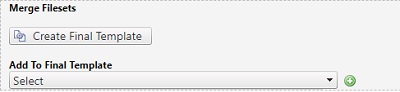
If your template is to become a basefile, i.e. used to supply data to Unify, click the create final template button to create a file with a _final suffix, e.g. Yourtemplatename_final.
Note: When you click the create final template button, the merge filesets field will become locked and display information on the final template. Ensure all mapping, etc. is completed before creating a final template.
Lookup templates
Lookup templates appended to a core/transactional template to save loading it unnecessarily. If your template is a lookup file, you would:
-
Use the add to final template dropdown to select the final template to which you wish to append the lookup template.
-
Press the add button next to the dropdown. Your lookup template will now appear as a sub-template. The create final template option is removed and replaced with information on which templates your sub-template is merged with, i.e. the final template selected from the dropdown.
-
Use the dropdowns that appear next to the linked final template to tell the basefile record how to match to the look up, e.g. match on a SourceURN for a basefile campaign ID, which would relate to the lookups Campaign ID.

-
Continue to add other templates, as required, e.g. if you have five campaign feeds, each one needing to relate to a lookup, create and add the five templates to your lookup template.
Note: You will need to add your templates to the file set process order of your final template. This will ensure that the file set will only run once it has received the files from the two sub-templates.
Note: Your file set processing rules should be applied to the final template, not the sub templates.
Note: When running in final files, you should only ever press run on the final file or run all and let the ETL run the final file. In doing so, the final file will run the two sub-templates, then run itself. The sub templates do not create any people, but stores them for the final file to create and update people.