2018 R2 Release Notes
The Eclipse PPM team will be releasing 2018 R2 on September 29th. This release will continue progress towards feature parity as the remaining components of Administration are moved to the current generation of Eclipse PPM. The new Work Planner, to build and manage schedules without the need for Silverlight, has it's initial release. 2018R2 also focused on delivering more than 40 Customer Enhancements!
Feature Migration
Projects
Schedule
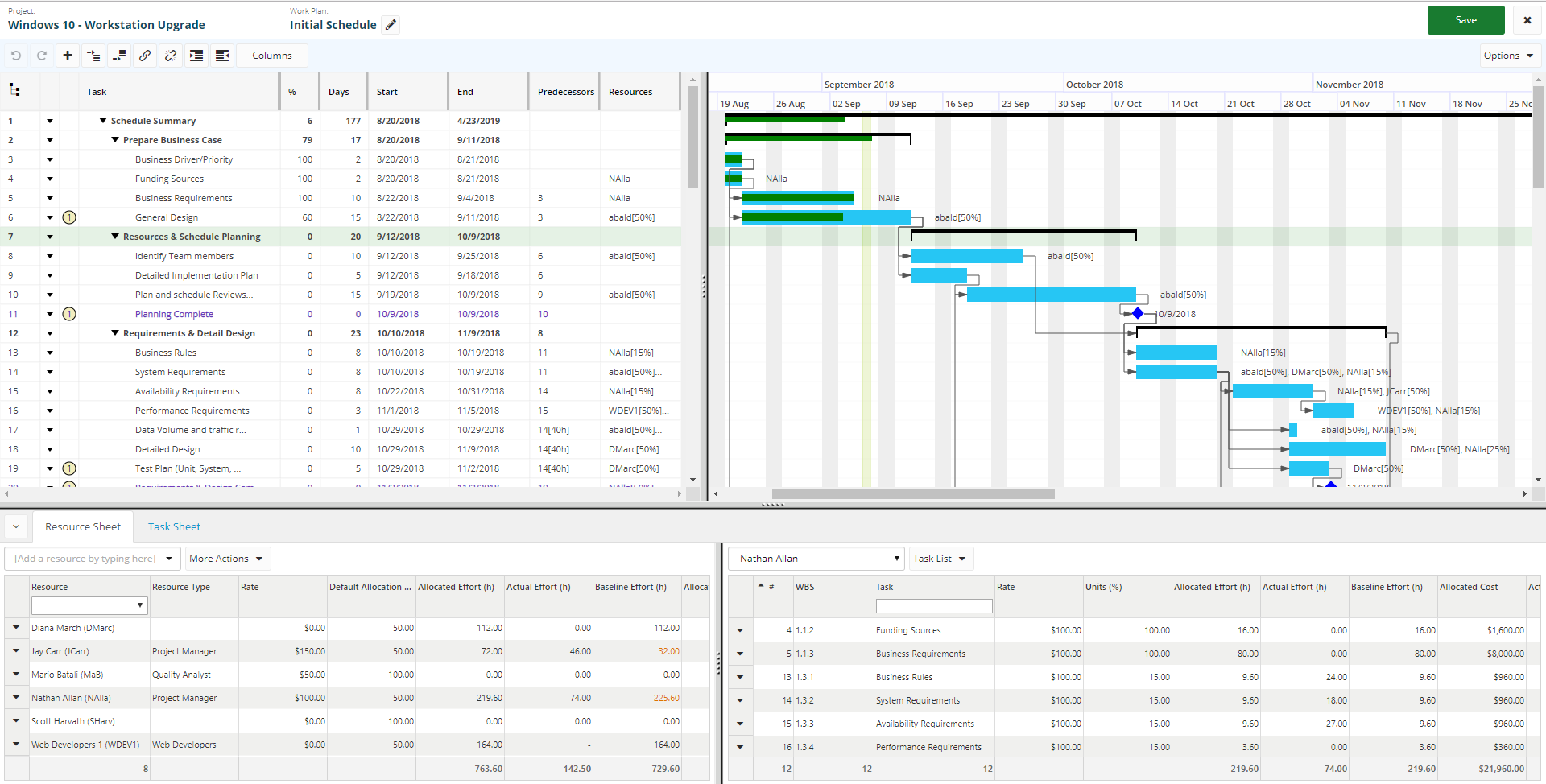
Users can now manage work plans using a new HTML work planner inside Eclipse PPM. The new work planner is a shared component between Eclipse and another Upland product called Tenrox.
The initial release of the new work planner provides the most important and frequently used features from the legacy planner. Future releases will focus on lesser used features, such as Detailed Time or Microsoft Project Integration. The architecture of the new work planner is consistent with the original work planner which means users can switch between the new and old version in the interim.
Several customer enhancements have also been addressed with the initial release of the new work planner:
- Users can now interact directly with the gantt area to adjust task durations, adjust task scheduling constraints, and manage predecessor relationships
- Users can now zoom to two additional Gantt levels not previously supported: "Year/Quarter" for large projects and "Week/Day" for small projects
- Undo/Redo support
- Full screen editor
- Drag and drop column reordering / resizing
- Auto checkin/checkout
Administration
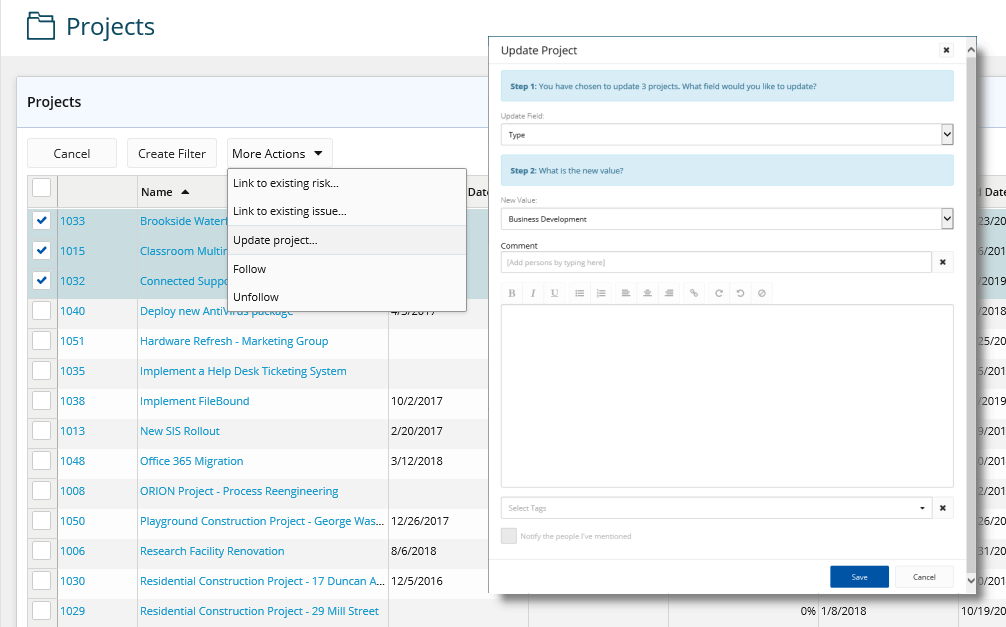
Bulk Action Update
The ability to bulk update records as been added
- Update/Apply Project Classification values
- Update/Apply Resource details and rates
- Update/Apply Resource Assignment & Reminder notifications
- Update/Apply Security Policies
Bulk Import
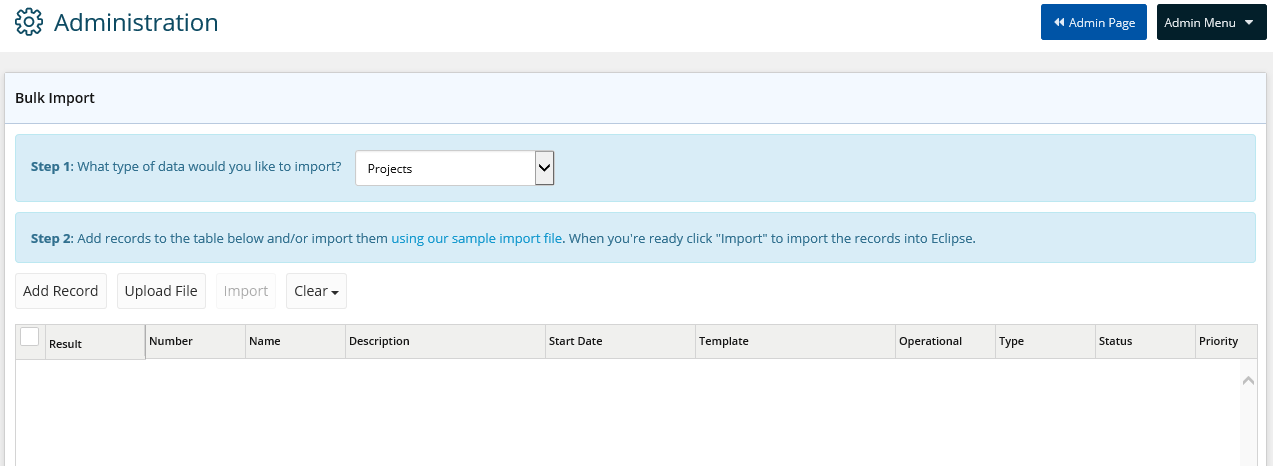
Bulk import of Resource and Project records
Data Exchange
Import financial XML data files and review API import & processing status.
Other Migrated Items
Export to Calendar
Export tasks in .ICS format to added to calendars outside of Eclipse PPM.
Email-In Links
Unique ‘email-in’ links added to projects to add emails to Comments and Notes.
Customer Driven Enhancements
Through the Upland Enhancement Request process and ongoing dialogue with users, the Eclipse PPM product team has delivered 44 enhancements for this release.
| Reference | Description | Notes |
|---|---|---|
| ECL-835 | Search Builder - Add counts to the preview grid. | Users can now see the result count in the filter preview grid. |
| ECL-927 | Home - My Work - Flag non-current tasks | Non-Current tasks will be flagged on the home page my work lists. |
| ECL-975 | Dashboards - Add missing sorting fields | Users can now choose from several new sort fields on dashboard lists. |
| ECL-1109 | Custom Properties - Add a "Long Text" property type | Users can now include text custom properties up to 4000 characters (previously 256). |
| ECL-1193 | Home - My Work Lists - Small configuration adjustments and extending options for removing items | Users can exercise set more granular options on removing items from their home page work lists. |
| ECL-1330 | Dashboards - Add the "Resource(s)" column from v5 into v6 dashboards. | Users can now display a comma separated list of resources on the dashboard portfolio summary panel. |
| ECL-1332 | Filters - Resources - Add "Status" to the search results column list. | Users can now display the "Status" of a resource as a column on a resource filter results screen. |
| ECL-1345 | Reports - Add "Issue Status" and "Risk Status" to project status report | The "Project Status" report now contains the status of linked issues and linked risks. |
| ECL-1660 | Dashboards - List Panels + PS Panel - Allow on-the-fly sorting by clicking column headers | Users can now sort dashboard list panels on-the-fly by clicking column headers. (Some columns are not sortable for various reasons.) |
| ECL-1662 | My Work Lists - Task List - Add "Ready To Start" and "Not Ready To Start" indicator to task lists. | Users can now see a "Ready To Start" and "Not Ready To Start" indicator on my work task lists for tasks that have predecessor relationships. |
| ECL-1990 | Report Templates - Add "LastEnteredState(SomeStatusName)" as a new project field. | Users can now include "the last time a project entered a particular status" as a column in a report template. |
| ECL-2325 | Approvals - Timesheet - Add an action for "Approve all entries for this week for this resource". | Users can now "bulk approve" timesheets for a particular resource/week. |
| ECL-2405 | Administration >> Templates >> Approvals >> Select all columns | Users can now quickly add or remove all fields from an approval template using the "Select All" or "Unselect All" buttons. |
| ECL-2750 | UI - Allow customers to upload a corporate logo to replace the Eclipse product logo. | Users can now brand their Eclipse instance by supplying a corporate logo that will replace the Eclipse PPM logo in the upper left hand corner of the screen. |
| ECL-2877 | Reports - Project Status - Sort the output by project name | When running the "Project Status" report for multiple projects, the projects will be sorted by project name which makes locating a specific project much easier. |
| ECL-2895 | Reports >> Custom Reports >> When mouse hovered the report's name, a tool tip should appear showing the report's full name | Users can now hover a report name (that may be partially hidden depending on device screen size) to see a tooltip showing the entire name. |
| ECL-3128 | Project - Resources - Add Refresh Button | Users can now refresh the project resources list from inside the application (as opposed to refreshing the entire application) when data edits have been made elsewhere that might not be reflected on the screen. |
| ECL-3162 | Email Notifications - "Notify me when I have not made any time entries during the previous period" | Users can now subscribe to a new email notification that will alert them when they have not made any time entries during a specific period. |
| ECL-3211 | Project - Create - Allow user to pick from any work plan on project template (defaulted to current) | Users can now select a specific work plan from a project template when creating a project (if the project template contains more than one work plan). |
| ECL-3239 | Task Lists - Showing parent or hierarchy of tasks in list screens. | Users can now view a task hierarchy (for tasks that are nested inside a work plan) allowing them to identify tasks that may have similar names inside a work plan like "Status Meeting" or "Follow Up". |
| ECL-3372 | Project - Resources - Adjustments when removing a resource from the project roster | Some slight and visual and user experience adjustments have been made to the project resources screen when removing resources from a project. |
| ECL-3373 | User / Resource - Make relation more apparent | A slight visual change has been made to make the relationship between user/resource more apparent. |
| ECL-3374 | Dashboards - Investigate virtualization / paging in dashboard tables and removing "Disable Paging" option | Some minor adjustments have been made the "paging" option in dashboard list panels to make the meaning clearer to users. |
| ECL-3461 | Dashboards - Add tabs to the simple list config panels (x4) on dashboards. | Some minor adjustments have been made to the layout of the dashboard list panel configuration popups to make them more consistent. |
| ECL-3463 | Dashboards - Add multiple grouping levels to the 4 list panels | Users can now specify multiple grouping levels to dashboard list panels. |
| ECL-3464 | Dashboards - Add "sort direction" sorting options to the 4 list panels. | Users can now specify the sort direction on dashboard list panels. |
| ECL-3466 | Administration - Policies - Apply Policy | Some slight adjustments have been made to the user experience when selecting projects to apply a security policy. |
| ECL-3556 | Project - Resources - Minor adjustments to hours/types display | Some minor adjustments have been made to the project resources screen to make the roles and effort values of resources on a project more apparent. |
| ECL-3619 | Report Templates - Exposing more resource fields on ProjectResources sub list | When using report templates, the "ProjectResources" sublist now exposes all resource fields (previously only a handful of fields were allowed). |
| ECL-3777 | Email Notifications - "Notify me when "[My Direct Reports]"have not made any time entries during the previous period" | Users can now subscribe to a new email notification that will alert them when their direct reports have not entered time within a specific period. |
| ECL-3778 | Email Notifications - "Notify me when resources on "[My Active Projects and Operations]" are non-compliant during the previous period" | Users can now subscribe to a new email notification that will alert them when resources on projects are non-compliant with time entries. |
| ECL-3779 | Email Notifications - "Notify me at the beginning of each week if the last status update on "[My Active Projects]" is older than" | Users can now subscribe to a new email notification that will alert them when the status update on their projects is getting stale. |
| ECL-3863 | Dashboards - Add ability to "clear" the sort on dashboard panels | Users can now specify an "unsorted" dashboard list panel. |
| ECL-4045 | Administration - User Groups - Add "Account Status" column to the group members grid | Users can now quickly see the "Account Status" for a user when managing user group members. |
| ECL-4222 | Administration - Project Settings - Add "Maximum pending requests (per requester)" | Previous versions restricted the amount of pending project requests to 1 for each requester.The new project setting option allows users to configure their environment to allow as many as 999 pending requests per requester. |
| ECL-4267 | Dashboards - Snapshot - Make "Open Risks" and "Open Issues" clickable. | Users can now click on the "Open Issues" or "Open Risks" count on the dashboard snapshot to navigate directly to the project and see the entire list. |
| ECL-4273 | UI - Add a "View Status Log" context menu action in several places around the application | Users can now click a "View Status Log" action from several places around the application.When clicked, the user will navigate to the activity feed page of the selected item and the status filter will be automatically applied. |
| ECL-4656 | Project - Resources - Save preferences per user (instead of per-project-per-user) | Users will now store preferences (selected filter, sort field, sort direction, view type) for the project resources page "per-user" instead of "per-user-per-project" like before. |
| ECL-4657 | Reports - Add "Back To Reports" button on the adhoc report page. | Users can navigate quickly back to the reports page using the "Back To Reports" button after running an adhoc report. |
| ECL-4744 | Preferences - Minor usability improvements | Some slight adjustments have been made to the user preferences pages to improve the navigation experience. |
| ECL-4745 | Project - Resources - Remove confirmation prompt when setting project owner. | Users are no longer required to confirm the project owner changes after clicking "Make this the project owner" from the project resources screen. |
| ECL-3124 | Status Updates - Minor improvements to the status update usability | Users can now quickly clear the existing status update text using the "Clear Status Update" button (available for projects / risks / issues). Users can also annotate the status update on risks and issues (only projects allowed this previously). |
| ECL-3247 | Quick Search - Break tokens apart when searching and remove highlighting. | Users who are specifying multiple search tokens on the quick search will now see better results.For example, if we search for "server upgrade", results that include "server" and / or "upgrade" will both be returned instead of just results that contained "server upgrade".A result that includes "server upgrade" will be ranked higher than one matching only one token. The text match highlight has been removed from the quick search results page.Users complained the yellow highlight was actually degrading the experienceby attracting too much visual attention. |
| ECL-3460 | Reports - Get some tool-tips on the report owners | Users can now see a tooltip on the reports list for data in the "Owner" column. |