2019 R2 Release Notes
The Eclipse PPM team will be releasing 2019R2 on April 13th. This release provides the final parity features for the Work Planner, such as the Duration Calculator, Team Builder and Calendar Editing. New features include support for Google Drive Integration, project Risk event scoring and the first step for Program management support. 2019R2 also focused on delivering more than 35 Customer Enhancements!
Feature Migration
Work Planner
Duration Planner
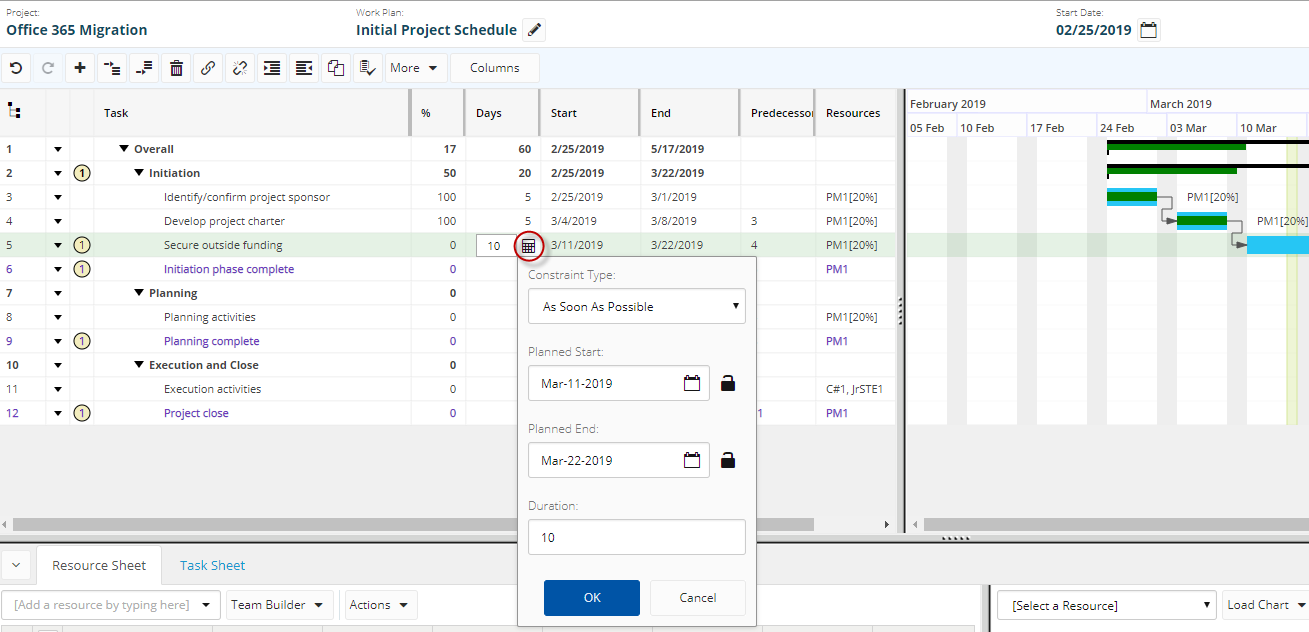
Users who edit work plans can now edit task durations using the "Duration Calculator" which allows them to set start date, end date, duration, and task constraint in one step.
Benefit:
Some planners build schedules where tasks take a very specific amount of time, occur on very specific days, or have few dependencies between them. If we take an example from an operational project, a resource might be booked on a "Training" task that is set between two dates. Using the duration calculator, the user can select the start and end dates specifically and not need to guess the duration to match the dates.
Team Builder
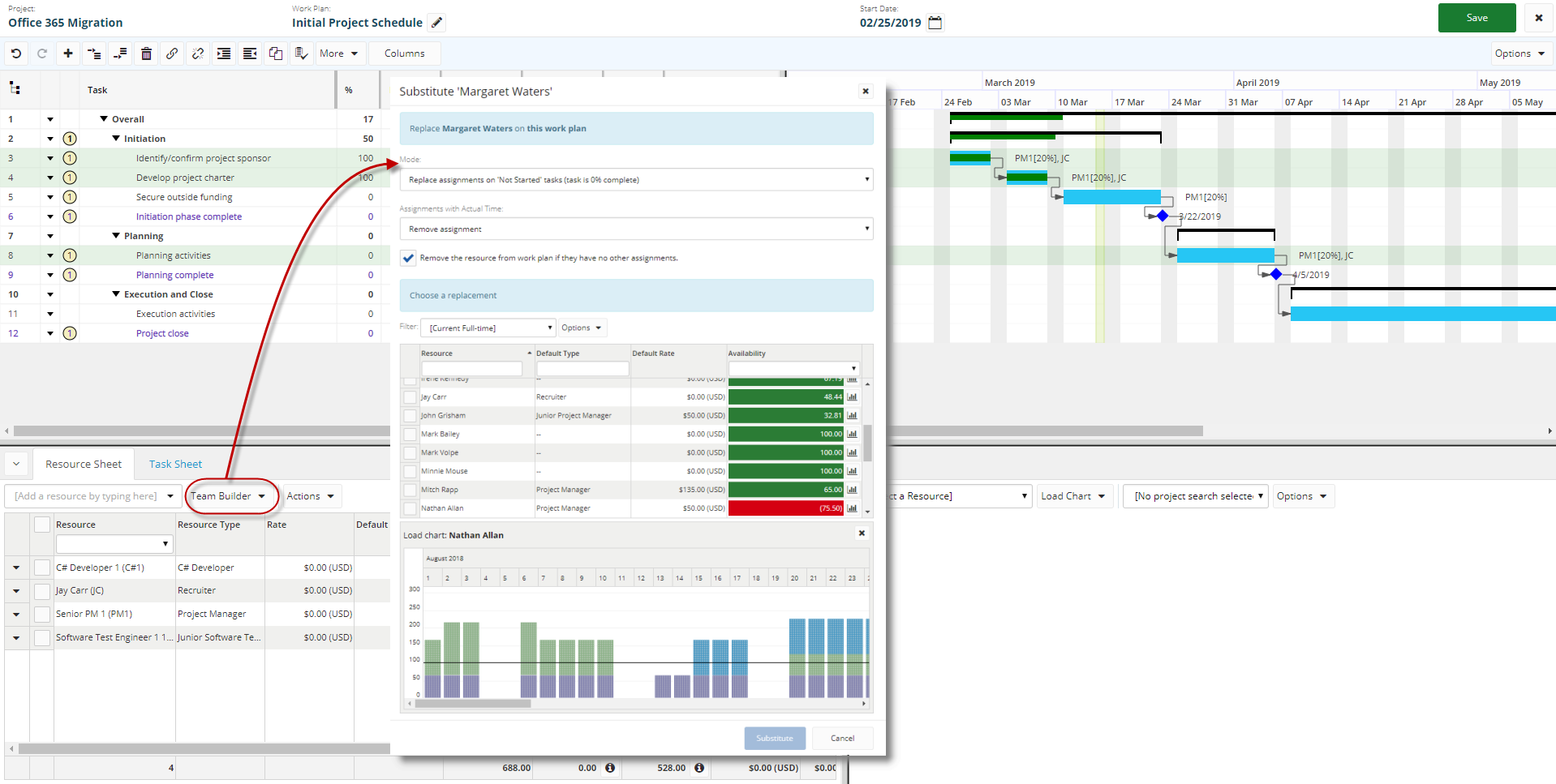
Users can intelligently build out the resourcing requirements for project schedules with the additional insight of the Team Builder.
Benefit:
Planners can now add resources to a work plan with the additional insight of their consumption by other projects, determining if they have sufficient capacity. Resource groups or teams can be listed with resources filters, displaying overall availability and then displaying the consumption distribution between projects and operations in a graph format.
Other Migrated Items
MS Project Synchronization
Microsoft Project XML schedules can be imported and synchronized on projects Work Plans.
Calendar Editing
Work Plan calendars can now be edited on the project.
Bulk Edit - Work Plans
Update multiple resources to multiple tasks on a Work Plan.
Customer Driven Enhancements
Through the Upland Enhancement Request process and ongoing dialogue with users, the Eclipse PPM product team has delivered 35+ enhancements for this release.
|
Reference |
Description |
Notes |
|---|---|---|
| ECL-977 | UI - "Id" vs "ID" - Labels are inconsistent and / or missing entirely | Several inconsistent and / or missing labels for "ID" and "Id" fields in adhoc reports, filters, detail pages and search results were fixed. |
| ECL-1192 | GUI - Allow more options for users to pick a start page | Users have requested the ability to define their own start page instead of
using the application home page.
Benefit: Some users have a limited role when interacting with Eclipse, for example, they only use the timesheet. They will be more efficient in their usage if they can navigate directly to the timesheet and don't have to stop at the home page. |
| ECL-1342 | UI - Adjust quick search results dropdown to be grouped (like Powersteering) | The quick search results dropdown is now grouped by object type and will display counts of matched results. Benefit: Users will be able to more quickly scan the results to find the object they are looking for and how many matches they have found. |
| ECL-2676 | UI - Adjust min/max column widths for dashboards and filters. | Several inconsistencies with minimum and / or maximum column widths hae been adjusted on dashboard grids and filter result grids.The new minimum column width is 60px.The new maximum column width is 500px. Benefit: Users can now tailor their dashboard grids and filter results grid to exactly fit their screen size. |
| ECL-2741 | Copy Project - Default the "Number" field | When copying a project, we will now populate the "Project Number"
field with a suggested project number based on the project number prefix of
the source project and the next available number.
Benefit: Not all projects are created from scratch, and users that want to copy an existing project will not interrupt their auto-numbering pattern when a project is copied. For example, let's say that 3 projects existed that were created from a template using auto-numbering - "Project-001", "Project-002", and "Project-003".If we tried to copy any of these projects, the copy popup would suggest "Project-004" to the user. |
| ECL-5087 | Reports - Project Portfolio Financial Summary - Add "Financial Plan Description" to report. | The "Financial Plan Description" is now included in the "Project Portfolio Financial Summary" report. |
| ECL-5145 | Reports - Project Schedule Sheet - Add a formatter for resources columns (hours, percent, initials, full name) | The "Project Schedule Sheet" report will now allow users to
choose the export format for the "Resources" column.Available options are: Initials + Percent
Allocation; Initials + Hours; Full Name + Percent Allocation; Full Name +
Hours.
Benefit: The larger the resource pool for a given organization, the more likely the chance of two resources having the same initials.This makes viewing assignments on the gantt difficult, so we've given the option to show the full name which should clear up any confusion. |
| ECL-5562 | Dashboard - Allow user to select/set panel filter directly from the panel header | We have added a new feature to our dashboards allowing a user to set a
single project filter for all panels/charts on the dashboard where a project
filter applies. Benefit: In our new version, we empowered our users by allowing them to configure individual filters for each panel/chart on a dashboard.While some users embraced that feature, others found it cumbersome and preferred the legacy method of setting a single filter for the whole dashboard in one spot. |
| ECL-5567 | Project - Allow user to define default home page when opening a project | Users can now choose a specific project start page when navigating to a
project.In some cases the context of
the hyperlink is used and will ignore the user's default option.
Benefit: While we expect most end-users to select "Home" for their start page, some users that fulfill other project roles like "Project Manager" or "Issue Manager" may prefer to navigate directly to a specific project page and save themselves the extra page click. |
| ECL-5610 | Notes - Increase max note length from 4000 to 10000 | Users can now enter project notes up to 10,000 characters in length.
Benefit: Some users have expressed concerns with the previous 4000 character limit on project notes.Now they will be able to enter up to 10,000 characters. |
| ECL-5618 | User/Resource - Make it easier to identify resources that are users, and vice-versa | Description: Users can now add the "User" column into the resource filter grid results, and the will see the "Resource" column in the users grid. !image-2019-02-27-08-38-35-493.png|thumbnail! !image-2019-02-27-08-44-20-455.png|thumbnail! Benefit: An administrator can quickly identify resources linked to users and vice-versa. |
| ECL-5880 | Administration - Configuration - Work Plan - Settings - Add config option to control display of quick add panel on project tasks list | The display of the quick-add tasks panel on the project tasks list is now
optional.
Benefit: Some customers expressed concerns over allowing inexperienced users or users who were not trained as proper project managers to create tasks directly from the tasks page without seeing the impacts on the entire work plan. |
| ECL-5918 | Approvals - Timesheet - Change default filter to "Pending My Action" instead of "All" | In the timesheet approvals page, we have changed the default filter from
"All" to "Pending My Action".
Benefit: The primary function of this page to view items that you are assigned to approve.By adjusting the default option, users will have one less step and first-time users will not accidentally pull large lists of data. |
| ECL-5929 | Resource Plan Tool - Display generic resources under their department (when configured to pivot that way) | Description:
Users who group their resource plan "By Department" will now see
the generic resources under their parent department from the organization
tree. Prior to this change, the department
grouping only applied to named resources.
Benefit: Planners can now see a consolidated view of resources and generic resources (demand) across an entire department. |
| ECL-6064 | Project - Dashboard - Financial Summary Panel - Add "Total Budget Remaining (B-E)" to the panel | In the project dashboard, we have added another financial indicators to the
"Financial Summary" panel - "Total Budget Remaining
(B-E)".This is not a new
indicator, it has simply been exposed on this panel.
Benefit: Users who want to monitor the remaining budget for their projects can do that from the project dashboard page instead of navigating to the financial plan. |
| ECL-6268 | Canned Reports - Is it possible to extract PDF reports in SSRS to Microsoft Word format? | Several canned reports are now available in Microsoft Word format, that
were previously only available in Adobe PDF or Microsoft Excel.
Benefits: Some reporting users expressed concerns over the inability to copy contents from Adobe PDF or Microsoft Excel files into external presentations and other tracking systems and maintain their formatting.Copying the text contents from a Microsoft Word file should give a more reliable experience. |
| ECL-6275 | Home Page - Time Entry Panel Options | The time entry panel on the home page is now filterable by the user.
Benefit: Many organizations allocate their resources to projects and tasks for planning purposes, but do not expect actual time to be logged against them.In those cases, the resource would potentially see a large list of projects/tasks in the panel but now have the ability to filter some of the rows. |
| ECL-6306 | Administration - Templates - Project - Add some more data columns | The project templates list screen contains four new data columns: Created
By, Created Date, Modified By, and Modified Date.
Benefit: Administrators can keep tabs on their templates and be aware of the users who create new templates and modify existing templates. |
| ECL-6409 | Dashboards - Allow charting on resource roles | Users can now build dashboard charts grouped by resource role.
Benefit: Users who want to review projects grouped by a particular resource role are now able to do so - for example if they wanted to see a chart displaying total budget for a set of projects grouped by project manager. |
| ECL-6508 | Email Notifications - Add a check for active resources to the "Time Entries - My Direct Reports" emails | The recently added email notification to alert managers of negligent
time-entry resources has been updated to filter for active resources. Prior to this change, all reports would be
included even if they were no longer active.
Benefit: Managers can get a more accurate representation of their negligent resources and not have to worry about filtering out inactive resources. |
| ECL-6518 | Project - Financials - Add two new financial indicators |
Two new financial indicator fields are available in project financials -
"Total Budget Remaining Actual (B - A)" and "Total Budget
Remaining Committed (B - C)". These fields can be sorted, filtered,
included in dashboards, report templates, and adhoc reports.
Benefit: Users will be able to keep closer tabs on their committed/actual spending against project budgets. |
| ECL-6523 | Risk - Add "Planned Mitigation Date" and "Actual Mitigation Date" to risks (phase 1) | Users can set two new fields on a risk - "Planned Mitigation
Date" and "Actual Mitigation Date".
Benefit: Risk Managers will be able to more effectively communicate information about the mitigation plans and mitigation deadlines for a risk. |
| ECL-6554 | My Work - Approvals - Update the "Resolved" indicator color to match the resolution | The resolved indicator on the approvals lists will now be colored to
represent the resolved state - red = rejected, and green = approved.
Benefit: Users can quickly scan the list for resolved approvals and see approved/rejected items without having to look to another place on the screen. |
| ECL-6583 | Resource Histogram Report - Adjust colors on histogram for PDF option | A small adjustment has been made to the "Actual" bars in the
"Resource Histogram" report in PDF format.
Benefit: Users had trouble distinguishing the different sections of the bar because the red and pink colors were very close.After this fix, the individual sections are much easier to pick out. |
| ECL-6687 | UI - Give user easier access to recent/following lists | Users can now access the "Recent Items" and "Favorite
Items" lists directly from the main navigation bar. Benefit: Prior to this fix, the recent items and favorite items were only accessible from the panel on the home page. |
| ECL-6858 | Approvals - Timesheet - Cleanup on the "Approve All" options | When working with the timesheet approvals popup, the approver will see all
timesheets submitted for a particular week for a particular resource, even
though some of them may already be resolved or assigned to other approvers.We have clarified the messaging they will
see to ensure they understand which approvals they can act upon.
Benefit: After reading the adjusted messaging, the potential approver should not have any confusion about their impact on the approvals: "You can only approve timesheets submitted to you. Only #### of these timesheets will be processed and the rest will remain in a pending state." |
| ECL-6869 | Expose project edit pop on project list | Users can edit the project profile (identification, classification, custom
properties) directly from the dashboards page by clicking the "Edit
Project" link in the row context menu.
Benefits: Some organizations cycle through their dashboards during weekly review meetings.As they progress through the list of projects and discuss each one, they often wish to make changes to the project to reflect the meeting discussion. With this new "Edit Project" feature, they are able to achieve just that. |
| ECL-6870 | Create and expose an "Edit Risk" popup from risk lists | Users can edit risks from several places throughout the application by
clicking the "Edit Risk" link in a context menu.
Benefits: Not having to navigate away from a page to make a quick edit is a big time-saver for users. |
| ECL-6871 | Create and expose an "Edit Issue" popup from issue lists | Users can edit issues from several places throughout the application by
clicking the "Edit Issue" link in a context menu.
Benefits: Not having to navigate away from a page to make a quick edit is a big time-saver for users. |
| ECL-7107 | Project Financials - Finder in financials page | Users can now search the financial plan to locate specific entries.
Benefit: In larger financial plans, it is sometimes difficult to find line items. With the "Finder", a user will be able to search for matching text (for example an expenditure item name) and the grid will highlight matching items. |
| ECL-7196 | Resource - Change the control we use for picking a new resource type | When managing resource types for a particular resource, we have adjusted
the picker control from a dropdown to a tree picker.
Benefit: Users who want to manage the resource types will be able to choose the correct type by viewing the resource types within the organization structure. |
| ECL-7312 | Timesheet - Show task WBS instead of sequence number | The timesheet will now display the task "WBS" instead of the task
"Sequence Number".
Benefit: Users will have a better understanding of the location of tasks within their respective schedules when entering time. |
| ECL-7442 | TImesheet / Approvals - Populate the impersonation control with an empty search | To impersonate a resource on the timesheet, the user must select the
resource from the typeahead control. Prior to this fix, the user needed to type at least two characters
before any resources would be shown. After this fix, we will retrieve the first page of results without
needing to enter any text. Benefit: Users with small list of resources will likely not need to type any characters and be able to see their entire list of resources that can be impersonated. |
| ECL-7276 | Filters - Fake support for "in" instead of forcing user to have may rules - tree picker | Users that are building filters with multiple rules on the same tree picker
field (portfolio, organization owner, etc) will now see them grouped in one
filter row. For example instead of having
two filter rules like this:
"Portfolio = Portfolio1 AND Portfolio = Portfolio2", they will
see "Portfolio = Portfolio1 or Portfolio2".
Benefit: This will reduce the number of rules on the page, improve performance of the screen, and be more similar to our legacy filter building while still giving us the improvements in filter complexity. |
| ECL-6916 | Risk Score - Risk Register | When viewing risks linked to a project, the user can now choose to view
them in the "Risk Register" format which is a tabular list showing
the subject, owners, status, score, mitigation dates, and other important risk
fields.
Benefit: Managing risks is an important part of a solid PMO. Using the risk register inside a project gives the risk manager a better means of responding to and mitigating risks as they happen. |
| ECL-6467 | Work Plan Tool - Adjustments to work plan tool allowing user to move schedules. | Users can now adjust the start date of a project, reset task constraints,
and reset task percent completes when moving a schedule.
Benefit: Sometimes a project will be put on hold to be resumed at a later date.In that scenario, it's helpful to be able to reset the entire schedule as you move to the new start date. |
| ECL-6507 | Work Plan Tool - Bulk action to reset rates for all assignments | Each specific assignment on a work plan can have it's own rate.Prior to this fix, applying a rate change
was a tedious process that required the user to edit each one individually.After this adjustment the user will have
the ability to edit rates in bulk.
Benefit: For organizations that track resource costs, having an accurate rate on the work plan is a must. Those rates may change over time and with this fix, the project manager has a much easier experience when updating those rates. |
| ECL-6866 | Work Plan Tool - Detailed Time - Investigate if we can auto-select text when focusing the cells for editing | In some browsers, the user was forced to higlight the text in the detailed time popup before it was editable. After this fix, the cell data should be automatically highlighted as the user focuses the cell for editing. |
| ECL-7240 | Work Plan Tool - Sort the "Task Time Types" dropdown alphabetically | Prior to this fix the "Task Types" dropdown was sorted by id,
instead of by name.
Benefit: Sorting the items by name allows users to quickly scan the list to find the items they are looking for. |
| ECL-7399 | Work Plan Tool - Detailed Time - Automatically adjusting zoom based on task size | When editing the detailed time for a specific task, the popup was polling
the schedule dates (instead of the task dates) to detect whether to
auto-switch the user's zoom preferences.
Benefit: For users that were editing small tasks on a large schedule, the zooms were constantly adjusted to "Monthly" even though they had set their preference to something smaller like "Days" or "Months". |
| ECL-6976 | Project - Task - User needs to see list of tasks in a table | When viewing tasks inside a project, the user can now choose to view them
in tabular format listing WBS, Task Name, Resources, Start Date, End Date,
and other important task fields. Benefit: Managing tasks is an important part of any project and the new task table gives a project manager another tool to help them stay on top of their daily work. |
New Features
Risk Score
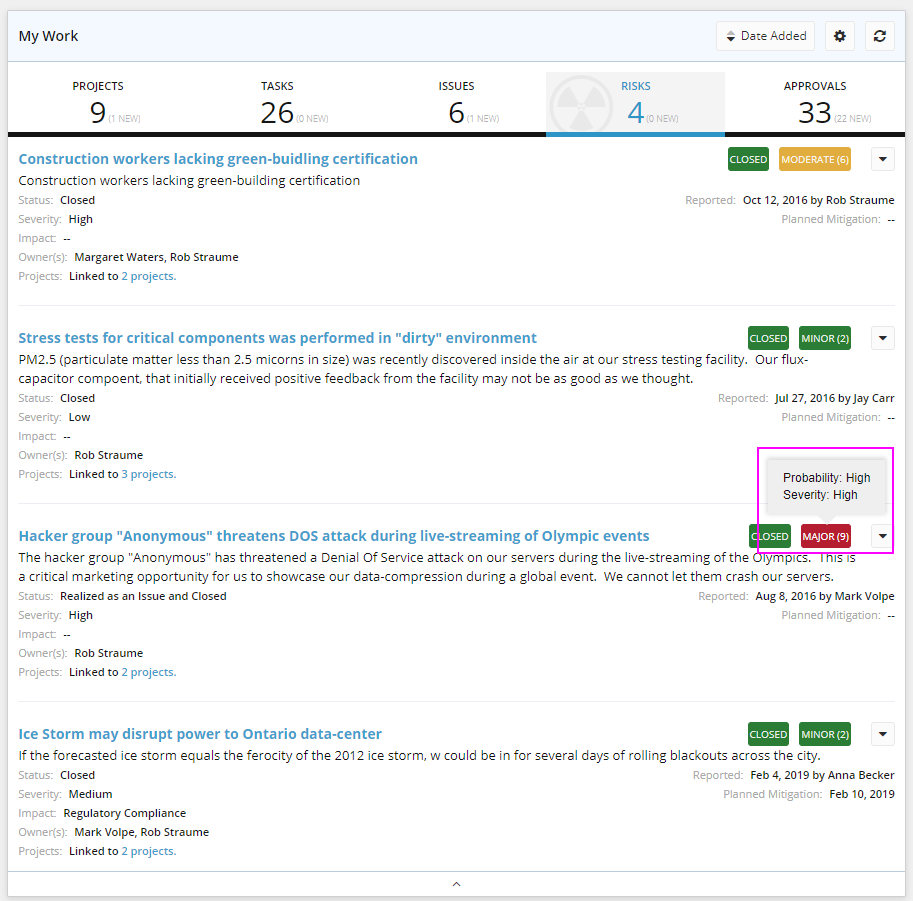
Risk Managers will notice a new field throughout the application called "Risk Score" which ranks risks as "Minor", "Moderate" or "Major" based on risk probability and risk severity. The score of a risk is calculated by multiplying the "Risk Probability Sort Order" (How likely is this risk to occur?) and "Risk Severity Sort Order" (How bad is this risk?).
Administrators also have the ability to define the score breakpoints for minor / moderate / major risks score.
Benefit:
Organizations who practice good risk management now have a method to objectively rank risks and review their potential impact on a project. Mitigation plans for a minor risk are likely different from those for a major risk.
Note: Note: Eclipse allows administrators to define custom sort orders for "Risk Probability" and "Risk Severity" data. Traditionally, the order was not important and users could sort them from "Low-To-High" or "High-To-Low" based on their preference. Our default data was ordered "High-To-Low", and many customers simply continued that approach. With the new risk scoring feature, the "Sort Order" value is used to calculate the "Risk Score" so you should re-order your data from "Low-To-High" if it's not that way already. If you require some assistance with this, please reach out to our support team and they'll be glad to help.
Programs
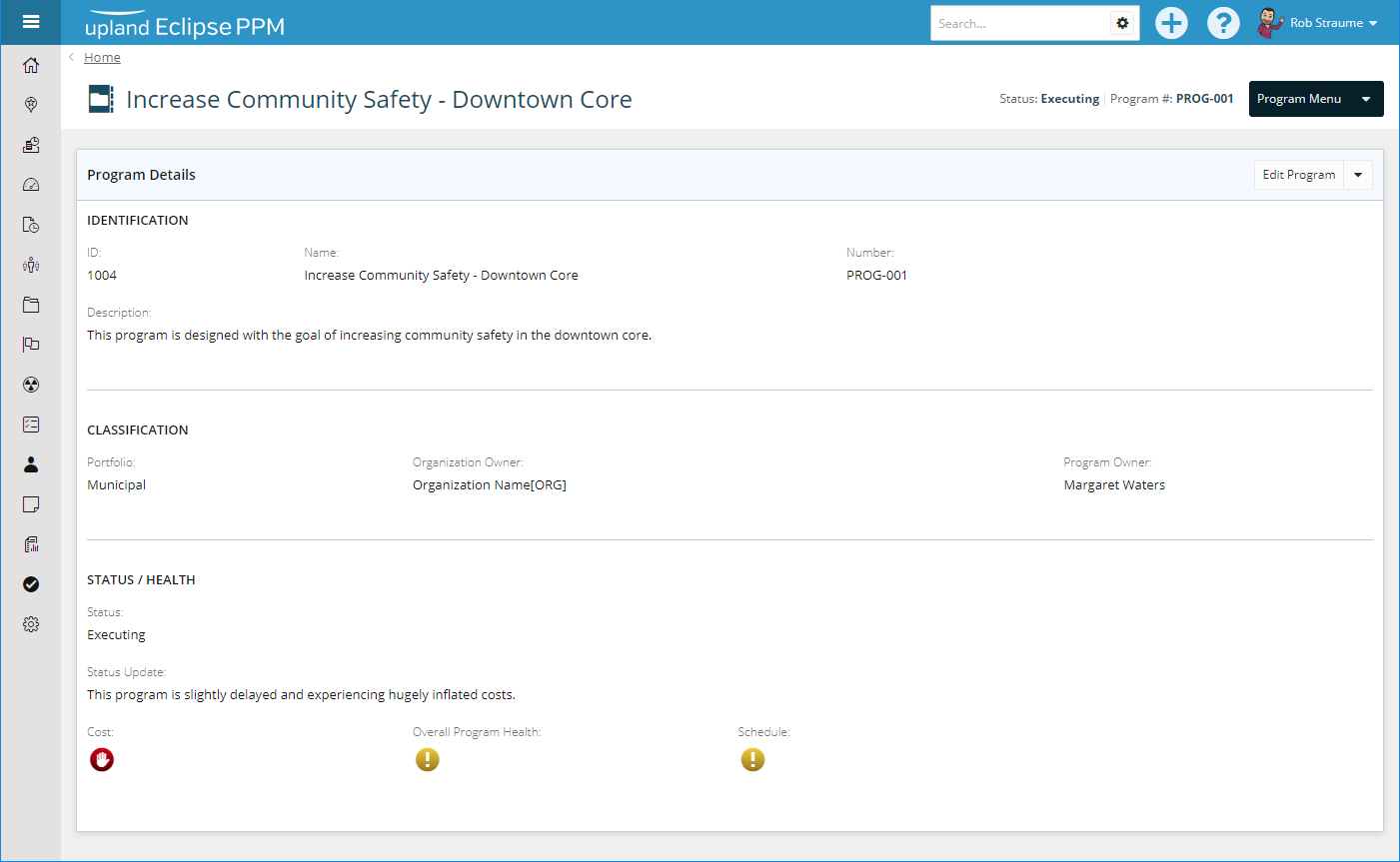
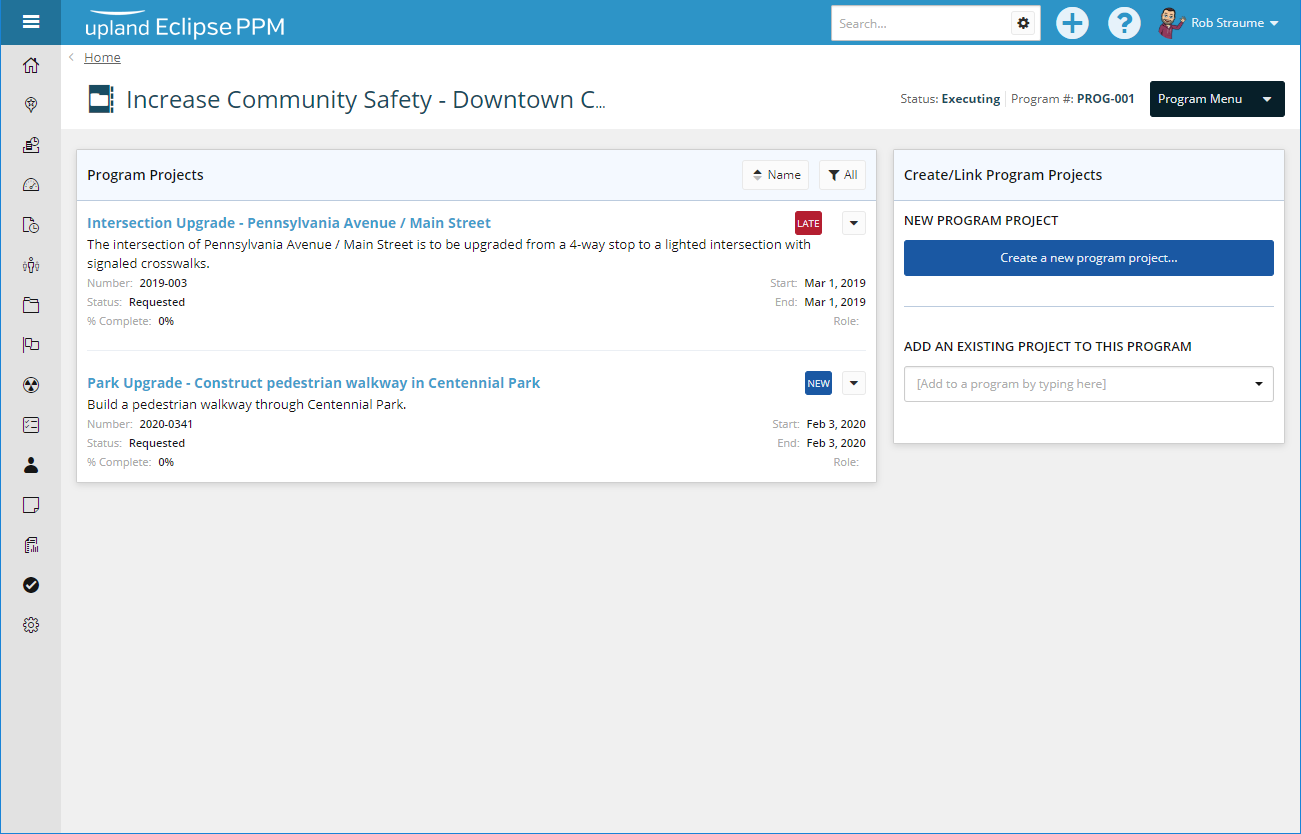
Organizations are now able to track programs inside Eclipse. A program is a collection of projects designed to drive the organization towards achieving a strategic goal. The projects may span many departments/teams/group/silos, but when reviewed as a whole they facilitate change within the organization. Each project inside a program provides a specific measurable output that can be used to help interpret the success of a program. Inside a program, some pieces of the component projects can be managed as a group in hopes of achieving a better outcome than by managing each project individually. A program IS NOT "just a big project".
Benefit:
Running successful programs, is by definition, a benefit to the organization. Organizations can achieve greater than the sum of the parts.
Google Drive Integration
Users with sufficient permissions are now able to configure an Eclipse project to connect to a Google Drive allowing users to interact with files stored there.
Benefit:
Google Drive is an external document storage system complete with it's own document editors. An organization can expose Google Drive folders to users outside the Eclipse product and have that information flow in and out of Eclipse.