2026R1 Release Notes
The 2026R1 version of Eclipse PPM released to production sites on Tuesday, November 17th, 2026. When this occurs, the features on this page will become available.
Note: This page will be updated as new functionality becomes available.
Release highlights
The highlights below showcase some of the most impactful enhancements in this release. Explore the full release notes to learn more about these updates and discover everything included in Eclipse PPM 2026R1.
 Upgrade to New Upland Analytics
The new "NextGen" Upland Analytics interface is designed to make exploring your data faster, clearer, and more intuitive. Whether you're tracking progress, spotting trends, or uncovering gaps, this modernized experience puts the reports, charts, and dashboards you rely on right at your fingertips—organized the way you want them. Your existing reports will be automatically migrated—no action required.
Get ready to turn insights into action, with less clicking and more clarity. Learn More →
Greater Visibility into Timesheet Approvals
Gain greater transparency into timesheet submissions and approvals performed through impersonation. See who acted on behalf of another resource, track submissions and decisions made on your behalf, and use enhanced filters to find the timesheets you need.
See the Big Picture Across Projects
Bring multiple project schedules together in one timeline to gain a clearer view of cross-project dependencies, understand how tasks are connected, and better coordinate interconnected plans.
The following enhancements will also be available with the 2026R1 release:
Alerts and Notifications
REMOVED Removed Document Storage Capacity Metrics and Notifications
Description:
Previously, administrators could receive notifications when document storage capacity approached its limit, including an alert when external document storage exceeded 90% of its capacity. Although Document Storage Statistics had already been removed from the Environment Metrics page in an earlier release, related notification options and functionality remained in the system.
In this release, document storage capacity notifications is removed from the Apply 'Administrator Notification' Settings page (Administration > Administrator Notification).
Benefit:
These changes remove outdated notification options, simplify administrative settings, and prevent administrators from receiving alerts for a storage metric that is no longer supported.
General
New Find Comments More Easily with Text Search and Expanded Tag Filtering
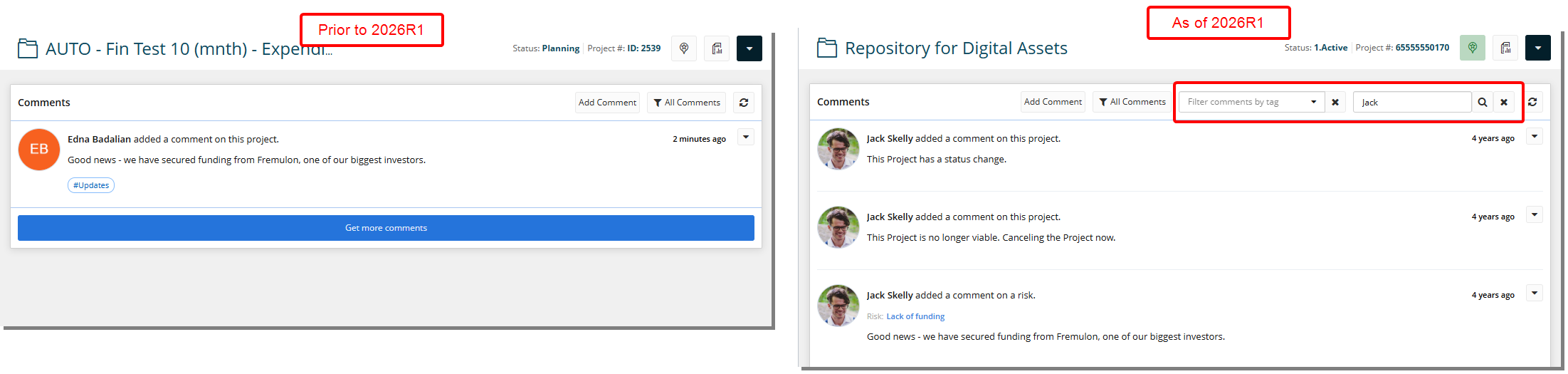
Description:
Previously, finding a specific comment could be difficult, particularly on pages with large numbers of comments, because you could not search by comment text or creator name.
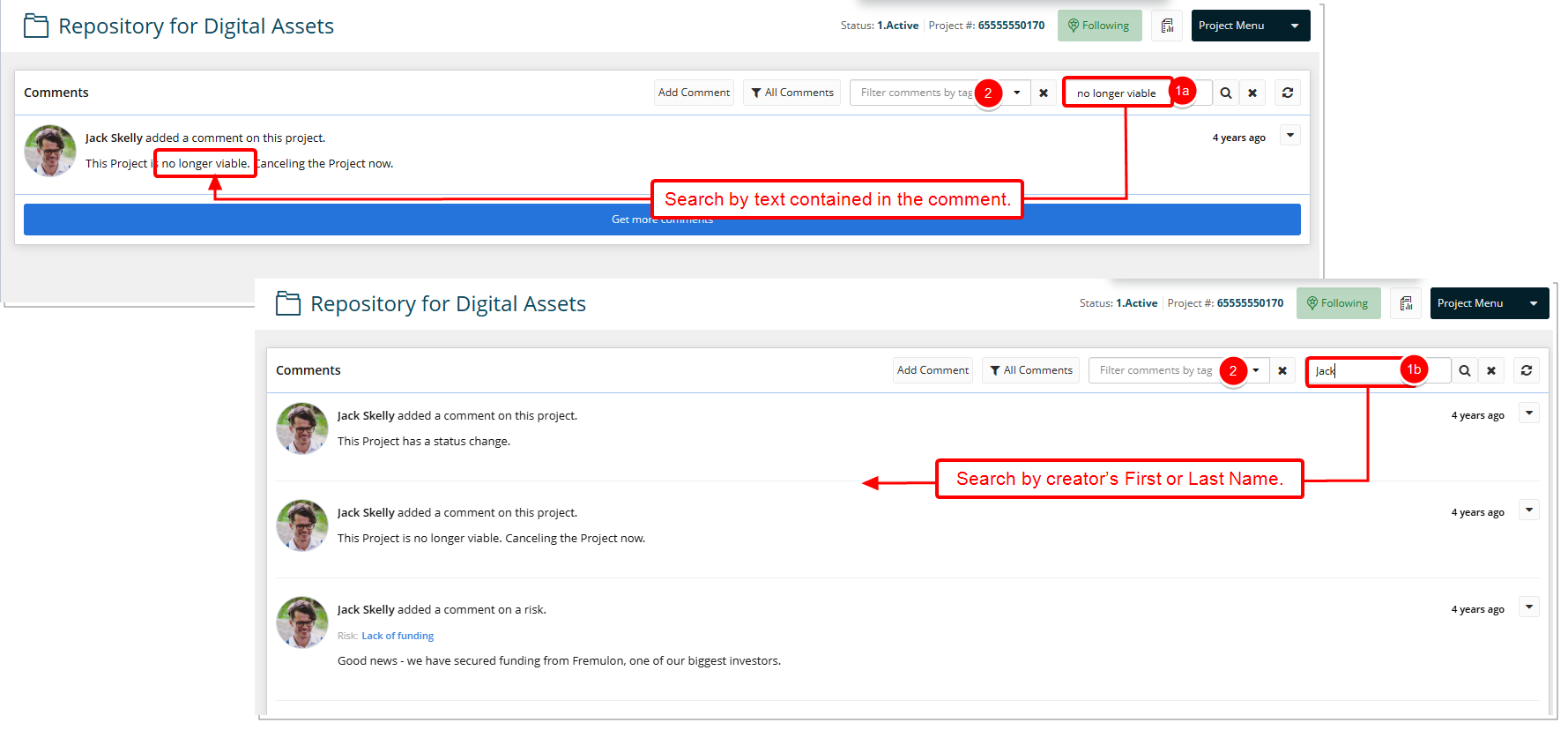
- This release adds a Text field that allows you to search comments by:
- Entering text contained in the comment
- Comment creator’s First or Last Name.
- The Tag filter is now available, allowing you to narrow the results by comment Tags.
Tip: You can combine the Text filter with the existing List and Tag filters to narrow results.
Benefit:
These enhancements make it easier to locate specific comments across the system, reduce the effort required to browse lengthy comment lists, and provide a more consistent comment-filtering experience across pages.
New View Descriptions for Custom Property Options in Selection Lists
Description:
Previously, users could not see a Description for each option in Single Select and Multiple Select custom properties. This made it difficult to understand similar or unfamiliar options.
This release lets administrators define a Description for each selectable item in Single Select and Multiple Select custom properties.
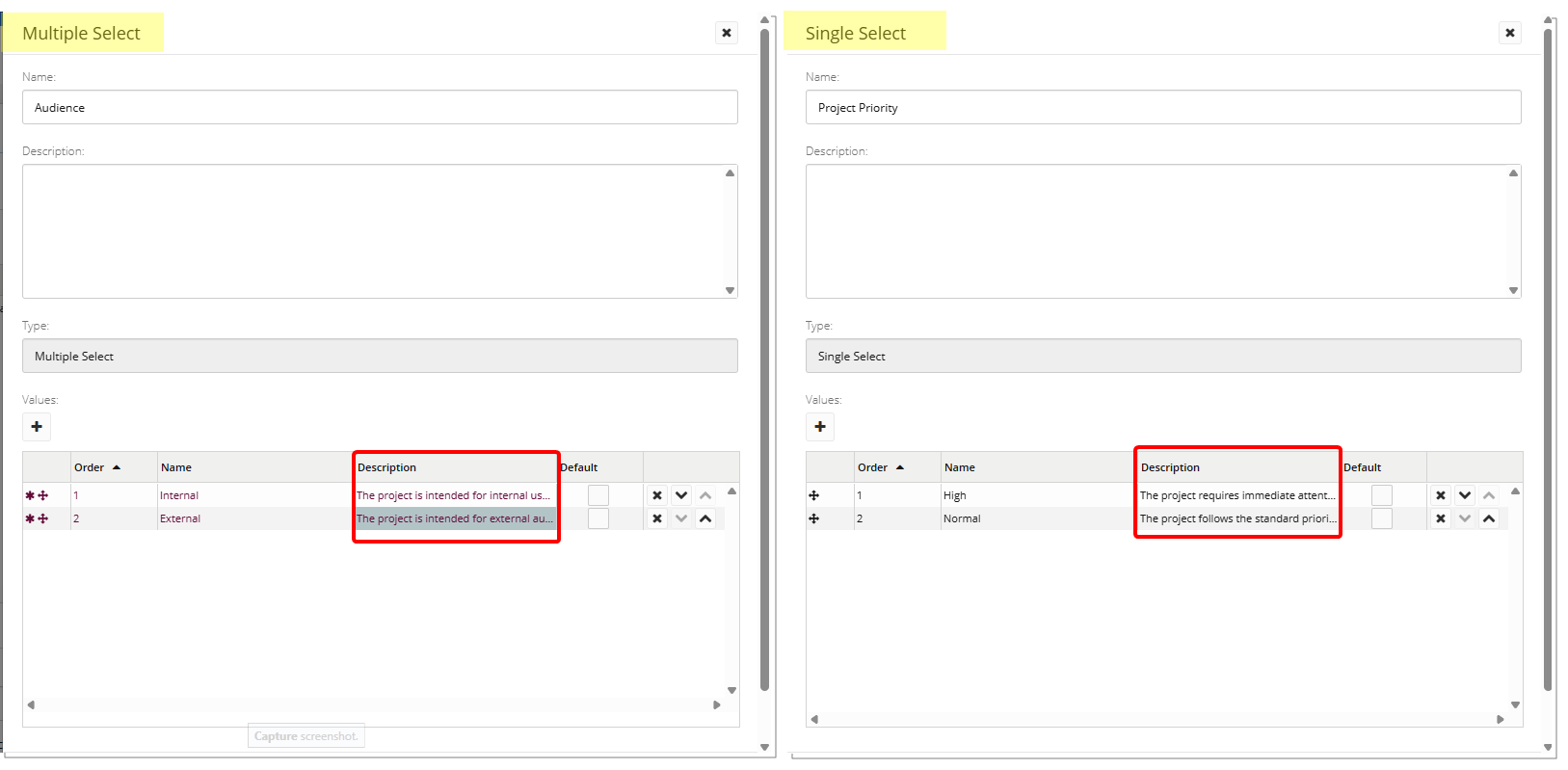
The enhancement is available in the following areas:
- Project properties: Project templates, project configuration, project editing, and bulk project updates.
- Program properties: Program templates, program configuration, and program editing.
Note: Descriptions are also exposed through the applicable configuration API endpoints for retrieving Project and Program Properties, including individual Property Details.
End User Experience:
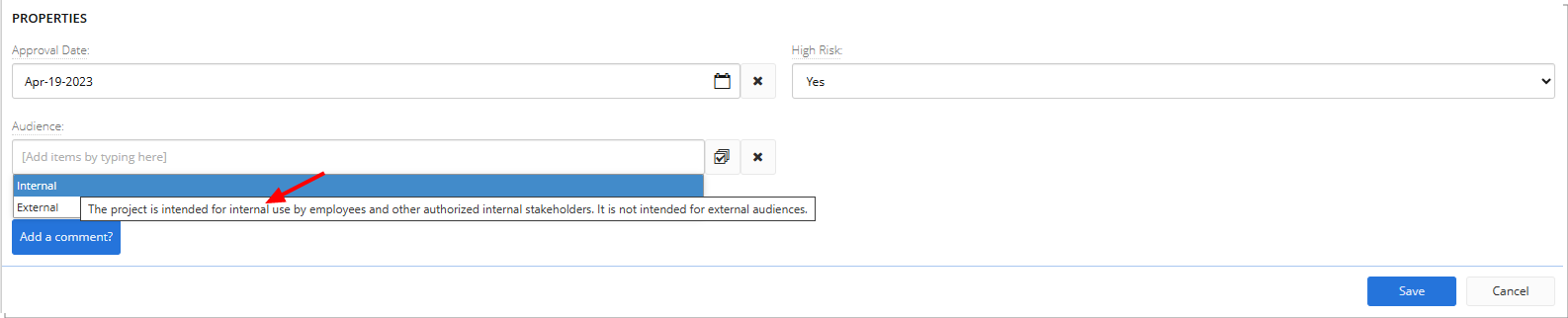
The Description appears as a tooltip when users select the item.
Benefit:
This enhancement helps administrators provide context for custom property options and helps users make informed, consistent selections when creating or updating projects, programs, and tasks.
Improved Improved Administration Page Navigation and Display
Description:
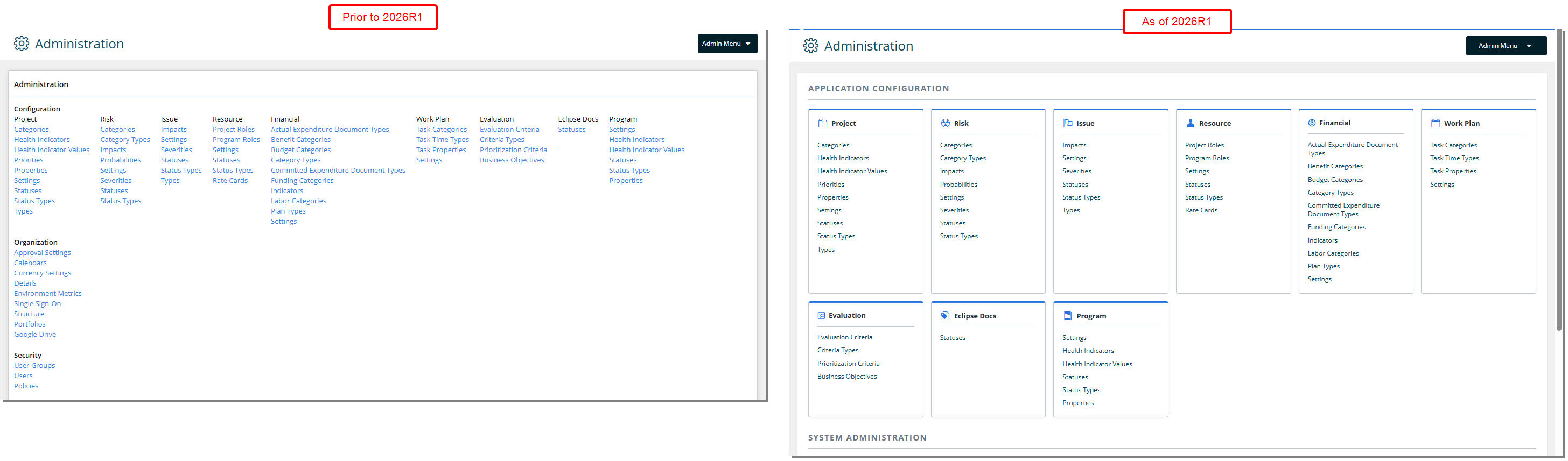
Previously, the Administration area had inconsistencies in its navigation and visual presentation. The Administration heading was missing from the Admin Menu, menu labels did not always match the corresponding page headings, and heading font sizes were inconsistent.
In this release, the following changes are made:
- The Administration page has been redesigned with a more modern layout. Categories and subcategories are now organized into clearly defined sections, making it easier to locate administrative settings and navigate the page.
Benefit:
These changes improve navigation clarity, ensure consistency between menu labels and page headings, and provide a more consistent visual experience across the Administration area.
Programs
New View Dependencies Across Multiple Project Schedules
Description:
Previously, users had to open individual project schedules to review task dependencies. This made it difficult to understand dependencies between projects and assess how work across multiple projects was interconnected.
This release introduces a consolidated schedule view that brings multiple project schedules together in a single timeline.
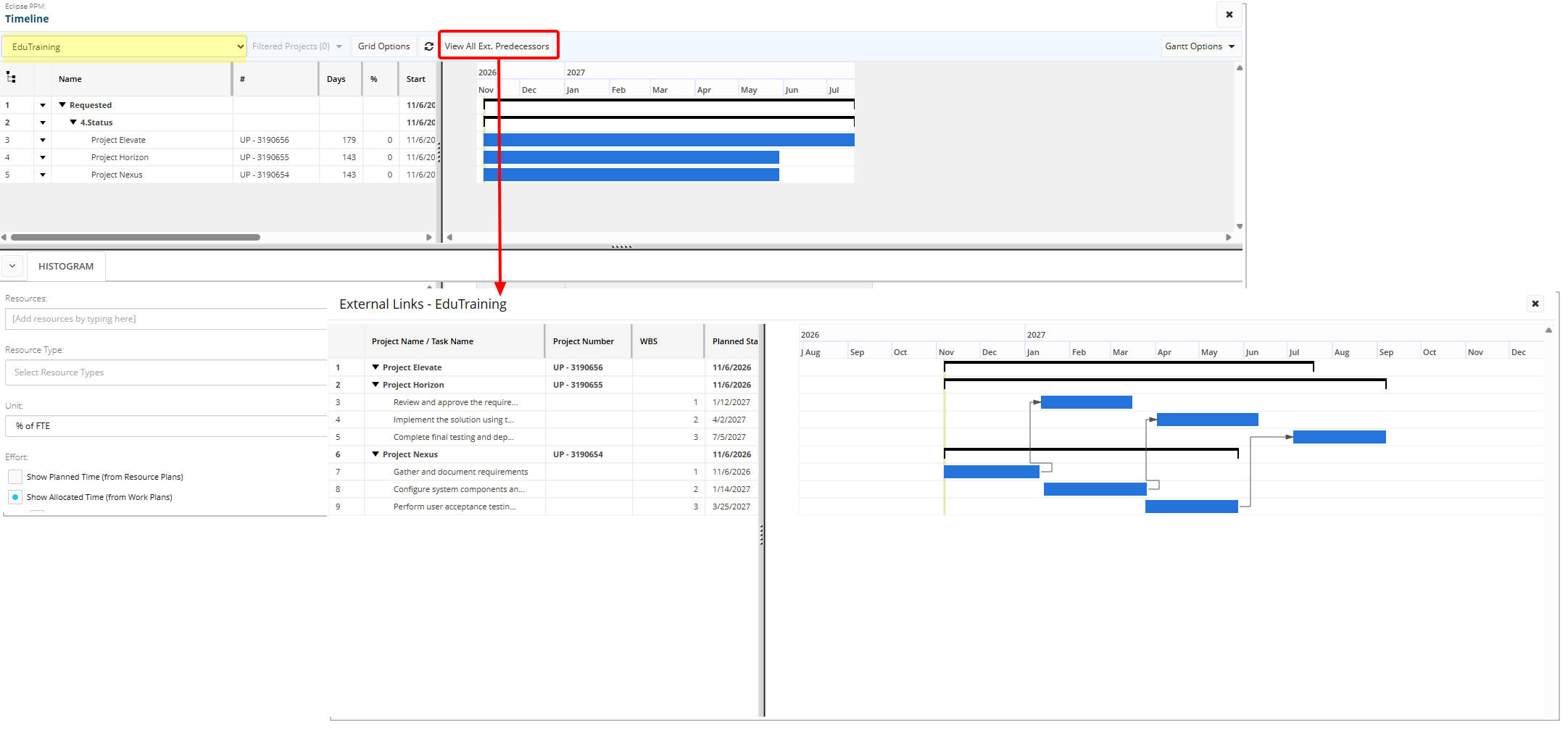
From the Timeline View, Select the required Filter, then click View All External Predecessors button.
The External Links view displays each project's tasks and summary tasks, preserving the existing task hierarchy and indentation, and includes external dependencies between tasks across projects.
The consolidated view reuses the existing Timelines infrastructure and provides the following capabilities:
- Combined project schedules: Displays multiple project schedules together, including their tasks and summary tasks.
- Cross-project dependencies: Displays external predecessor and successor relationships between tasks in different projects.
- Task hierarchy: Preserves the existing task structure and indentation to help users identify tasks within each project.
- Zoom settings: Inherits the zoom settings from the main page to maintain a consistent timeline scale.
- Standard view: Displays schedules and dependencies in standard mode.
Benefit:
You can review multiple project schedules and their interdependencies in one place without navigating between individual projects. This provides a clearer understanding of how work across projects is connected and helps you assess task relationships when coordinating schedules and managing dependencies across projects.
Reporting
Improved Default Resource Extract Date Range to the Project Schedule Dates in Single-Project Mode
Description:
Previously, the Resource Extract out of the box report used the user's previously saved date preferences for both single-project and multi-project executions. When running the report for a single project, this could result in a date range that did not match the project's schedule dates.
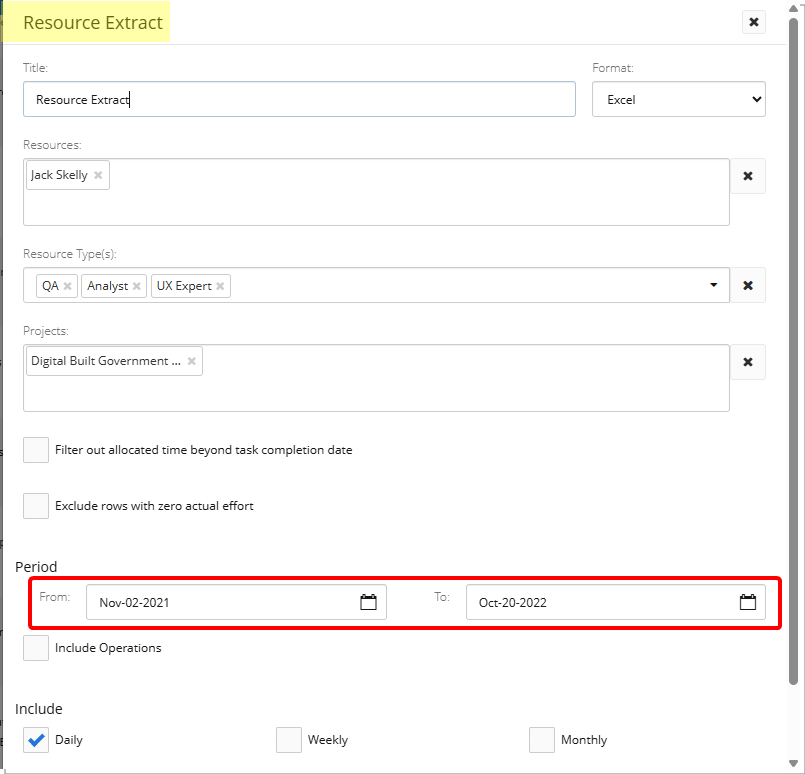
In this release, the default date behavior is adjusted based on the execution mode:
- Single-project mode: The From and To fields are populated using the current project's schedule Start Date and End Date. Previously saved date preferences are ignored and are not updated when the report is run in this mode.
- Multi-project mode: The From and To fields continue to use the user's previously saved date preferences. Any changes to these dates are retained for subsequent multi-project executions.
Benefit:
This enhancement ensures that the report uses the full schedule date range when run for an individual project while preserving users' preferred date ranges for recurring multi-project reporting.
Timesheet
Improved Track Actions Performed While Impersonating Another User in Timesheet Approvals
Description:
Previously, when users submitted or approved Timesheets while impersonating another resource, the approval records did not consistently identify the person who performed the actual action. Although submission records already captured the person who submitted the timesheet on behalf of another resource, approval records did not retain this information. As a result, users could not always determine who had actually approved or rejected a timesheet.
In this release, improvements were made to impersonation tracking in Timesheet Approvals:
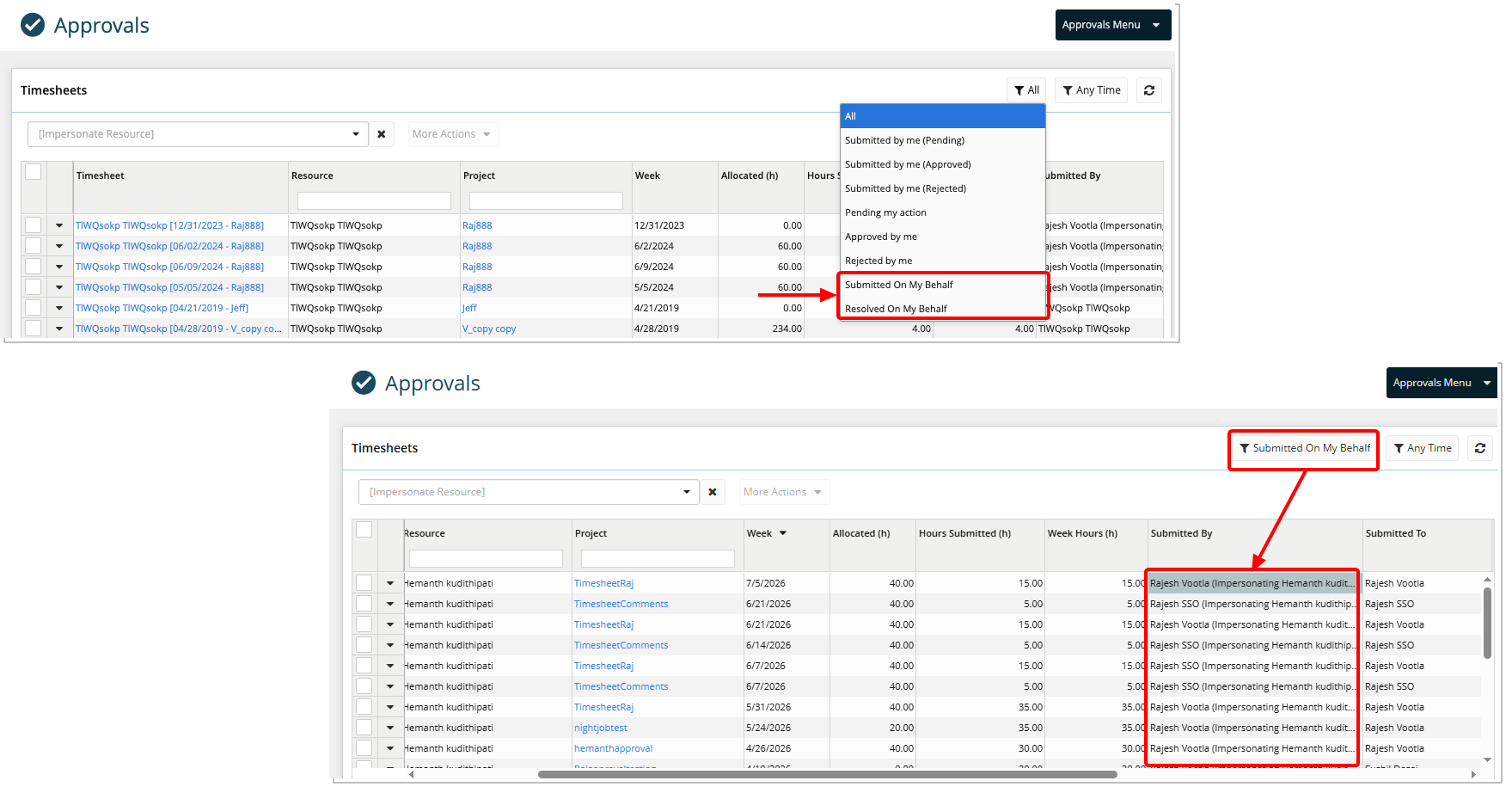
- Submitted By: When a timesheet is submitted while impersonating another resource, the column now displays the actual user's name followed by the resource they were impersonating. For example, Ethan Caldwell (impersonating Nathan Whitmore).
- Resolved By: Approval records now capture and display the actual user's name and the resource they were impersonating when approving or rejecting a timesheet. For example, Ethan Caldwell (impersonating Clara Bennett).
- New filters: Two filters were added to the Timesheet Approval page:
- Submitted On My Behalf: Displays timesheets submitted by another user impersonating the logged-in resource, regardless of whether they are pending, approved, or rejected.
- Resolved On My Behalf: Displays timesheets approved or rejected by another user impersonating the logged-in resource.
- Existing filters: The Submitted By Me, Approved By Me, and Rejected By Me filters are enhanced to include applicable actions performed through impersonation. The filters also account for the resource being impersonated when determining which records to display.
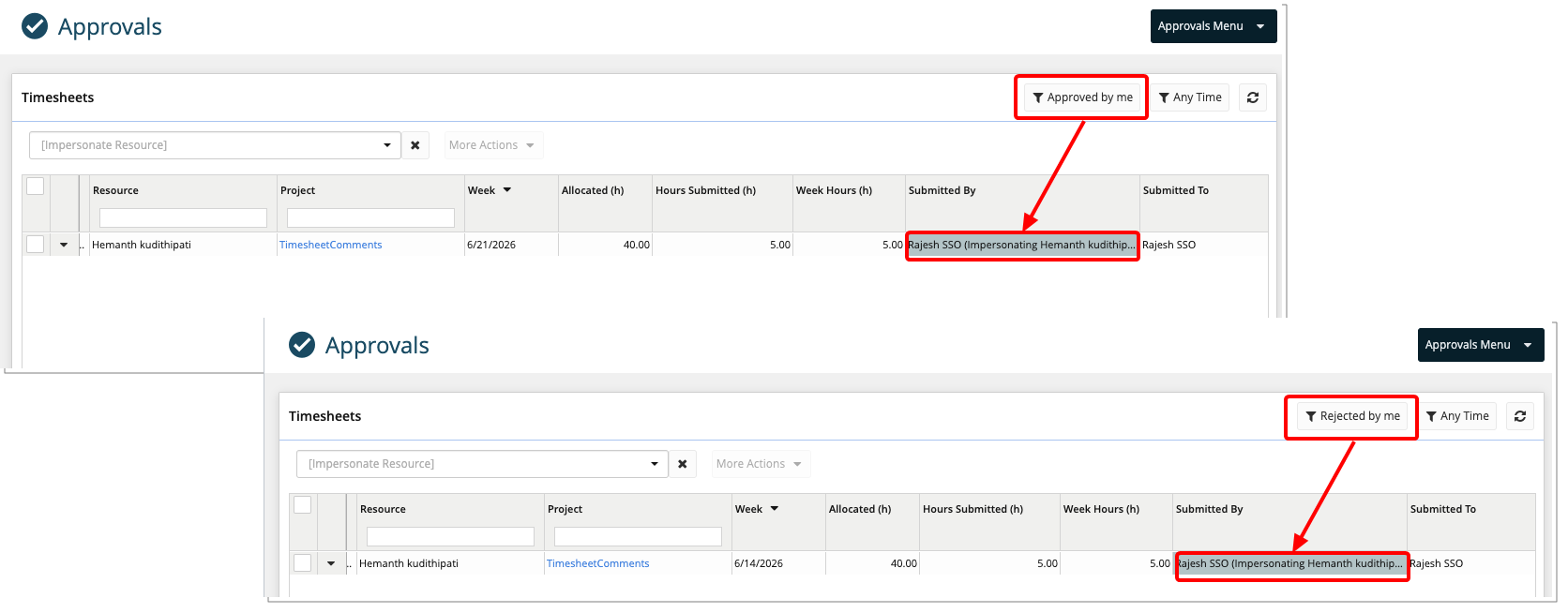
Note: The actual user who performed an approval or rejection was not previously recorded. Therefore, the Resolved By column remains blank for approvals completed before this enhancement. The system cannot identify the person who performed those historical actions.
Benefit:
These changes improve accountability and transparency in timesheet submission and approval workflows. Users can identify who performed an action, distinguish actions completed directly from those completed through impersonation, and more easily find timesheets submitted or resolved on their behalf.
Upland Analytics
New Enhanced Analytics Experience with the Latest Version of Upland Analytics
Description:
Upland Analytics has continued to evolve, offering an enhanced experience with modern navigation, streamlined workflows, and advanced analytical capabilities.
In this release, Eclipse PPM is upgraded to the latest version of Upland Analytics, providing access to the latest enhancements and capabilities of New Analytics. This upgrade brings a more intuitive and streamlined analytics experience, helping you explore your data, uncover meaningful insights, and make more informed business decisions.
Your existing reports and settings remain available, allowing you to continue working with your established analytics content while benefiting from the latest improvements.
For details about the latest enhancements and features, see the Upland Analytics Upgrade - 2026R1.6.
For guidance and tips on making the most of New Analytics, visit the New Analytics Help Center.
New Filter Upland Analytics reports by the logged-in user
Description:
Previously, report designers could not easily identify the logged-in Upland Analytics user in reports. This made it difficult to create reports that show each viewer their own data.
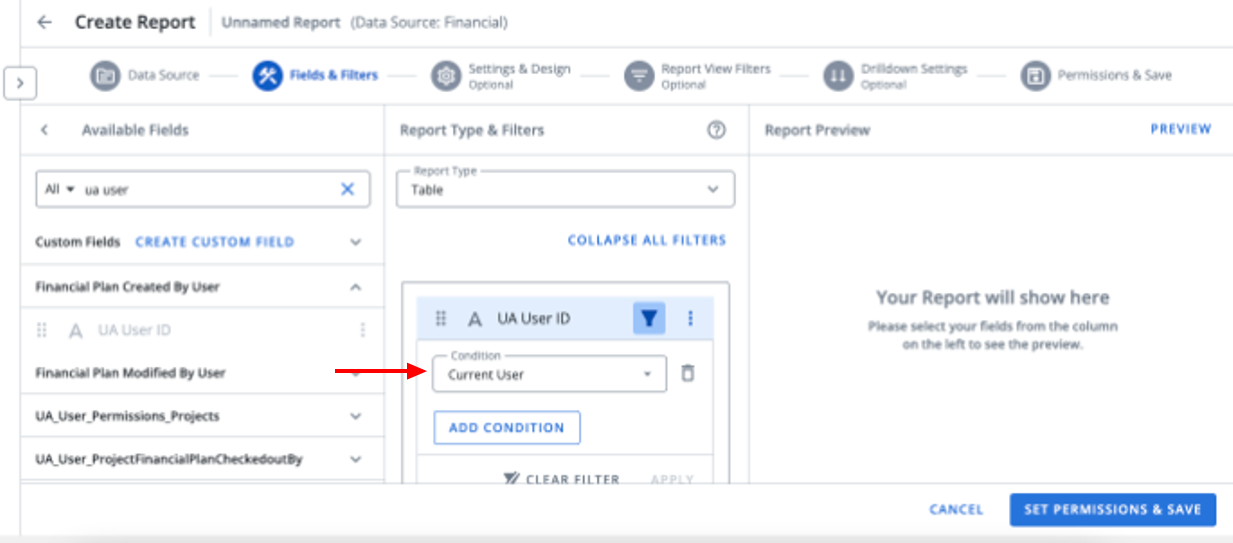
This release adds the Current User Condition to the UA User field. When this field is included in a report, report designers can apply the Current User Filter to display data associated with the logged-in user.
Benefit:
This enhancement simplifies report design by eliminating the need to manually configure user-specific filters or create separate report variations for different users.