Manage Variable Resources to Financial Worksheets
Through the Project Configuration page, the user is capable of adding and removing variable resources from the financial worksheets.
To add or remove variable resources from the financial worksheets
- Access the Project Configuration page. For more information on accessing the Project Configuration page, click here.
- On the Project Configuration page, scroll down to the Financial Worksheet Settings panel.
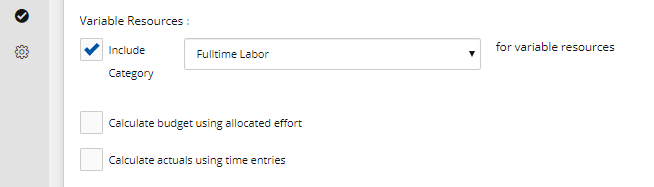
- Under Variable Resources, select the check box next to Include Category and click the arrow next to the category box, a list of resource types is displayed.
- Select the category of the resource type.
Note: To remove the variable resource, clear the check box next to Include Category below Variable Resources.
-
Select the check box next to Calculate budget using allocated effort to make the calculations for the selected resource category in the project to be calculated using the allocated effort only.
- Select the check box next to Calculate budget using time entries to make the calculations for the selected resource category in the project to be calculated using all time entries.
- Click Save. A success message is displayed indicating that the configuration setting has been saved successfully.