The User Login Report displays information about successful or failed log in attempts for users.
-
On the Navigation menu, click Reports, then click System Reports.
-
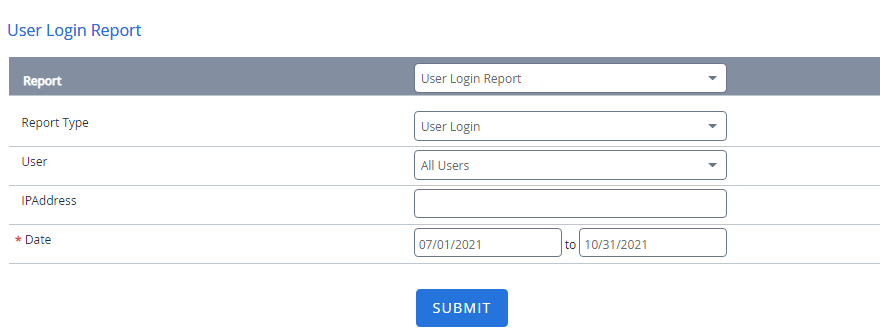
Select User Login Report from the Report list.
-
Select a report from the Report Type list. The following options are available:
- User Login: Displays information about successful user log ins.
- Failed Login: Displays information about failed user log ins.
-
Select a user from the User list or select All Users to see information from all the users.
-
Specify the IP address of the machine for which you want to view log in information from in the IP Address box.
-
Specify a date range for log in attempts using the Date boxes.
-
Click Submit.
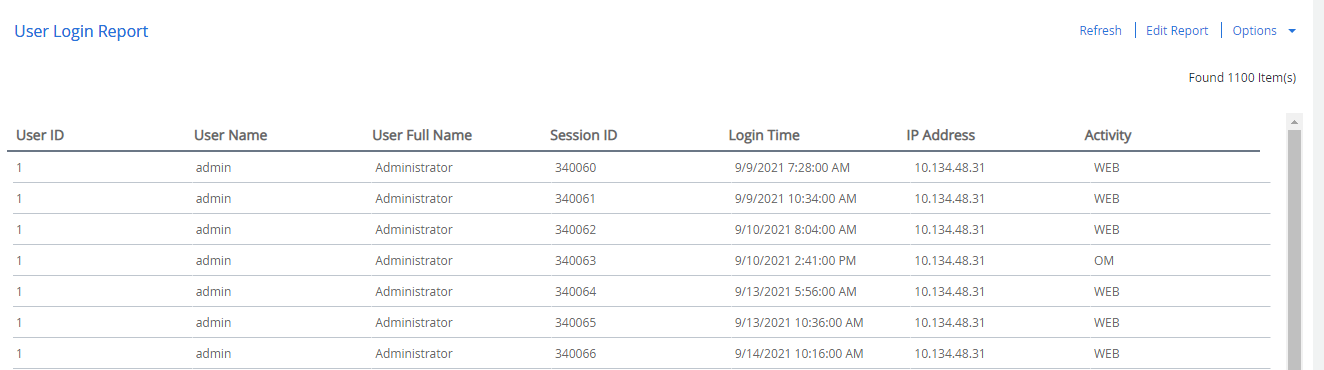
User Login Report columns
| Column Name | Description |
|---|---|
| User Id | A unique number associated with the user. |
| User Name | The name of the user. |
| User Full Name | The user's full name. |
| Session ID | A unique number associated with the login session. |
| Login Time | The date and time the user successfully logged in. |
| Error Date | The date and time the user failed to log in. |
| IP Address | The internet protocol address of the machine from where the user logged on. |
| Activity | The type of login. |