Refine Your Help Center Search: Tips for More Accurate Results
Use Exact Phrases
To search for an exact phrase, enclose it in quotation marks:
- Search: "form designer"
- Finds: Topics that contain the exact phrase form designer.
Apply Filters to Refine Your Results
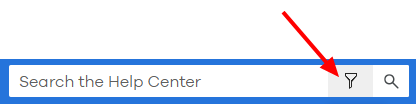
To narrow down search results in the Help Center, click the filter icon on the search bar. This allows you to focus your search within specific content categories or product areas—helping you find the most relevant articles faster.
Use Search Operators
By default, the search returns results that contain all the words you enter (like using AND). You can refine further with these operators:
| To find | Use this | Example | Finds |
|---|---|---|---|
| All words (any order) | Enter single words. | sales order | Finds topics containing both sales and order, in any order. |
| An exact phrase | Enter phrase in quotes " " | "credit note" | Finds topics containing the exact phrase credit note. |
| One term or another |
or / |
sales or purchase | Finds topics that contain either sales or purchase. |
|
Both one term and another11Note: You don't need to specifically include the and operator, since separated words are treated like and by default. |
and + & |
"purchase order" + print | Finds topics containing both purchase order and print in any order. |
| Topics excluding a particular term |
not ! ^ |
sales ^ order | Finds topics that contain sales but not order. |
| Combinations of the above | ( ) | (sales or purchase) and order | Finds topics containing either sales or purchase, and also order. |
Note: Use quotes for searches starting with Boolean operators (not, or, etc.) Example: "not attempted", "OR filter"