Audio Capture Application
Note: This section is not applicable to your CRM.
A key component of the Upland Transcription Service is a desktop application, Audio Capture, that records microphone and speaker audio and sends it to the InGenius Client for transcription. This must be installed on your machine, and then linked to your client UI through a link code. An Upland team member will provide you with the installer file.
Audio Capture UI
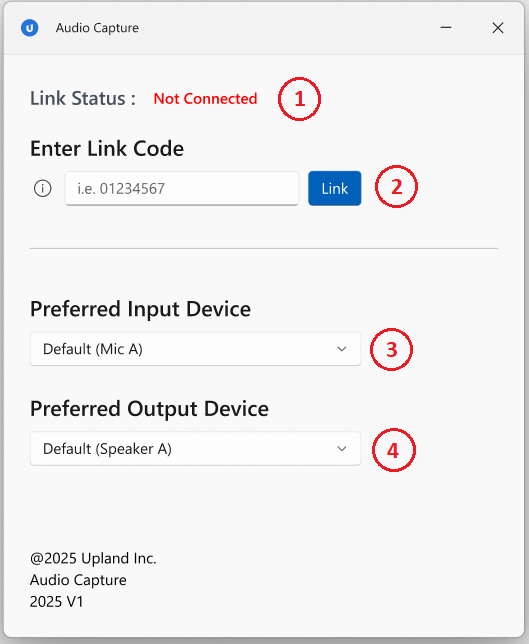
| 1. Link Status | Displays whether the app is currently connected with an InGenius instance. |
| 2. Enter Link Code | Used to link the Audio Capture app with InGenius. This link code can be obtained from the InGenius call UI. |
| 3. Preferred Input Device |
Allows for microphone device selection. The last used selection will be saved on next launch. Note: The system's default device is pre-selected, and the selection also reverts to the default if a chosen device is unavailable during a call. |
| 4. Preferred Output Device | Allows for speaker device selection. The last used selection will be saved on next launch. Note: The system's default device is pre-selected, and the selection also reverts to the default if a chosen device is unavailable during a call. |
Linking Audio Capture to InGenius
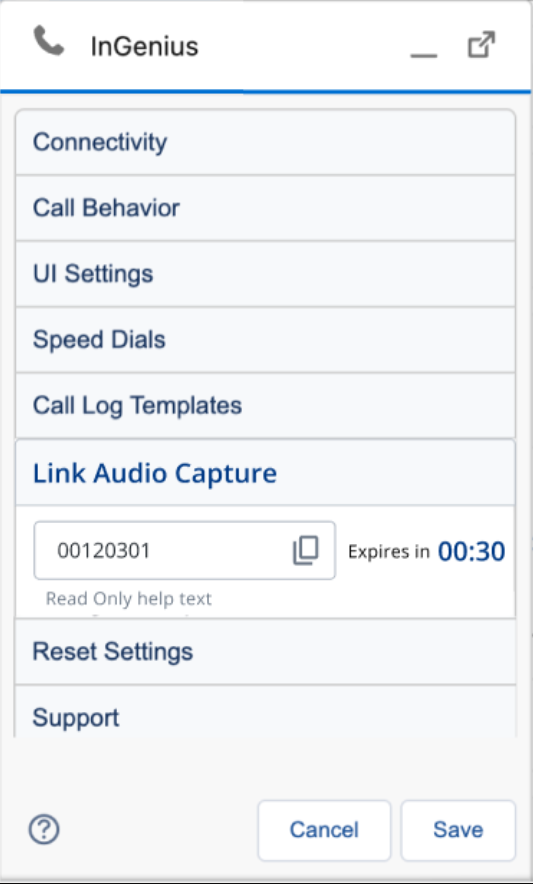
After transcription is enabled for your organization, a new settings option will become available in your InGenius client UI. This option will provide a code that expires and refreshes every 30 seconds, which when copied into the Audio Capture application, persistently links it to InGenius for that account and device. Follow the steps below:
-
Login to your Salesforce org.
-
In your InGenius client UI, click on Settings
-
Click and expand the 'Link Audio Capture' option
Note: If you do not see the 'Link Audio Capture' option under settings, transcription may not have been enabled for your organization. Contact InGenius Support.
-
Copy the code manually or by clicking the clipboard (
 ) icon
 -
Paste the code into the Audio Capture application, under 'Enter Link Code', and press the Link button.