Configure a currency data field
For a currency data field, you can configure the decimal delimiter used to normalize numeric values and specify whether values enclosed in parentheses are treated as negative.
-
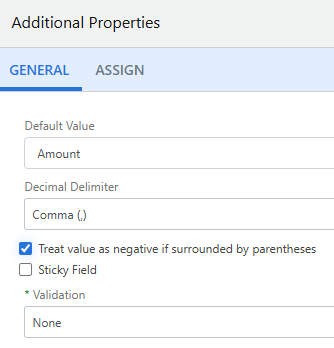
On the General tab, select a decimal delimiter from the Decimal Delimiter drop-down list. The following options are available:
-
Auto Detect: The number format is automatically identified based on separator positioning.
-
Period (.): A period is used as the decimal separator, and a comma or space is used as the thousands separator.
-
Comma (,): A comma is used as the decimal separator, and a period or space is used as the thousands separator.
-
-
Select the Treat value as negative if surrounded by parentheses check box, if applicable.
-
Click Save.