Getting help
To access troubleshooting assistance and full documentation:
-
Select
 Help on the title bar.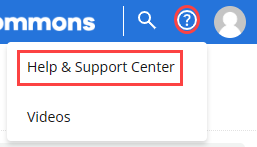
-
Select Help & Support Center.
Note: To open a collection of instructional videos for Mobile Commons, select Videos.
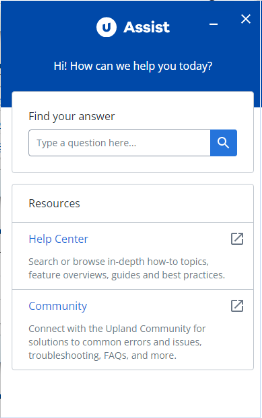
The Upland Assist pane opens.
-
To find answers to your questions:
-
Enter a question or search term or phrase in the Search box. Upland Assist searches Help topics and Support articles and displays the results.
-
Select Help Center to search or browse the full documentation set. Enter search terms or phrases in the Search box at the top of the page or select a tile on the home page.
Note: Help Center opens in a new browser tab.
-
-
Select a result to open the topic or article.
For further assistance, contact Technical Support.