Working with the Agent View report
To open the Agent View report:
-
Select
 Text Messaging in the left pane, and then select Agent View.
 -
In the Agent View Actions panel on the right, select
 Report.
The Agent View report opens.
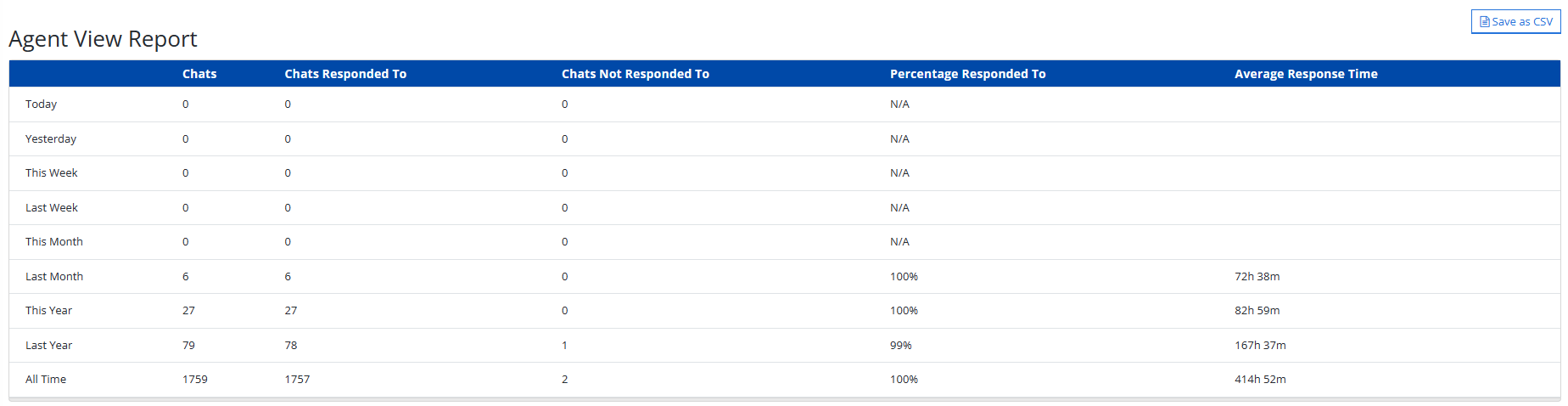
The Agent View report displays statistics on chats with users. Each row represents a time segment: Today, Yesterday, This Week, Last Week, This Month, Last Month, This Year, Last Year, and All Time.
The Agent View report contains the following information on chats with users:
-
Total number of chats between agents and mobile users
-
Number of chats responded to by agents
-
Number of chats not responded to by agents
-
Percentage of chats that were responded to
-
Average response time spent responding to chats
-