Personalizing your message
Use Liquid language to personalize your broadcast messages with values stored in the recipient's profile. There are two types of markup in Liquid:
-
Output markup uses a profile field name surrounded by matched pairs of double curly brackets {{…}}. Use Output markup to personalize your message by merging the contents of a profile field into your message.
For example, insert Hi {{first_name}} to add the recipient's first name to your message: Hi Mara or Hi Greg. You can even insert a pipe ( | ) to specify a default value; for example, Hi {{first_name | default: "friend"}} displays Hi friend when the first_name field in the user's profile is blank.
-
Tag markup uses if ... else statements surrounded by matched pairs of a curly bracket and percent sign {%...%}. Use Tag markup to set conditions for content added to your message.
For example, insert the following statements to invite Maine residents to a rally in support of a state bill and urge subscribers outside of Maine to support an online petition:
{% if state == 'ME' %}
Show your support for the Evergreen Preservation Bill! Meet in front of the statehouse in Augusta on at 1 p.m. on Sunday to make noise and be heard!
{% else %}
Show your support for the Evergreen Preservation Bill! Log in to www.evergreenforest.org and sign our petition.
{% endif %}
Always test your message markup in Liquid Tester, which can accommodate both standard 160 character messages and longer messages of more than 160 characters. For more information, see Testing your Liquid markup and Getting started with a sample Liquid message.
Note: Liquid does not recognize spaces in field names, so when you add a field name to your message, be sure to replace all spaces with underscores, for example, first name becomes first_name.
Working with Output markup
You can insert any default profile field or custom field using double curly brackets {{...}}. When you surround the name of a profile field or custom field with {{...}}, the stored value in the field is merged into the message.
 Default merge fields
The following fields are available to merge into your messages, with the character counts that will be applied toward the 160 character limit per message:
-
first_name (9 characters)
-
last_name (11 characters)
-
street1 (30 characters)
-
street2 (13 characters)
-
city (14 characters)
-
state (2 characters)
-
state_name (14 characters)
-
postal_code (5 characters)
-
email (25 characters)
-
representative (29 characters)
-
junior_senator (22 characters)
-
senior_senator (22 characters)
-
state_representative (38 characters)
-
state_senator (38 characters)
-
carrier_name (17 characters)
-
phone_number (18 characters)
When using Liquid to merge a date field into your message, be sure to specify the default format:
{{field_name | date format}}
where field_name is the default profile field or custom field containing the value to merge into the message and format is one of the date format expressions.
Date formats
Use the following date formats:
| Format | Description | Example |
|---|---|---|
| %a | abbreviated weekday | Sun, Mon, Tues, Wed, Thur, Fri, Sat |
| %A | full weekday | Sunday, Monday, Tuesday, Wednesday, Thursday, Friday, Saturday |
| %b | abbreviated month | Jan, Feb, Mar. Apr, May, Jun, Jul, Aug, Sep, Oct, Nov, Dec |
| %d | day of the month (with zero) | 01, 02, 03, ... 10, 11, 12 ... |
| %-d | day of the month (no zero) | 1, 2, 3, ... 10, 11, 12 ... |
| %m | month of the year | January, February, March, April, May, June, July, August, September, October, November, December |
| %D | dd/mm/yy | European date format, for example, 25/06/2024 for June 6, 2024 |
Working with Tag markup
Tag markup sets conditions using if ... else statements surrounded by matched pairs of a curly bracket and percent sign {%...%} , which displays as conversational text in your message.
Tag markup supports:
-
Filters that perform calculations or commands within tags, for example, if, elsif, else, and endif.
-
Operators for comparisons, for example, ==, !=, <, >, and, or.
Tags may be nested for multiple conditions.
Operators used for comparisons
| Operator | Description |
|---|---|
| == | Equals: must match exactly, is case sensitive |
| has | HAS: must match but is not case sensitive |
| != | Does not equal: must not match, is case sensitive |
| > | Greater than: numeric values only |
| < | Less than: numeric values only |
| >= | Greater than or equal to: numeric only |
| <= | Less than or equal to: numeric values only |
| is_after | Later than: dates only |
| is_before | Earlier than: dates only |
| or | OR: expands the results to include either condition |
| and | AND: limits the results to include both conditions |
| contains | CONTAINS: item is present in a string |
Note: If a tag contains more than one AND or OR operator, the operators are applied in order from right to left.
Testing your Liquid markup
To test your use of Liquid to personalize conversations in text messages:
-
Select
 Text Messaging in the left pane, and then select Campaigns.
The Campaigns page opens.
-
Select Actions at the top of the page, and then select Liquid Tester.
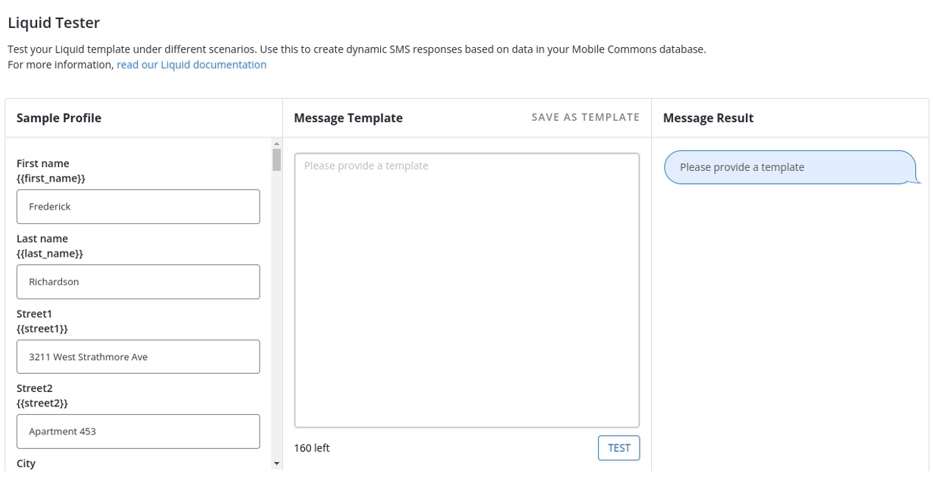
The "Liquid Tester" page contains a sample profile on the left and a text box for testing a sample liquid template in the middle.
-
Type the message to test in the Message Template text box, and then select Test.
The Liquid markup is processed based on the field values in the sample profile and displays in the Message Result.
Tip: To refine your test markup, edit the entries in the sample profile.
Getting started with a sample Liquid message
Liquid language is a powerful tool for communicating with your subscribers. It can take some time to develop expertise, so here is a sample message so you can get started quickly.
Requesting an email address
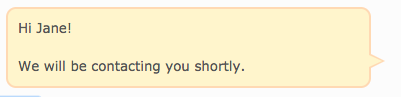
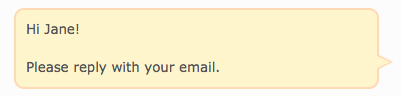
You want to collect an email address from subscribers who have not already provided one. In this sample, you can specify separate messages, depending on whether an email address is available.
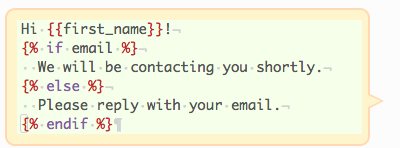
| If the user's profile contains an email address, the following message is sent | If the user's profile does not contain an email address, the following message is sent: |
|
|
For information on advanced liquid, see Advanced Liquid.