OL Connect Send 2.1.3 Printer Driver Release Notes
Overview
This document provides an overview of the new features and enhancements in the OL Connect SendPrinter Driver.
Important Notes
- Passthrough printing through the OL Connect Send Printer Driver is not supported. This includes printing from Connect (Designer) or any other software that relies on passthrough printing. It might partially work, but it cannot be relied upon.
- Aborting a Adobe Reader PDF print run to the OL Connect Send Printer Driver disables any subsequent printing attempts from Adobe Reader. To fix this issue, simply restart Adobe Reader.
OL Connect Send 2.1.3 Printer Driver
Installer Improvements
-
Installer now only prompts for credentials when needed. (OLCS-941)
-
Updated Installer to new Upland OL style standards. (OLCS-946)
-
Installer now better supports Unicode. (OLCS-954)
-
The installer now only checks for comma and backslash characters in the printer name. (OLCS-1017)
OL Connect Send 2.1.2 Printer Driver
Operating system support
As of version 2.1.2, OL Connect SendPrinter Driver is officially supported under Windows 11 and Windows Server 2022.
Installer Improvements
Updated the third party library used to compile our installers to fix a security vulnerability. (OLCS-1014)
OL Connect Send 2.1.1 Printer Driver
- Licensing improvements. (OLCS-607/610)
- Fixed issues with OLCS Printer Driver installation Connection Test failing for HTTPS addresses. (OLCS-598)
- Fixed issue with PDF not being processed due to invalid token. (OLCS-136)
- The OLCS installer failed to add additional printers if the setup was run immediately after printing to existing printer. This has been fixed. (OLCS-137)
- Back end improvements made to limit file transfer chunk size. (OLCS-193)
- Fixed logging errors in OLCS Printer Driver installation Connection Tests. (SHARED-82169)
- Fixed an Azure licensing issue. (SHARED-82515)
- Fixed issues with large print files sent via OL Connect Send. (SHARED-82215 / SHARED-82222 / SHARED-82225)
OL Connect Send 1.8.0 Printer Driver
Citrix and Microsoft Terminal Services (Remote Desktop Services) support
OLCS now runs under both Citrix and Microsoft’s Remote Desktop Services environments. (SHARED-71164/71167)
Some of the changes made to allow this include:
-
The license check for user based licenses has been changed to distinguish between different users on the same machine/system. These are now separately counted. (SHARED-80631)
-
Improvements were made so you can now get the browser pop-up when printing from a desktop on a multi-user system, for a full interactive OLCS experience. (SHARED-80443)
General improvements
-
The internal compressed spool file is now sliced into smaller portions. This speeds up transfers and reduces timeouts, but means more individual file portions will need to be transferred for larger files. (SHARED-80613)
- OLCS user-name is now case sensitive. (SHARED-80496)
OL Connect Send 1.7.0 Printer Driver
Improved licensing
OLCS User Mode License changes
For previous releases the only way to allow access to any domain, was to use a credit-based license.
As of 1.7.0, user-based licenses will allow jobs to be received from either specific domains/sub-domains, or from all domains.
Improvements include:
-
A license can now include domains and sub-domains, so users will be able to print regardless of domain structure. (SHARED-77378)
-
Added support for a limited number of users without domain restriction. (SHARED-77381)
OLCS Enterprise license change
As a consequence to these domain restriction license changes, the Enterprise license – which now supports sub-domains and, optionally, all domains – has been limited to 1000 users. Customers with more than 1000 users will need to purchase additional licenses. Existing customers will not be affected by this change.
Improved Printer Driver installation
A new way of pre-configuring the installer has been introduced that simplifies the installation process. The installer can now download customized settings directly from a web site. This means it is no longer necessary to download multiple files and follow instructions to install. Instead, simply download the installer, copy/paste a URL in the installation wizard and the installer will take care of the rest. (SHARED-75200)
Other Installation changes
- Improved “silent” (unattended) Printer Driver installation/un-installation. (SHARED-72450)
- Installer no longer replaces 'localhost' with 127.0.0.1. (SHARED-77192)
General improvements
- Changed OLCS compression method, resulting in increased performance when submitting some large files. (SHARED-75205)
- Printer Driver port monitoring improved. (SHARED-79280)
OL Connect Send 1.6.6 Printer Driver
Installer Improvements
-
Interactive installation with presets is now supported. The installer will read a presets file of the same format as would be supplied for a silent installation. The presets file must be located in the same folder as the msi. Installer fields will be pre-loaded from the presets file where values are specified, otherwise the installer will use the normal defaults. (SHARED-73616)
-
Printer driver defaults are set to reduce issues with font and character recognition, to improve support for margins, add paper size options, and support collation. (SHARED-50405/64787/70883)
- When testing the communication URL settings, if the test was successful but the response status code is not '200 OK', the response status code of the HTTP request will be displayed. (SHARED-75834)
-
Previously, only A-Z, a-z, 0-9, and _ were allowed in a job submission URL. The installer has been changed to accept any valid URL. (SHARED-76579)
Improved communication with Connect Workflow
- OL Connect Send now allows for client authorization by API key when printing. (SHARED-74794)
- The URL for interaction can now be different from the URL for print job submission. (SHARED-75197)
-
An issue that occurred when sending a Word mail merge to the Connect Send queue is fixed. (SHARED-67705)
-
Handling for documents with embedded elements has been improved. (SHARED-67755)
OL Connect Send 1.4.5 Printer Driver
Operating system support
As of version 1.4.5, OL Connect Send Printer Driver is officially supported under Windows Server 2016.
OL Connect Send 1.3.5 Printer Driver
Installer Improvements
- Improved feedback from the Installer. (SHARED-54046)
- The URL for print job submission entered as part of the installation process are now stored case sensitive. (SHARED-55193)
Note: These entries must match the requirements of the target host’s case-sensitiveness. It is highly recommended that you enter the URL exactly as given by the target host’s administrator.
- There were reports that Windows SmartScreen would raise a warning when starting the installer on some machines. The OL Connect Send Printer Driver installer (the MSI file) is now signed with Objectif Lune's official Extended Validation (EV) Code Signing Certificate, to reduce this risk. (SHARED-55195)
Note: Windows SmartScreen warnings might still be displayed for awhile. This is due to how Windows SmartScreen works. To understand why, please read this Microsoft article:
https://blogs.msdn.microsoft.com/vsnetsetup/2013/01/09/windows-smartscreen-prevented-an-unrecognized-app-from-running-running-this-app-might-put-your-pc-at-risk/
Task Bar Notifier added to Start Menu and Task Bar
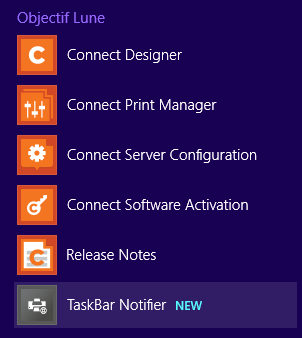
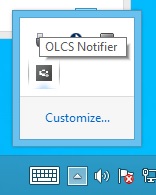
OL Connect Send Notifier has been added to the Windows Start Menu, as well as the Windows Task Bar. (SHARED-48883/52989)
The icons appear as follows:
Improved connections to Connect Workflow
An issue was encountered with HTTPS communication between the OL Connect Send Printer Driver and Connect Workflow.
When the OL Connect Send Printer Driver was working with Secure HTTP (HTTPS), then the Secure Socket Layer (SSL) would check the "Certificate Revocation List" (CRL) via a Revocation Server. If the machine in question did not have access to the Internet, then the attempt to connect to the Revocation Server would fail, leading to the OL Connect Send printer not working. This issue has now been fixed. (SHARED-53158)
OL Connect Send 1.2.5 Printer Driver
Installer Improvements
- A Silent Installer is now available. (SHARED-49934/54152)
- The OL Connect Send Printer Driver installer restricts the Port range to 65535, but Port values below 256 are generally reserved, even if this is not a mandatory requirement. To reduce the possibility of conflicts, the installer now displays a warning when Port numbers below 256 (with an exception for Port 80, as this is generally the default HTTP Port) are entered. (SHARED-49709)
- Improved/streamlined entry of URL paths and target HTTP action names. (SHARED-53280)