Supported, Endorsed, and third-party nodes
OL Connect Automate is built on top of Node-RED and includes both the full set of standard nodes for common automation tasks and a curated collection of nodes developed to integrate seamlessly with Upland Objectif Lune products. Additional nodes are available from multiple sources, but some of these may not function with OL Connect Automate.
To ensure stability, maintainability, and predictable behavior across environments, we provide this information on which nodes are officially supported, which are endorsed, how to determine the source of nodes, and tips on evaluating third-party nodes. You can also create your own nodes, subject to a few conditions.
Supported nodes
OL Connect Automate supports the following node categories:
OL Connect Automate nodes
These are the nodes developed and maintained by Upland Objectif Lune. They are fully supported, tested with every OL Connect Automate release, and include embedded documentation and example flows. All official OL Connect Automate node packages are published under the @objectif-lune namespace on npmjs.com.
Examples of these packages include (but are not limited to):
-
@objectif-lune/node-red-contrib-connect
-
@objectif-lune/node-red-contrib-files-and-folders
-
@objectif-lune/node-red-contrib-ol-remote-print
Tip: For more information about OL Connect Automate nodes, see OL Connect Automate packages.
Core Node-RED nodes
All nodes included in the standard Node-RED installation are supported. These built-in nodes provide core logic, integration, and utility capabilities. They are published as part of the node-red package on npmjs.com.
Unsupported nodes
The following node categories are not supported by Upland Objectif Lune:
-
Nodes published under any other developer namespace.
-
Nodes with package names starting with node-red-contrib-*.
-
Any third-party modules not explicitly endorsed by Upland Objectif Lune.
These nodes may work but are not validated as part of our release cycle and can introduce unpredictable behavior.
Endorsed Third-Party nodes
We recognize that some third-party nodes can be valuable additions depending on your use case. While these modules are not supported, they are stable, widely used, and commonly deployed in production environments. Based on our experience, the following modules are generally reliable. This list will be expanded over time as additional information and field experience become available.
| Package | Description |
|---|---|
| node-red-email | Nodes to send and receive simple operational emails. |
| node-red-mysql | Node to read and write to a MySQL or MariaDB database. |
| node-red-contrib-mssql-plus | Node to execute queries, stored procedures and bulk inserts in Microsoft SQL server and Azure Databases SQL2000 ~ SQL2022 |
| @flowfuse/node-red-dashboard | Nodes that provide functionality to build your own UI applications. Great for dashboards monitoring jobs, flows, logging or resources in OL Connect’s File Store. |
These modules are not bundled with OL Connect Automate and are not included in the installer, but they are well-maintained and typically work reliably within OL Connect Automate deployments. For more information on using third-party nodes, see below, Evaluate the health of Third-Party packages.
Identify a Node’s origin
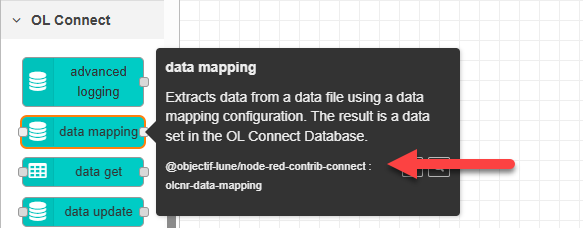
To confirm the source of a node, hover over the node in the left sidebar palette. The tooltip displays the namespace (if present), the package name, and the node’s internal name.
The following image shows the information for the data mapping node published by Upland Objectif Lune, which is part of the @objectif-lune/node-red-contrib-connect package. This is a supported node.
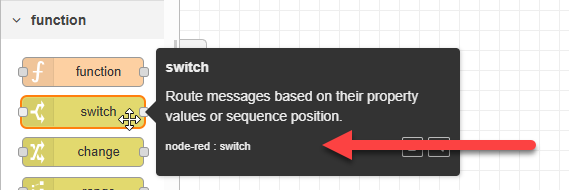
The following image shows the information displayed for the switch node, which is part of the core Node-RED package. This is a supported node.
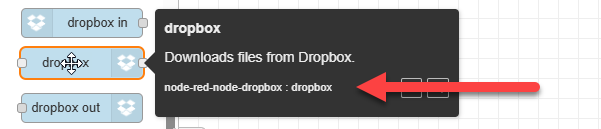
The following image shows the information for a third-party node that is not covered by Upland Objectif Lune support policies. This node is not part of the core node-red package and does not belong to the @objectif-lune namespace.
View Node Packages
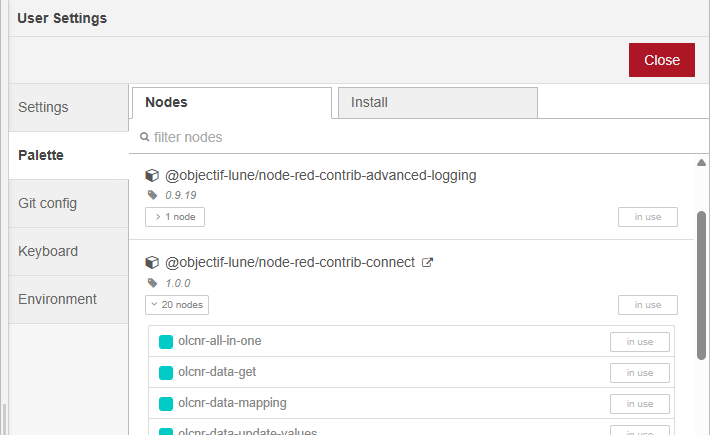
To view all installed packages and their nodes:
-
Navigate to Menu → Manage Palette and click the Palette tab.
-
Scroll down, if necessary, to see the full list of installed packages.
-
Click Nodes below any package to view the full list of nodes in that package.
Evaluate the health of Third-Party packages
When installing third-party modules, it is important to evaluate the overall health and maintenance status of the package. The Palette Manager provides useful information to help you assess this.
Third-party modules are typically installed through the Palette Manager. Select the Palette tab on the left, then the Install tab. Use the search field to filter by name, keyword, or category. The search results for each package show the version, when it was last updated, and weekly download statistics. Additional information about packages is available on the Node-RED website.
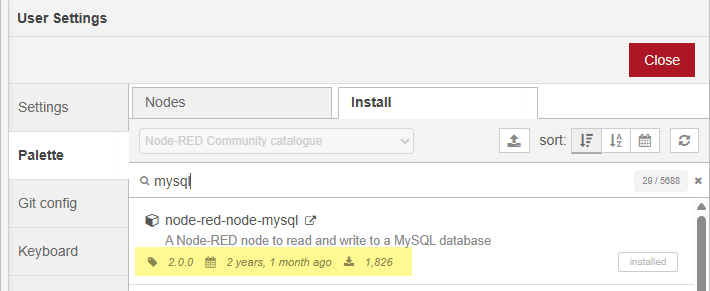
Version and Last Updated date
This information helps you gauge:
-
Developer activity.
-
Maintenance cadence.
-
Whether the project may be abandoned.
Note Infrequent updates are not always a concern. Some modules, such as those implementing stable specifications (e.g. working with ZIP archives), may not require regular changes.
Weekly download statistics
Weekly downloads provide insight into package adoption:
-
High downloads may indicate broad use and community validation.
-
Low downloads may suggest a niche module or potential issues causing users to avoid it.
Package Details on Node-RED website
Click the remote-link icon (at the right end of the package name) to view the package details on nodered.org.
The right sidebar on the module page displays helpful metadata, including:
-
Current version.
-
Rating and Scorecard link.
-
Weekly downloads.
-
Maintainers and contributors.
Packages with multiple maintainers often have better long-term stability and faster response times.
Some maintainers, such as knolleary and dceejay are well-known core contributors to Node-RED. The image below shows the node information for the @objectif-lune/node-red-contrib-connect package, including links to view on npm and view the scorecard. The list of maintainers and additional details are further down the module page right sidebar.
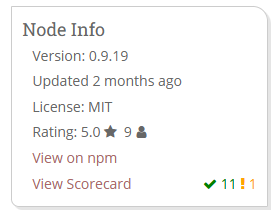
Scorecard checks
The Scorecard provides additional health indicators, such as:
-
Minimum supported Node.js version. This should be compatible with the Node-RED version required by OL Connect Automate.
-
Minimum supported Node-RED version.
-
Availability of sample flows or example files.
-
Indicators of whether the project is actively monitored and maintained.
These details help you determine whether a module is a safe choice for your environment.
Create custom node packages
Customers, partners, and internal departments may develop and publish their own Node-RED packages. When doing so, it is important that these modules do not give the impression of being official Upland Objectif Lune products.
You can add custom packages to OL Connect Automate without publishing them to npmjs.
To avoid confusion when publishing your custom packages to npmjs.com:
-
Use your own namespace, or publish them as
node-red-contrib-*modules. -
Do not use names or prefixes that could imply the package was developed or supported by Upland Objectif Lune.
-
Avoid using the color scheme associated with OL Connect Automate nodes, specifically #00ccc5, which is used for packages under the
@objectif-lunenamespace.
Following these guidelines helps ensure clear differentiation between community-developed modules and officially supported OL Connect Automate components.