Function node text condition examples
These are examples of Text condition branching.
Note: All text conditions in this section are based on a filename stored in the message. The following filenames are used throughout:
inv_net30_acc67829_20250001.xml: invoice file
stmt_monthly_acc67829_2025_01.xml: statement file
These examples illustrate common techniques such as string contains checks, substring matching, regular expressions, and multi-value comparisons, all of which are frequently used in real-world file-based automation flows.
The function node uses JavaScript to give you more flexible control over text conditions. The number of outputs is defined in the Setup tab of the node’s Properties dialog. When more than one output is configured, the function returns an array of messages, with each position in the array corresponding to a specific output.

This makes it easy to implement:
-
Multiple-output conditions using the
iforswitchstatements in JavaScript. -
Setup other properties based like the name of a template, data mapping configuration or preset.
-
Decisions based on multiple message properties, not just a single filename, for example by doing a lookup.
Compared to the switch node, the function node is often better suited when conditions involve complex comparisons, compound logic, or dynamic rule sets that are easier to express in JavaScript.
Compare multiple values
The following script shows a simple approach for evaluating multiple values in a function node.
-
It extracts the filename prefix using
split()and then applies anif / else if / elsestatement to route the message. -
The function returns an array of messages, where each position in the array corresponds to a specific output on the node.
// Extract the prefix before the first underscore
const prefix = msg.payload.split("_")[0];
if (prefix === "inv") {
    // Output 1: invoices
    return [msg, null, null];
} else if (prefix === "stmt") {
    // Output 2: statements
    return [null, msg, null];
} else {
    // Output 3: unknown or unsupported files
    return [null, null, msg];
}
One advantage of this approach is that it allows you to populate additional message properties as part of the same decision logic. This is useful when downstream nodes need dynamic configuration based on the file type.
Dynamic routing and setting additional properties
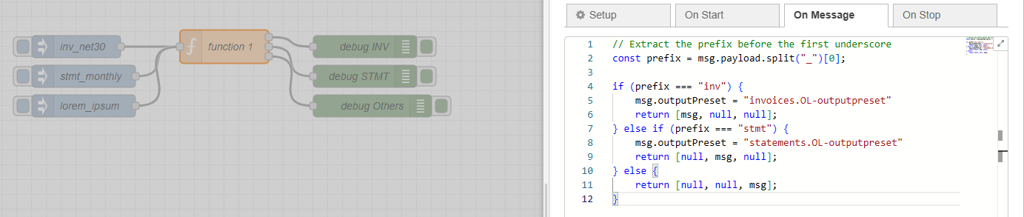
In the following example, the function node not only routes the message but also sets msg.outputPreset, which can be used to dynamically select the output preset in a paginated output node.
// Extract the prefix before the first underscore
const prefix = msg.payload.split("_")[0];

if (prefix === "inv") {
    msg.outputPreset = "invoices.OL-outputpreset"
    return [msg, null, null];
} else if (prefix === "stmt") {
    msg.outputPreset = "statements.OL-outputpreset"
    return [null, msg, null];
} else {
    return [null, null, msg];
}
Route multiple file types to a single output
To modify the previous example so that both invoice and statement files are routed to the same output, you can reduce the function node to two outputs. The first output handles all known file types, while the second output is used for unknown or unsupported inputs. The output preset is still set dynamically based on the file type.
// Extract the prefix before the first underscore
const prefix = msg.payload.split("_")[0];

if (prefix === "inv") {
    // Invoice files
    msg.outputPreset = "invoices.OL-outputpreset";
    return [msg, null];
} else if (prefix === "stmt") {
    // Statement files
    msg.outputPreset = "statements.OL-outputpreset";
    return [msg, null];
} else {
    // Unknown or unsupported files
    return [null, msg];
}
This approach is useful when different file types share the same downstream processing, but still require type-specific configuration, such as selecting the correct output preset.