Switch node text condition examples
These are examples of Text condition branching.
Note: All text conditions in this section are based on a filename stored in the message. The following filenames are used throughout:
inv_net30_acc67829_20250001.xml: invoice file
stmt_monthly_acc67829_2025_01.xml: statement file
These examples illustrate common techniques such as string contains checks, substring matching, regular expressions, and multi-value comparisons, all of which are frequently used in real-world file-based automation flows.
The switch node routes messages to different branches of a flow by evaluating a set of rules against the value of a message property, such as msg.filename or msg.payload. Each rule is mapped to an output, and the node can have one or more outputs depending on how many conditions are defined.
The switch node is well suited for clear, rule-based logic that is easy to read and maintain, especially when text conditions can be expressed declaratively. It supports common comparisons such as equals, less than, greater than, contains, is true, is false, is empty, and is not empty, making it suitable for most conditional routing scenarios.
Compare the value of a msg property
In this example, the switch node evaluates the value stored in msg.payload, which contains a filename. The node is configured with two rules:
-
Rule 1: If
msg.payloadcontainsinv_, the message is routed to output 1.-
Applies to invoice files, such as
inv_net30_acc67829_20250001.xml.
-
-
Rule 2 (Otherwise): All other values are routed to output 2.
-
Applies to statements or unexpected inputs.
-
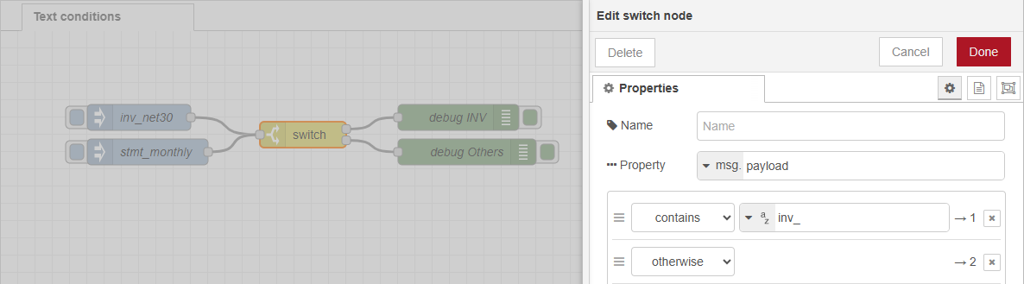
This is a common and recommended pattern for text conditions:
-
The first rule captures the expected case.
-
The otherwise rule provides a safe fallback for anything that does not match.
Extend the condition
Building on the flow above, you can extend the condition by adding another rule. Use Add rule at the bottom of the rule list, in the switch node Properties.
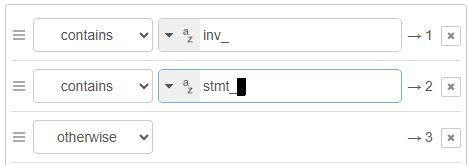
The switch node still evaluates msg.payload, but now uses three rules:
-
Rule 1: If
msg.payloadcontainsinv_, the message is routed to output 1.-
Applies to invoice files, such as
inv_net30_acc67829_20250001.xml.
-
-
Rule 2: If
msg.payloadcontainsstmt_, the message is routed to output 2.-
Applies to statement files, such as
stmt_monthly_acc67829_2025_01.xml.
-
- Rule 3 (Otherwise): All other values are routed to output 3.
Applies unexpected inputs.
Match name starts with, using regular expression
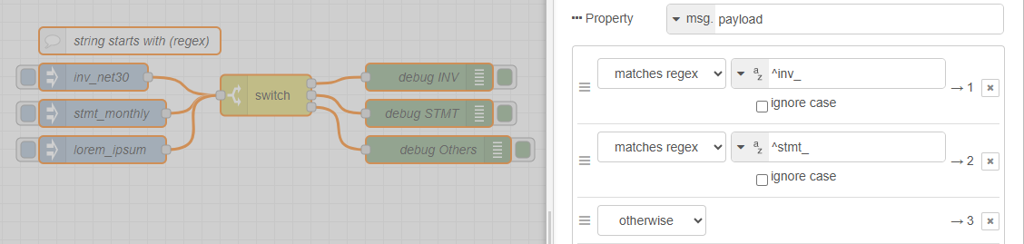
In this scenario, the switch node rule comparison is changed to regular expression (regex). Instead of checking whether the value contains a string, the rules explicitly test whether the filename in msg.payload starts with a specific prefix.
Enter the ^ anchor character to ensure the match occurs at the start of the string. This makes the condition more precise than a simple contains check. This approach is recommended when filename prefixes have a defined structure and meaning.
Compare multiple values using a single regular expression
In this variation, a single regex rule is used to match multiple known filename patterns and route them to the same output anchor. Any filenames that do not match the pattern are handled by the otherwise rule.
The following regular expression is used:
^inv_|^stmt_
The pipe character, |, means OR. It allows the rule to match either of the two patterns:
-
^inv_matches filenames that start withinv_. -
^stmt_matches filenames that start withstmt_.
If either condition is true, the message is routed to the configured output. Filenames that do not start with one of these prefixes fall through to the otherwise branch, where unknown or unsupported inputs can be handled safely.

Compare multiple values using JSONata
JSONata is a powerful expression language for formatting, transforming, and combining data. Many nodes, including switch, support using JSONata to compute values at runtime. More information about JSONata is at https://jsonata.org/.
The following expression shows how to extract the text before the first occurrence of the underscore character of our file names and tests of the value exists in the array:
$substringBefore(payload, "_") in ["inv","stmt"]There are many manipulation features in JSONata that are useful for text conditions.

For more information and code snippets, see JSONata in arrays