Generate UUID with function node
You can generate a UUID (Universally Unique Identifier) by using a function node with an external module such as uuid.
Before starting, ensure you’re familiar with the essential concepts of OL Connect Automate and Node-RED, including editor features and flow design. See Documentation, Training, and Support for links to getting started topics and information about using samples and tutorials. Nodes shown in flow example images may display their entered names, set in the node Properties panel, instead of their default names.
To generate a UUID with the function node:
-
Double-click a function node to go to its Properties.
-
Enter a descriptive name for the node, such as
uuid. -
Select the SetUp tab.
-
Below the Modules section, click +Add.
-
For module name, enter
uuid. This is copied to Import as.
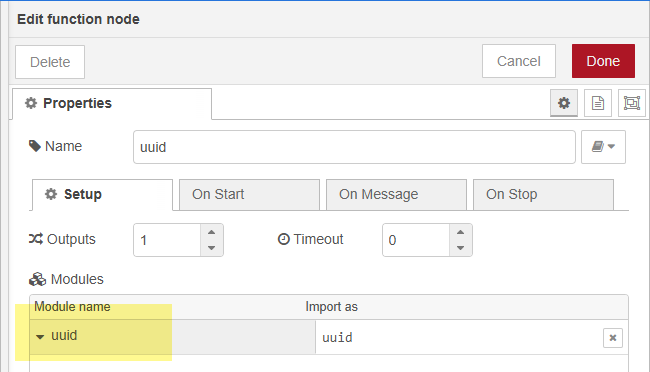
-
Select the On Message tab.
-
Enter the following for line one. Line two completes automatically.
Copymsg.uuid = uuid.v4()
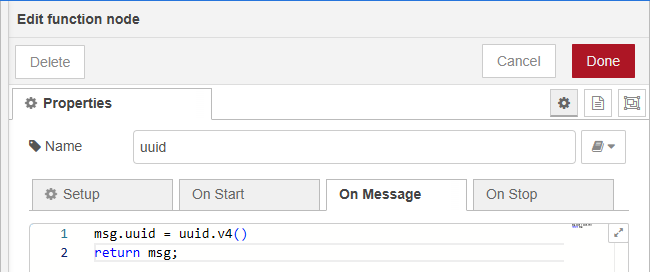
-
When this node is deployed in a flow, the UUID is returned as a message payload. A sample result is:
87d76f78-484e-4d3c-bc03-83beb2e7fcbf
Tip: An alternative to the uuid module is Nano ID. It uses a larger alphabet than UUID, and therefore generates smaller URL-friendly and unique strings. Sample output:
V1StGXR8_Z5jdHi6B-myT
For more information, see https://github.com/ai/nanoid#readme