OL Connect Release Notes 2025.2.3
License Update Required for Upgrade to OL Connect 2025.x
From OL Connect 2019.1 onwards, only customers with a current OL Care subscription will be able to update OL Connect.
Every OL Connect license now contains an end date that represents the last day of OL Care coverage for each customer. Upgrades and updates of OL Connect will be freely available up until that end date, but will not be available thereafter, unless the OL Care period is extended.
This licensing model requires anyone upgrading from OL Connect versions earlier than 2019.1 to first update their OL Connect License. A dialog box appears as part of the OL Connect upgrade process requesting that you do this.
It is recommended that you first update the OL Update Manager, as newer versions of the Update Manager can update your OL License to the required version.
For further details on how to upgrade the OL Update Manager to the latest version and update your OL Connect License see the Update Manager 1.10 - Upgrade Guide.
If issues arise, or if you need to renew your OL Care subscription, please contact your local Customer Care group.
Backup before Upgrading
It is recommended that you always backup your existing OL Connect preferences before upgrading to a new version. This will enable you to revert back to the previous version, in a worst case scenario in which the new version introduces issues with your existing production processes. Whilst the probability of such a worst case scenario is remote, it cannot hurt to take some simple precautions, just in case.
For instructions on how to do so, please see
Overview
This document provides an overview of the new features and enhancements in OL Connect 2025.2, as well as some important installation information.
Installing OL Connect 2025.2
- OL Connect is released as a 64 bit version only.
- Full details on installing and licensing OL Connect can be found in the online help, here
- Note that OL Connect comes with a 30 day trial license by default.
- It is recommended that you install and use OL Connect Designer under the same user account.
OL Connect installer requires Administrator rights
Please note that the OL Connect installations can only be run by users who have Administrator rights.
OL Connect 2025.2.3 Improvements
OpenSSL security issue
A security issue (CVE-2025-15467) was reported in the OpenSSL libraries used in 2025.2.1. This could leave those libraries vulnerable to Denial-of-Service and Remote Code Execution attacks.
This release updates the OpenSSL libraries bundled in both OL Connect and OL Connect Workflow 2025.2 to more recent and secure libraries. (97344)
Security vulnerability fixed
A security flaw (CVE-2026-29000) was discovered in one of the libraries used by OL Connect 2025.2.1. This library has now been updated. (97458)
Upgrade issue in 2025.2.1
Fixed an issue where in some scenarios the OLConnect_MariaDB service would stop after an upgrade. (97231)
OL Connect 2025.2.1 Improvements
During the OL Connect 2025.2.0 Partner Preview an issue was discovered with the updated built-in German DV-Freimachung Address Block in OL Connect (96743), as well as some minor translation issues in OL Connect Workflow (96603).
These issues were addressed in the updated 2025.2.1 release.
OL Connect 2025.2 Improvements
Objectif Lune University
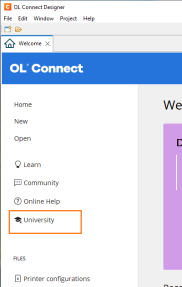
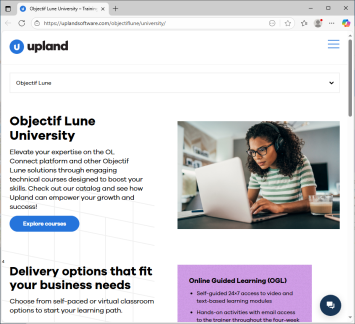
A link to the Upland Objectif Lune University has been added to the Welcome screen.
This will allow you to elevate your expertise in the OL Connect platform and other Objectif Lune solutions through engaging technical courses designed to boost your skills. (96390)
|
|
Architectural Software Updates
-
Updated Adobe PDF library. (96142)
Security improvements
- Third party libraries updated to more recent versions. (94177/95568/95646)
- Changed the Server Configuration tool to improve database security by requiring entry of the database password the first time any of the pages needs to access the database. (96397)
OL Connect General Improvements
-
Support has been added for connecting to case-sensitive databases. For example, connecting to a existing Linux based MariaDB database installation. (94056)
-
The ‘olconnect’ database user that is created when installing the MariaDB database component alongside OL Connect has had its permissions reduced to only those necessary for running Connect. (94301)
-
Improved software license stability. (95108)
-
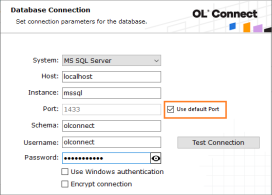
It is now possible to select the “default port” for Microsoft SQL database connections in the installer. (95174)
-
Fixed a deadlock issue in OL Connect logger for DataMapper and Weaver engine processes. (95208)
- The default installation memory settings have been updated to be improve efficiency. (95639)
- You could not update Microsoft SQL database configurations using Windows Authentication without changing the password. This password was not necessary for the connection to be successfully applied, so it is no longer required. (95826)
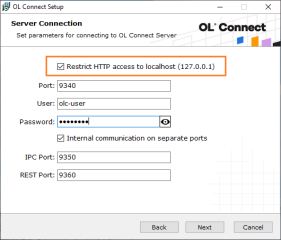
- New installer option added to both the wizard and the silent installer to configure the “Restrict access to localhost” setting. (96124/96178)
OL Connect 2025.2 Designer Improvements
Scripting improvements
-
Calling 'position()' from a standard script could in some cases throw an exception and unexpected behavior. This has now been fixed. (95818)
Address Block improvements
- Fixed issue whereby accessing the Box Formatting menu also selected an unrelated box, causing unexpected behavior. (95358)
- Updated the built-in German DV-Freimachung Address Block. (96027)
This enhancement ensures Address Blocks are correctly formatted and automatically include the required postage imprint. It streamlines compliance with German mailing standards, improving both accuracy and efficiency in mail processing.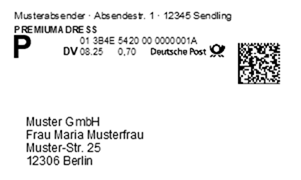
- Custom Address Block templates that had the string ‘custom’ in their file name would not be displayed with the correct name in the insert Address Block dialog. This has been fixed.(96168)
Note: If you are interested in adding custom local address block formats for your country or region, please reach out to the OL Support and we will see if we could add support for your region.
General Designer improvements
-
When removing the “Required” property of a field, the state of that field is now better tracked, so a reverse can applied when undo is selected. (65647)
- The “Required” Data Model contextual menu option is now only shown when in the Data Mapping perspective. (67496)
- Fixed an issue where changes applied from a formatting dialog would not be reverted when the dialog was closed without using the OK button. (91652)
- Fixed an issue where folder content would not be copied after copy-pasting a folder in the Resources panel. (92454)
- Fixed state for the synchronize button and data model on Undo/Redo when both the template and DataMapper editors are open. (92653)
- When opening two dialog windows at the same time, the second window could be unresponsive. This has been fixed. (92952)
- Disabled several context menu options (such as Cut and Paste), in the Preview when the Preview is read only. (92955)
- Fixed an error that could occur when pasting from the clipboard into the “sourcePaths” while the filter in the Scripts panel had input focus. (93441)
- Fixed issue that could prevent the Text Script Wizard opening for some scripts. (93630)
- Fixed an issue that could cause the caret position to change unexpectedly whilst typing. (93708)
- Fixed an issue that could cause the editor to scroll up after clicking in an absolute positioned object. (94677)
- OL Connect Desktop now re-evaluates the original data when changing the data type of fields within the data model. (94718)
- Microsoft Access .mdb data file types are now properly recognized in Designer when reopening Templates that contain such. (94991 )
- A check mark is now displayed in the contextual menu when Required option is selected for a field. (95168)
- Fixed an issue where the button controls did not use the entire available space of the conditional script wizard. (95226)
- Fixed an issue with incorrect document properties for templates loaded from an OL-package. (95414)
- Fixed field format value in Data Model for re-opened template configurations. (95442)
- Improved consistency of keyword colorization in Script Editors. (95508)
- Fixed an issue that could cause the editor to scroll to the top unexpectedly. (95699)
- Fixed an error that could occur when overwriting a context resource through the File > Import Resources option. (95809)
- Fixed an issue with undo/redo when making changes in the Attributes panel whilst the Source tab is active. (95868)
- Enhanced Preview mode: Positioned boxes can now be moved and resized directly in Preview view, making layout adjustments faster and more intuitive. (95981)
- Fixed an issue that was introduced in 2025.1 where the designer could get stuck after switching to the Source tab. (95983)
- As of OL Connect 2025.1 we no longer accepted URLs with spaces due to a change in the underlying framework. We now work around potential regression issues by automatically encoding spaces where possible. (96144)
- Fixed an issue where OL Connect would not free up file handles. (96324)
- Fixed an issue with output where in rare cases the content scale could change mid-job. This would occur if a script called
results.cssto change the style of the<html>element, but only if automatic Handlebars evaluation was not enabled. (96428)
OL Connect 2025.2 Output Improvements
Additional Content enhancements
The Additional Content dialog lets users add elements like text and barcodes to generated content, commonly used for OMR codes or job-related information on a banner page. The drop-down menu for inserting variables has been expanded with commonly used entries, for example to make it easier to set conditions for adding content to banner or cover pages. (96023)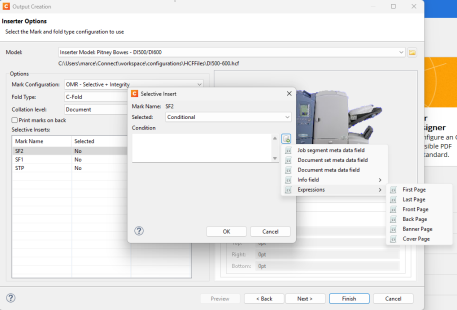
Output to Grayscale
Added an experimental option to convert content to grayscale during output creation. When this option is enabled, the entire output file should be converted into true grayscale, rather than color. (96130)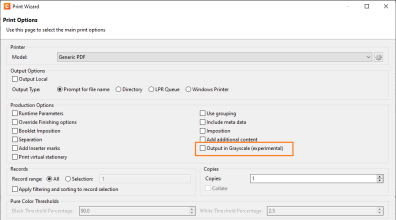
When enabled, this feature automatically converts all content, including text and images, into grayscale, removing embedded RGB or CMYK color data.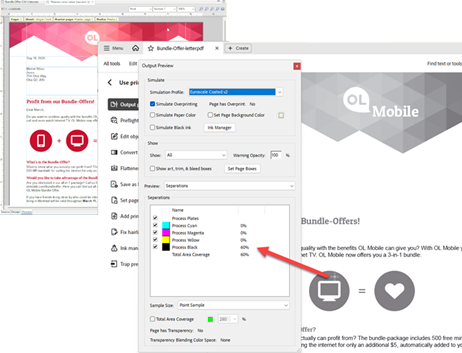
Note: As this feature is experimental, some limitations apply.
It may not work with all color spaces or transparency effects, and content added via the Print Output Additional Content option will not be converted.
General Output Improvements
- Fixed issue with PDF background clips being applied to all the pages, whereby the background would be inconsistent for some pages. (93634)
- Fixed an output issue that affected PDF images with long path names. (93635)
- When creating PDF output with separation whilst using PDF Security settings (such as applying PDF permissions or setting a PDF open password), image resources would be omitted from second (or subsequent) output files, while the first output file included them. This issue has been resolved. (95091)
- Fixed issue with the
page-break-beforestyle option creating unnecessary whitespace between article, heading, and paragraph elements, which could lead to large empty sections or additional blank pages. (95116) - Improved the error messaging when the Server loses connection to an engine. (95117)
- Added support for server names containing dots in the job output folder setting in the directory output options of both the Print and Output Preset Wizards. (95563)
- Set output font weight and width of 5 (medium) rather of 0 (undefined/invalid) when writing Type 1 fonts to AFP output. (95588)
- Fixed an issue with output that could, in rare cases (depending on the sheet configuration) cause missing or overlapping content. (95678)
- In OL Connect version 2025.1 an error gets raised if a data value has more than 20 million characters. We now prevent this. (95685)
- When creating PDF output with separation, some characters were missing and appeared as squares in the second and subsequent output files, while they rendered correctly in the first output file. This issue has now been resolved. (96120)
- Fixed a problem in CFF font handling which could lead to errors when processing specific fonts. (96210)
Print Output Improvements
-
Fixed an issue with rotated form being printed incorrectly in IPDS when a printer is configured to use overlays. (96008)
-
Fixed an issue where a custom Address Block was not included in the first print, after a merge engine was started. (96010)
Known Issues
The Known Issues can be found