JSON
JSON is a text format for storing and transporting data.
This is an example of a JSON object.
Example:
{"member" : {
    "fullName":    {
        "firstName": "John",
        "lastName": "Doe"
        },
    "car":"Mercedes",
    "age":32
    }
}
In the Data Model, JSON objects are displayed in the JSON field on a single line. The individual keys and values appear in subsequent lines.
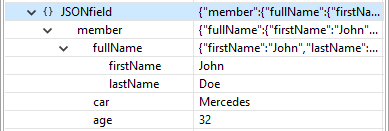
For a further explanation of the syntax see: MDN Web Docs.
Defining JSON values
-
Extraction: Extracting (part of) a JSON structure by selecting it automatically creates a JSON field. However, extracting a single key-value pair results in a String field.
You can also set the type of an existing field to JSON.
-
In the Data Model, select the field.
-
On the Step properties pane, under Field Definition set the Type to JSON.
-
-
JavaScript Expression: Set the desired value as a JSON string, using the JavaScript function
JSON.stringify().Example:
record.fields["myJSON"] = JSON.stringify({"member":{"fullName":{"firstName":"John", "lastName":"Doe"},"car":"Mercedes","age":32}});
Using JSON values in scripts
In scripts in the DataMapper and Designer, you can access properties inside a JSON field using the dot notation.
For instance, let's say that the JSON object at the top is extracted to a JSON field named myJSON. To access the value "Mercedes" in a standard Designer script, you would write record.fields.myJSON.member.car
The same notation can be used in expressions (see Variable data in text: expressions).