OL Connect Release Notes 2025.2.3
License Update Required for Upgrade to OL Connect 2025.x
From OL Connect 2019.1 onwards, only customers with a current OL Care subscription will be able to update OL Connect.
Every OL Connect license now contains an end date that represents the last day of OL Care coverage for each customer. Upgrades and updates of OL Connect will be freely available up until that end date, but will not be available thereafter, unless the OL Care period is extended.
This licensing model requires anyone upgrading from OL Connect versions earlier than 2019.1 to first update their OL Connect License. A dialog box appears as part of the OL Connect upgrade process requesting that you do this.
It is recommended that you first update the OL Update Manager, as newer versions of the Update Manager can update your OL License to the required version.
For further details on how to upgrade the OL Update Manager to the latest version and update your OL Connect License see the Update Manager 1.10 - Upgrade Guide.
If issues arise, or if you need to renew your OL Care subscription, please contact your local Customer Care group.
Backup before Upgrading
It is recommended that you always backup your existing OL Connect preferences before upgrading to a new version. This will enable you to revert back to the previous version, in a worst case scenario in which the new version introduces issues with your existing production processes. Whilst the probability of such a worst case scenario is remote, it cannot hurt to take some simple precautions, just in case.
For instructions on how to do so, please see
Overview
This document provides an overview of the new features and enhancements in OL Connect 2025.2 and Workflow 2025.2, as well as some important installation information.
Installing OL Connect 2025.2 and Workflow 2025.2
- OL Connect is released as a 64 bit version only
- Full details on installing and licensing OL Connect and Workflow can be found in the online helps.
OL Connect:
OL Connect Workflow: Workflow Installation. - Note that both OL Connect and Workflow come with a 30 day trial license by default.
- It is recommended that you install and use OL Connect Designer
OL Connect and Workflow installers require Administrator rights
Please note that the OL Connect and Workflow installations can only be run by users who have Administrator rights.
OL Connect templates used in Workflow
For improved performance we recommend re-saving any OL Connect templates used in Workflow to the current version of OL Connect templates.
Reduced Memory Version (not recommended for production)
It is possible to install OL Connect on a machine with a minimum of 2 GB of RAM. The OL Connect Designer will automatically detect whether it has been installed on a machine with less than 4 GB of RAM and default to only using one internal Weaver and one internal merge engine on that system. The Server will also run using internal engines.
OL Connect 2025.2.3 Improvements
OpenSSL security issue
A security issue (CVE-2025-15467) was reported in the OpenSSL libraries used in 2025.2.1. This could leave those libraries vulnerable to Denial-of-Service and Remote Code Execution attacks.
This release updates the OpenSSL libraries bundled in both OL Connect and OL Connect Workflow 2025.2 to more recent and secure libraries. (97344)
Security vulnerability fixed
A security flaw (CVE-2026-29000) was discovered in one of the libraries used by OL Connect 2025.2.1. This library has now been updated. (97458)
Server port configuration settings leading to missing images in 2025.2.1
In 2025.2.1 some customers experienced missing images in the output, due to modified Server port options. These issues have been addressed in this release. (SHARED-97237)
Upgrade issue in 2025.2.1
Fixed an issue where in some scenarios the OLConnect_MariaDB service would stop after an upgrade. (97231)
OL Connect 2025.2.1 Improvements
During the OL Connect 2025.2.0 Partner Preview an issue was discovered with the updated built-in German DV-Freimachung Address Block in OL Connect (96743), as well as some minor translation issues in OL Connect Workflow (96603).
These issues were addressed in the updated 2025.2.1 release.
OL Connect 2025.2 Improvements
Objectif Lune University
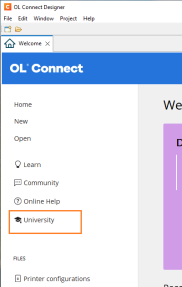
A link to the Upland Objectif Lune University has been added to the Welcome screen.
This will allow you to elevate your expertise in the OL Connect platform and other Objectif Lune solutions through engaging technical courses designed to boost your skills. (96390)
|

|
Architectural Software Updates
-
Updated Adobe PDF library. (96142)
Security improvements
- Third party libraries updated to more recent versions. (94177/95568/95646)
- Changed the Server Configuration tool to improve database security by requiring entry of the database password the first time any of the pages needs to access the database. (96397)
OL Connect General Improvements
-
Support has been added for connecting to case-sensitive databases. For example, connecting to a existing Linux based MariaDB database installation. (94056)
-
The ‘olconnect’ database user that is created when installing the MariaDB database component alongside OL Connect has had its permissions reduced to only those necessary for running Connect. (94301)
-
Improved software license stability. (95108)
-
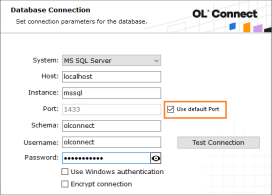
It is now possible to select the “default port” for Microsoft SQL database connections in the installer. (95174)
-
Fixed a deadlock issue in OL Connect logger for DataMapper and Weaver engine processes. (95208)
- The default installation memory settings have been updated to be improve efficiency. (95639)
- You could not update Microsoft SQL database configurations using Windows Authentication without changing the password. This password was not necessary for the connection to be successfully applied, so it is no longer required. (95826)
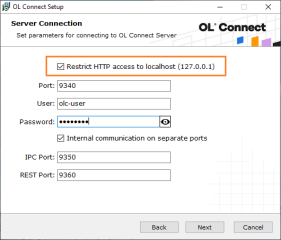
- New installer option added to both the wizard and the silent installer to configure the “Restrict access to localhost” setting. (96124/96178)
OL Connect API improvements
- The Output Creation API Service Get Result of Operation (as Text) endpoint has been updated to accept only a requested content type of
text/plain. (95317) - Fixed an issue with simultaneous job statistics API calls causing problems with database query exceptions. (95449)
-
Added a new endpoint to the API to allow conversion of a PostScript file to PDF format. (95611)
PostScript files uploaded to the OL Connect File Store can be seamlessly transformed into PDF, extending the automation capabilities of Workflow and Automate. Inspired by the Create PDF task in Workflow, the initial implementation provides straightforward conversion, with additional functionality planned for future releases.
New Endpoint:http://localhost:9340/rest/serverengine/converter/pstopdf/{fileId}
The fileID parameter specifies the managed file ID of the source PostScript file and the operation result is the managed file ID of the generated PDF file.
When a PostScript file is submitted for conversion, OL Connect Server returns a link header containing URLs to check progress, retrieve the PDF, or cancel the task.
OL Connect 2025.2 Designer Improvements
Scripting improvements
-
Calling 'position()' from a standard script could in some cases throw an exception and unexpected behavior. This has now been fixed. (95818)
Address Block improvements
- Fixed issue whereby accessing the Box Formatting menu also selected an unrelated box, causing unexpected behavior. (95358)
- Updated the built-in German DV-Freimachung Address Block. (96027)
This enhancement ensures Address Blocks are correctly formatted and automatically include the required postage imprint. It streamlines compliance with German mailing standards, improving both accuracy and efficiency in mail processing.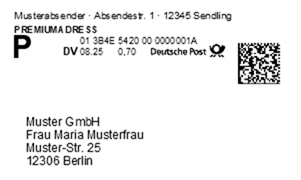
- Custom Address Block templates that had the string ‘custom’ in their file name would not be displayed with the correct name in the insert Address Block dialog. This has been fixed.(96168)
Note: If you are interested in adding custom local address block formats for your country or region, please reach out to the OL Support and we will see if we could add support for your region.
General Designer improvements
-
When removing the “Required” property of a field, the state of that field is now better tracked, so a reverse can applied when undo is selected. (65647)
- The “Required” Data Model contextual menu option is now only shown when in the Data Mapping perspective. (67496)
- Fixed an issue where changes applied from a formatting dialog would not be reverted when the dialog was closed without using the OK button. (91652)
- Fixed an issue where folder content would not be copied after copy-pasting a folder in the Resources panel. (92454)
- Fixed state for the synchronize button and data model on Undo/Redo when both the template and DataMapper editors are open. (92653)
- When opening two dialog windows at the same time, the second window could be unresponsive. This has been fixed. (92952)
- Disabled several context menu options (such as Cut and Paste), in the Preview when the Preview is read only. (92955)
- Fixed an error that could occur when pasting from the clipboard into the “sourcePaths” while the filter in the Scripts panel had input focus. (93441)
- Fixed issue that could prevent the Text Script Wizard opening for some scripts. (93630)
- Fixed an issue that could cause the caret position to change unexpectedly whilst typing. (93708)
- Fixed an issue that could cause the editor to scroll up after clicking in an absolute positioned object. (94677)
- Microsoft Access .mdb data file types are now properly recognized in Designer when reopening Templates that contain such. (94991 )
- A check mark is now displayed in the contextual menu when Required option is selected for a field. (95168)
- Fixed an issue where the button controls did not use the entire available space of the conditional script wizard. (95226)
- Fixed an issue with incorrect document properties for templates loaded from an OL-package. (95414)
- Fixed field format value in Data Model for re-opened template configurations. (95442)
- Improved consistency of keyword colorization in Script Editors. (95508)
- Fixed an issue that could cause the editor to scroll to the top unexpectedly. (95699)
- Fixed an error that could occur when overwriting a context resource through the File > Import Resources option. (95809)
- Fixed an issue with undo/redo when making changes in the Attributes panel whilst the Source tab is active. (95868)
- Enhanced Preview mode: Positioned boxes can now be moved and resized directly in Preview view, making layout adjustments faster and more intuitive. (95981)
- Fixed an issue that was introduced in 2025.1 where the designer could get stuck after switching to the Source tab. (95983)
- As of OL Connect 2025.1 we no longer accepted URLs with spaces due to a change in the underlying framework. We now work around potential regression issues by automatically encoding spaces where possible. (96144)
- Fixed an issue where OL Connect would not free up file handles. (96324)
- Fixed an issue with output where in rare cases the content scale could change mid-job. This would occur if a script called
results.cssto change the style of the<html>element, but only if automatic Handlebars evaluation was not enabled. (96428)
OL Connect 2025.2 DataMapper Improvements
Announcement of behavior to be removed in a future release
The legacy ODBC-JDBC bridge DLL will be removed from the DataMapper in a future release of OL Connect.
This DLL relies on an outdated Microsoft Visual C++ redistributable that contains known security vulnerabilities. Its removal is a security-driven decision aimed at reducing risk and improving the overall integrity of the platform. (95819)
This will disallow a couple of scenarios. These are:
-
Enabling the legacy option in the user interface
-
A script that explicitly references the legacy bridge in the connection string of the
db.connect()method.
JSON Based Data Mapping Improvements
Make the process of creating JSON data mappings more intuitive and reduced time required for configuring these mappings. Improvements include the following:
- Improved repeat step creation behavior for JSON data files. (96002)
Instead of looping through the fields inside an object, the Add Repeat option now iterates over sibling objects in the array. This provides a clearer and more intuitive starting point for building detail tables and extracting line-item data.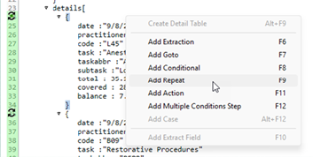
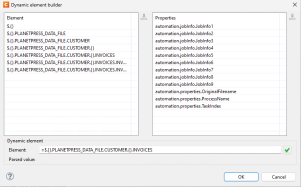
- Added support to dynamically set the element used by the Document Boundaries On Element trigger for JSON data sources. (92276)
The JsonPath can be constructed using automation variables and runtime parameters, providing flexibility when overall data structures are consistent across job types but the parent elements holding the records differ. This enhancement removes the need for separate data mapping configurations per job type, allowing a single configuration to efficiently handle multiple scenarios.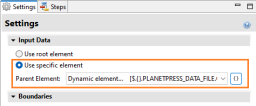
- Simplified the creating of detail tables from JSON based data. (96055)
A new Create Detail Table function has been added directly from the JSON viewer’s contextual menu. With a single action, it creates the required repeat step, automatically generates the corresponding extraction steps, and detects and sets data field types.
The feature supports nested details up to three levels deep (including the main level), making it much easier to configure data mappings for complex, structured documents such as invoices, statements, and insurance policies.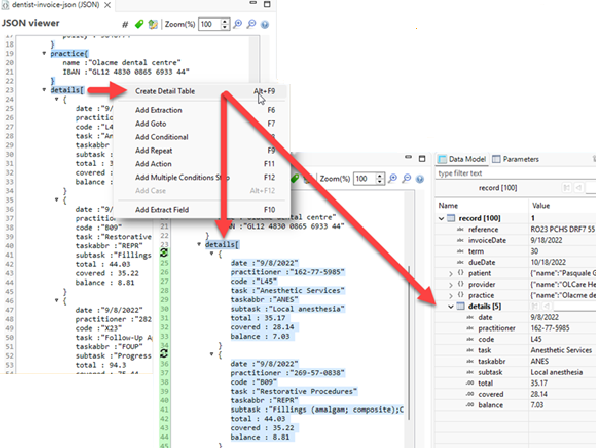
ODBC Data Mapping Improvements
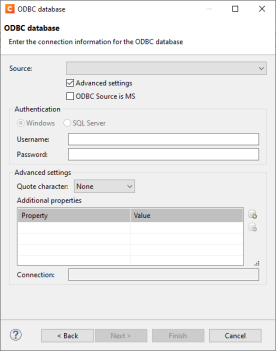
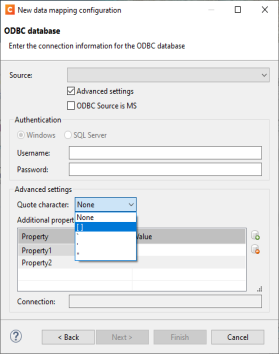
Added support for Advanced settings in ODBC data sources. (93643) 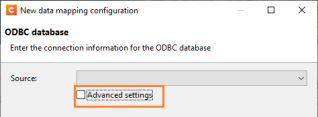
This allows selection of Authentication Username and Password, as well as a extra settings such as properties and defining quote characters
|
|
DataMapper Security Improvements
- Improved security in DataMapper configuration based on database connection. (96022)
General DataMapper Improvements
- Improved data engine error handling when the execution parameter is greater than 20 million characters. (92739)
- Fixed error when subfields were removed after a split lines action. (92947)
- Improved sample data file management. (93781)
- Fixed a bug in the Data Model View where the record count was not updated when a filter value was applied but did not match any entries, ensuring accurate display of filtered results. (93884)
- Fixed issues with region selection in DataMapper for Windows custom scaling. (93902)
- A problem was fixed where a very precise placement of lines with specific font sizes in a PDF would result in an infinite loop in the Goto step. (94130)
- Added warning message when replacing sample data file with different file type. (94372)
- When performing a Copy or Save As action in the sample data file list, the internal copy of the data file is now being used instead of looking for the original file path on disk. (95031)
- Improved script property documentation in DataMapper Postprocessor. (95232)
- Improved error messaging when attempting to open a PCL file without the proper license. (95292)
- Improved properties management in the Start step of the DataMapper. (95303)
- Improved error messaging when DataMapper XLSX switched to another XLSX file and that sheet is not found. (95335)
- The Run JavaScript section in the Step Properties pane now automatically expands to use available space, making it easier to script. (95443)
- The edit script dialog in the DataMapper has now been harmonized with the Designer edit script dialog. (95447)
- Improved usability of Extract step in DataMapper for PDF data files. (95697)
- Corrected the wrong behavior for DataMapper boundaries fixed line lengths for text data files containing characters outside the Basic Multilingual Plane (BMP). (95746)
- Fixed an issue introduced in 2025.1 for Goto steps, where the step was moved based on regular expression (such as
\d\d\d\d\d\d, or\d{6} or [0-9]{6}) and relative page distance. (95832) - Improved error handling in the DataMapper PDF text extractor. (95892)
- Dragging a data field into a detail table of an existing data model no longer collapses the detail table. (95976)
- Improved dialog for selecting a dynamic sheet name. The parsed value now resides in the group that contains the expression builder field. (96514)

- Improved usability of the dialog for dynamic selection of JSON root node. (96516)
OL Connect 2025.2 Output Improvements
Additional Content enhancements
The Additional Content dialog lets users add elements like text and barcodes to generated content, commonly used for OMR codes or job-related information on a banner page. The drop-down menu for inserting variables has been expanded with commonly used entries, for example to make it easier to set conditions for adding content to banner or cover pages. (96023)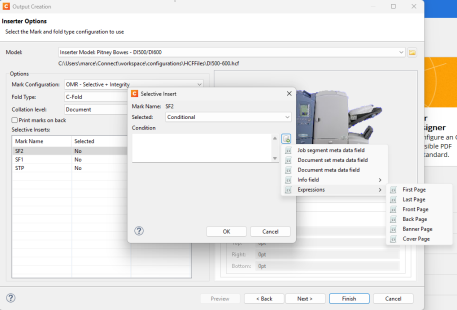
Output to Grayscale
Added an experimental option to convert content to grayscale during output creation. When this option is enabled, the entire output file should be converted into true grayscale, rather than color. (96130)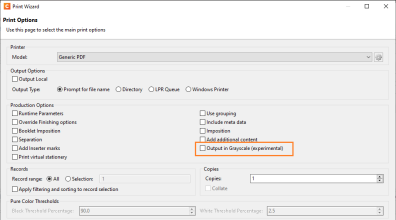
When enabled, this feature automatically converts all content, including text and images, into grayscale, removing embedded RGB or CMYK color data.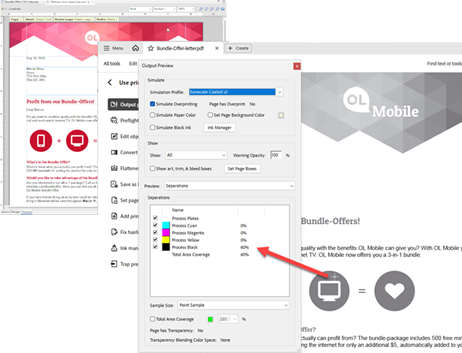
Note: As this feature is experimental, some limitations apply.
It may not work with all color spaces or transparency effects, and content added via the Print Output Additional Content option will not be converted.
Print Manager (Enterprise edition only)
When Print Manager was installed on its own, it would fail to start successfully. This has now been fixed. (94444)
General Output Improvements
- Fixed issue with PDF background clips being applied to all the pages, whereby the background would be inconsistent for some pages. (93634)
- Fixed an output issue that affected PDF images with long path names. (93635)
- When creating PDF output with separation whilst using PDF Security settings (such as applying PDF permissions or setting a PDF open password), image resources would be omitted from second (or subsequent) output files, while the first output file included them. This issue has been resolved. (95091)
- Fixed issue with the
page-break-beforestyle option creating unnecessary whitespace between article, heading, and paragraph elements, which could lead to large empty sections or additional blank pages. (95116) - Improved the error messaging when the Server loses connection to an engine. (95117)
- Added support for server names containing dots in the job output folder setting in the directory output options of both the Print and Output Preset Wizards. (95563)
- Set output font weight and width of 5 (medium) rather of 0 (undefined/invalid) when writing Type 1 fonts to AFP output. (95588)
- Fixed an issue with output that could, in rare cases (depending on the sheet configuration) cause missing or overlapping content. (95678)
- In OL Connect version 2025.1 an error gets raised if a data value has more than 20 million characters. We now prevent this. (95685)
- When creating PDF output with separation, some characters were missing and appeared as squares in the second and subsequent output files, while they rendered correctly in the first output file. This issue has now been resolved. (96120)
- Fixed a problem in CFF font handling which could lead to errors when processing specific fonts. (96210)
Print Output Improvements
-
Fixed an issue with rotated form being printed incorrectly in IPDS when a printer is configured to use overlays. (96008)
-
Fixed an issue where a custom Address Block was not included in the first print, after a merge engine was started. (96010)
Workflow 2025.2 Improvements
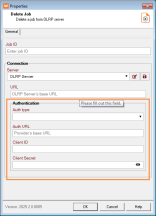
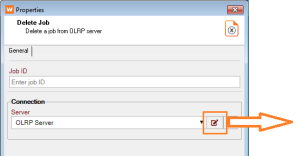
OL Remote Print replaces OL Connect Send
OL Connect Send was expanded to include a Server component, as well as a Printer Driver.
This expansion meant a more meaningful name was required, so we are proud to introduce OL Connect Remote Print 3.0.
Plugins for this were added to the Workflow in their own separate plugin category. (85332)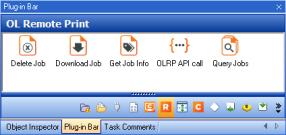
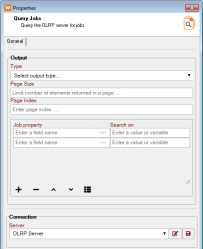
Query Jobs
|
Delete Job
|
|
Security and library improvements
- Third party libraries updated to more recent versions. (95093/95283/95393)
- Updated the SQL Lite library used by Workflow. (96198)
Microsoft Office 365 plugin improvements
- Reduced authentication overhead by enabling the sharing of access tokens between MicroSoft Office 365 related plugins and Connect Workflow process runs. (75384)
- Fixed a potential infinite loop in MicroSoft 365 SharePoint Input. (96476)
OL Search improvements
The check box labeled “Only search files created since the last refresh” was misleading and inaccurately described the option’s actual behavior. This option does not filter files based on their creation date, rather it ignores file dates entirely. The check box description has been changed to better reflect what the option does. (95370)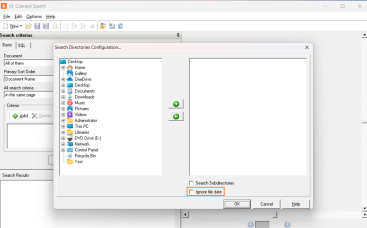
Workflow Installer Improvements
- Silent installations on machines without .Net 4.8 (a required prerequisite) now log a warning about it, before exiting. (94727)
- When upgrading Workflow, the Workflow service will now automatically restart after the upgrade if it was running prior to launching the installer. (95541)
- Service users configured during Workflow installation are now validated before the setup can continue. (95985)
General Workflow Improvements
- Fixed an issue that caused Workflow to hang when attempting to import a DataMapper file containing double-byte characters on an Operating System using that native language (Japanese, Chinese, and the like). (89659
- Fixed a problem where properties of a custom plugin were lost when opening an old workflow configuration on a more recent version. (92090)
- In the Load External File and Load External program plugins, when the file/program is present on the file system but an error occurs upon execution (for example, a file permission mismatch), a warning is now entered in the Workflow log file, detailing the issue. (92328)
- Fixed issue where NodeJS SOAP server port was set to 9090 regardless of user configuration. (92939)
- Fixed issue with large content assigned to Job Info variables being truncated when passed on to an error process. (93472)
- Fixed issue with NodeJS static resources ignoring CORS settings from Workflow. 93793)
- When using the metadata sequencer, an extra iteration was incorrectly added when using “split before” conditional logic if the condition was encountered on the final item of the metadata level being sequenced. (94809)
- The XML/JSON Conversion plugin now supports the conversion of CDATA elements from the source XML file. (94817)
- Configurable query timeout is now available in the Database plugin. (95034)
- An issue was resolved in the SOAP client plugin when getting information from a WSDL containing
xs:anyelements inside of a complex type definition, which prevented the WSDL from being properly read. (95119) - Additional error handling was added when sending timeout from the NodeJS server. (95513)
- Extracting text from some PDFs would cause process to silently fail or fail with "string too long" error. This has been fixed. (95616)
- Fixed an issue in the HTTP Client Input where the plugin would fail to run properly if a previous job had errored out. (95643)
- A problem was fixed where printing some PDF files to a printer queue with a PSCRIPT-based printer driver (including the OLCS/OLRP and PlanetPress Printer drivers) would fail silently, without the print job being sent to the print queue. (95858)
- Fixed an issue in Alambic where some pages were randomly missing from the output. (96030)
- A problem was fixed where data selections might return corrupted data if the “lower case” or “upper case” conversions were used. (96135)
- When adding JS scripts to the Worklow preferences, updating Workflow would override and remove those preferences. This has been fixed. (96556)
Known Issues
The Known Issues can be found