OL Connect Release Notes 2026.1.2
License Update Required for Upgrade to OL Connect 2026.x
From OL Connect 2019.1 onwards, only customers with a current OL Care subscription will be able to update OL Connect.
Every OL Connect license now contains an end date that represents the last day of OL Care coverage for each customer. Upgrades and updates of OL Connect will be freely available up until that end date, but will not be available thereafter, unless the OL Care period is extended.
This licensing model requires anyone upgrading from OL Connect versions earlier than 2019.1 to first update their OL Connect License. A dialog box appears as part of the OL Connect upgrade process requesting that you do this.
It is recommended that you first update the OL Update Manager, as newer versions of the Update Manager can update your OL License to the required version.
For further details on how to upgrade the OL Update Manager to the latest version and update your OL Connect License see the Update Manager 1.10 - Upgrade Guide.
If issues arise, or if you need to renew your OL Care subscription, please contact your local Customer Care group.
Backup before Upgrading
It is recommended that you always backup your existing OL Connect preferences before upgrading to a new version. This will enable you to revert back to the previous version, in a worst case scenario in which the new version introduces issues with your existing production processes. Whilst the probability of such a worst case scenario is remote, it cannot hurt to take some simple precautions, just in case.
For instructions on how to do so, please see
Overview
This document provides an overview of the new features and enhancements in OL Connect 2026.1 and Workflow 2026.1, as well as some important installation information.
Installing OL Connect 2026.1 and Workflow 2026.1
- OL Connect is released as a 64 bit version only
- Full details on installing and licensing OL Connect and Workflow can be found in the online helps.
OL Connect:
OL Connect Workflow: Workflow Installation. - Note that both OL Connect and Workflow come with a 30 day trial license by default.
- It is recommended that you install and use OL Connect Designer
OL Connect and Workflow installers require Administrator rights
Please note that the OL Connect and Workflow installations can only be run by users who have Administrator rights.
OL Connect templates used in Workflow
For improved performance we recommend re-saving any OL Connect templates used in Workflow to the current version of OL Connect templates.
OL Connect 2026.1.2 Improvements
The following issues were resolved in the 2026.1.2 release:
Output issues
-
Fixed an issue where a job got canceled when it contained a record for which all sections were disabled. (98056)
DataMapper Barcode changes
-
Fixed an issue the
extractBarcode(...)JavaScript function exhibited when processing rotated PDF pages. (98054) -
New operators have been introduced to the Barcode boundaries settings:
begins withandends with. (98178)
Workflow changes:
-
Fixed a possible XSS vulnerability in the Workflow HTTP Input server. (98159)
-
Node.js helper dependencies updated to remove security vulnerabilities. (98195)
-
Updated the SQLite shipped with OL Connect Workflow to resolve some security vulnerabilities. It was upgraded to SQLite 3.53.4 (98447)
OL Connect 2026.1.1 Improvements
During the OL Connect 2026.1.0 partner preview some issues were discovered.
These issues were resolved for the 2026.1.1 release.
The issues were as follows:
OL Connect fixes
In some circumstances the output for GS1-128 barcodes would add unnecessary parentheses to the barcode when viewing the barcode in human readable form.
This has been fixed in both OL Connect Mozilla version and the new OL Connect Chromium version. (97948)
OL Connect Chromium specific fixes
-
OL Connect Desktop pointed to the Enterprise/Professional Help. (97973)
-
An issue was addressed with some PDF backgrounds causing output creation failures due to CEF color filtering errors when processing them. (97929)
OL Connect Workflow enhancement
Updated the Node.js shipped with OL Connect Workflow to resolve some late security vulnerabilities. (97915)
OL Connect 2026.1 Improvements
Architectural Software Updates
-
Datalogics Adobe PDF Converter and Adobe PDF Libraries have been updated to the latest 64 bit versions. (96334/96458/97373)
-
The MariaDB Database Driver used by OL Connect has been upgraded to the latest major version (3.5.7). (96802/97295)
Note: As of OL Connect 2026.1 the JDBC database driver uses the same
jdbc:mariadbsubprotocol for both MySQL and MariaDB database connections, rather thanjdbc:mariadbfor MariaDB andjdbc:mysqlfor MySQL.
Security improvements
- Third party libraries updated to more recent versions. (96321/96944)
Installer improvements
- The Installer now prevents installation if the Operating System is not supported. (96947)
-
Fixed an issue where in some scenarios the OLConnect_MariaDB service would stop after an upgrade. (97231)
OL Connect General Improvements
-
Added support for validation of ports used for internal communication in the Server Configuration tool. (96307)
-
Addressed issues related to clean up data partitioning on systems that were running more than one
objectlunedatabase schema on the same MariaDb server. (96655) -
In 2025.2.1 some customers experienced issues with missing images in the output, due to modified Server port options. These issues have been addressed in this release. (SHARED-97237)
OL Connect REST API improvements
- We have introduced OpenAPI (Swagger) documentation for the OL Connect REST API. (90274/ 90275)
The API documentation can be accessed at the following URL:http://localhost:9340/serverengine/doc/
Future versions will further enhance this documentation with additional details and improvements. - Added support for XPS to PDF conversions to the REST API. (96919)
-
The OL Connect REST API Cookbook working examples have been updated to use newer JavaScript libraries and ECMAScript standards. (96364)
Note that support for Microsoft Edge (Legacy) and Microsoft Internet Explorer 11 has been removed.
OL Connect 2026.1 Designer Improvements
Scripting improvements
-
User scripts can now change the “
left” and “top” styles of a positioned box directly. Previously you would need to modify the “offset-x” and “offset-y” attributes, which were non-standard. (90483) -
Added support for creating a snippet directly in a sub-folder. (90687)
-
Fixed an inconsistency in the use of shortcut notation for fields in the script engine. The field value can be updated using a shortcut.
The use of shortcuts is disabled in code completion in favor of using the full path. (91769) -
Fixed error for scriptable boundaries split in PDF based DataMapper configuration. (96282)
-
Preview mode will be read-only if the “Evaluate Handlebars expressions” option is turned on, even if no Handlebars expression is present.. This differs from earlier implementations, where it was read-only only if double mustache symbols for Handlebars expressions (
{{) could be located anywhere in the document. The previous behavior could lead to unexpected results, which is why it was changed. (96891) -
In script wizards you can now select JSON sub-fields. This allows data from properties to be formatted or concatenated with other fields. (97072)
Address Block improvements
- Improved handing of data model field names containing periods (or dots). (96885)
- Improved the DE DV Freimachung address template. (97078)
- Added a new exception field for the DV Produkt display, and updated field descriptions. (97539/97540)
General Designer improvements
-
The Package and Send to Workflow features now only generate a thumbnail for the first enabled section to prevent memory issues. This also applies to the “imagepreview” REST API endpoint (if no section name is passed). (78292)
-
Files with a period (or dot) in their file name, which are resource types that have a property dialog (such as JavaScript files), no longer have the file name truncated in the Properties Dialog. (80267)
-
For previews that include all sections (which is the case for features like Send to Workflow), we no longer include disabled sections. If all the sections are disabled we now generate an error. (82030)
- Fixed an issue with Microsoft Access data file loading, when a saved template was re-opened. (90026)
- Improved text alignment in imports form Microsoft Word. (90926)
- Fixed an issue where canceling to save an open template, while creating a new template could lead to errors when trying to create the new template a second time. (94473)
- Allow removal of the last section of a context, if the template contains more contexts. (94779)
- Job preset and Entity REST Service data selection filter performance has been improved. (96137)
- Fixed issue whereby if the Java Access Bridge was enabled (which is commonly done at the system level by installers for assistive technology tools) Designer would not start. (96530)
- When you import a Word Doc or PDF file, the OL Connect template is now marked as dirty until it is saved. (96552)
- Charts no longer hide any overflow. (96579)
- Fixed an issue where a generated checksum was visible in the human readable text of a generated barcode. (96727)
- Fixed a problem in font loading introduced by the KB5068861 cumulative update, which caused the Times New Roman font to always be rendered in italic, no matter what the original style setting. (96874)
- An error message is now shown in case of an error during database initialization. (96967)
- Previously, if you used
File > Open Datafor a Microsoft Access data source without an open DapperMapper editor (such as in OL Connect Desktop), and reopened the template, an error dialog would appear. This has been fixed. (96995) - Fixed an issue related to the Preview HTML feature that occurs when it is invoked while a master page is active. (96999)
- Improved log summary for 'Proof Prints'. (97199)
OL Connect 2026.1 DataMapper Improvements
Announcement of behavior to be removed in a future release
The legacy ODBC-JDBC bridge DLL will be removed from the DataMapper in a future release of OL Connect.
This DLL relies on an outdated Microsoft Visual C++ redistributable that contains known security vulnerabilities. Its removal is a security-driven decision aimed at reducing risk and improving the overall integrity of the platform. (93125)
This will disallow a couple of scenarios. These are:
-
Enabling the legacy option in the user interface
-
A script that explicitly references the legacy bridge in the connection string of the
db.connect()method.
Updated PCL input options - GhostPCL
A new PCL input option has been added to the DataMapper. You will now be able to chose between the new GhostPCL or the older LincPDF libraries to import PCL files. This enhancement addresses known limitations in the existing PCL processing capabilities, such as problems with large files and issues with rendering inconsistencies. 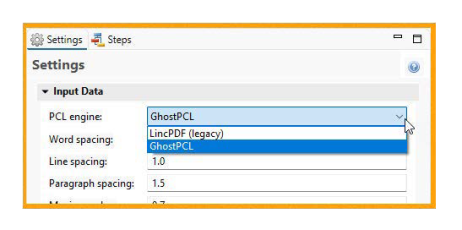
The ability to swap between these libraries means you have more options to cope with the limitations of either library. (97029)
Defining document boundaries based of barcodes
This release introduces support for barcode-based document boundary detection in the DataMapper. (97117)
With this capability, the DataMapper can now detect document boundaries directly from barcodes embedded in print-ready input files, such as PDF and PostScript. Users can define specific regions, similar to text-based boundary detection, and configure match rules to determine when a new document begins.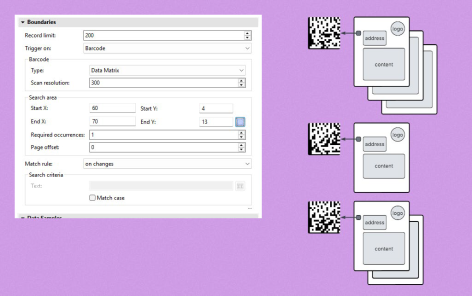
By handling barcode detection natively within the DataMapper, this feature eliminates the need for external barcode scanning steps in Workflow or Automate. This enhancement thus streamlines automation scenarios, simplifying overall solution architecture, and reducing reliance on custom or intermediary processing components.
Barcode scanning in DataMapper
This release introduces JavaScript functionality in the DataMapper script engine to read barcode values (in boundaries section and in steps section). (96962)
This provides greater flexibility for advanced implementations that require programmatic control over barcode processing. As in the following example:
// Boundaries script
var barcodeVal = boundaries.getBarcode(
    region.createRegion(4, 68, 13, 78), "DATAMATRIX"
).join();

if (barcodeVal && barcodeVal.startsWith("B")) {
    boundaries.set(2);
}// Action script
var barcodeVal = data.extractBarcode(4, 13, 70, 10, "DATAMATRIX")
record.fields.Barcode = barcodeVal; Automatic Array to Detail Table conversion for XML data
This release extends the “Create Detail Tables” functionality to XML-based data models. (97038)
With this enhancement, you can select a node that is part of a repeating structure in an XML document and automatically generate a corresponding detail table in a single step. Previously, this required multiple manual actions, including defining repeats and creating individual extractions. 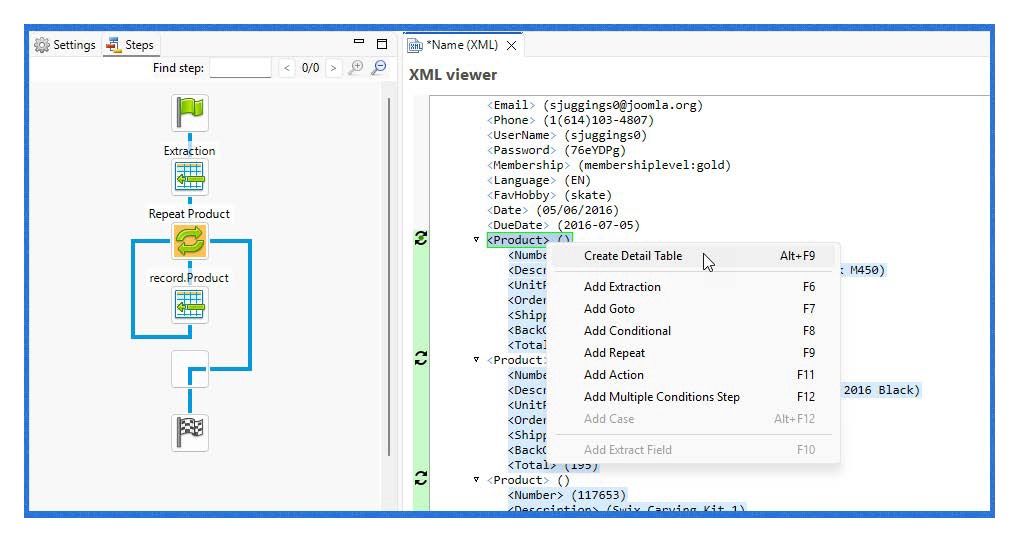
This provides a more efficient and intuitive starting point for building detail tables and working with line-item data.
General DataMapper Improvements
-
In the DataMapper script editor the action of the “Use selection” button has been fixed. The auto-generated text extraction JavaScript function in the DataMapper boundaries script engine now uses the boundaries related function. (53715)
- Improved error handling in the DataMapper Extract step. (90353)
- Pre-processors now execute only once in a DataMapper job, ensuring more consistent results and improved performance. (94425)
- Improved the behavior for editor selection Drag&Drop into data model. (96115)
- DataMapper improved for Text based data files featuring long lines. (96409)
- Fixed a problem for ODBC
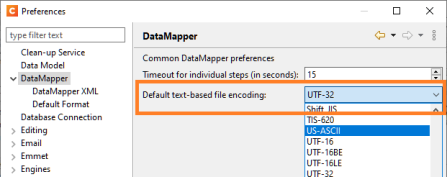
ResultSet.getString(name)function when the name corresponds to the first column in the ResultSet. (96431) - Added a setting for selecting the default encoding to be used for DataMapper text file configurations. (96795)
- Improved performance of XML based DataMapper configurations for large single record XML files. (96812)
- DataMapping steps that have been disabled inside of loops will no longer give an error upon execution, based upon those disable steps. (96933)
- Sorting XLSX data with a leading blank row no longer results in an empty last record in DataMapper. (97000)
- Improved the text used for DataMapper boundary selection, to make it more easily understandable. (97296)
OL Connect 2026.1 Output Improvements
General Output Improvements
- Fixed a PCL output issue with transforms causing some graphics to shift. (94324)
- Fixed issues with type casting in SQL Server queries during data selection filtering, when dealing with multiple datamappers that refer to the same field name but which use a different type for the field. (94973)
- Prevent disabled Additional Content items from causing errors. (96625)
Email Output Improvements
-
An issue has been resolved where the merge engine created a new SMTP connection for each email message, which could impact performance for large batches.
Print Output Improvements
- Output local will be forced on if "Prompt for file name" is selected in the Print Options in the output preset wizard or print wizard. (94901)
-
Fixed incorrect
automation.properties.OriginalFilenamevariable value for Print operations from Designer. (96197) -
Fixed a problem in AFP/IPDS output with handling of indexed (palette) colorspaces. (96539)
-
Fixed an issue with “Output in Grayscale” not working if the intermediate file is being flattened (transparency + non-PDF output type). (96555)
-
Additional Image dialog: OL Connect no longer rejects JPEG images with CMYK colorspace. (96565)
-
Changed the Output Creation Job Preset option from “<Default>” to “<Any>”, to better reflect the intended meaning. (96661)
-
The Advanced Print Options dialog should open faster than previously. (96731)
-
Allow the PostScript title in the Output Creation preset to be blank to ensure compatibility with older Connect versions. (96768)
-
Fixed a problem processing very large vector graphics in AFP and IPDS output. (96888)
-
Fixed an error with evaluating PDF type 4 (PostScript calculator) functions caused by locale-dependent interpreter behavior. (96975)
-
Fix error that could trigger a NullPointerException when trace-level logging is enabled for AFP output. (97218)
Workflow 2026.1 Improvements
Security and library improvements
- Third party libraries updated to more recent versions.
- The MicroSoft Access DB Engine 2016 runtimes were updated to 16.0.5044.1000 (96982)
General Workflow Improvements
- Added "Input encoding when unspecified" option to the XML Splitter plugin to correctly handle UTF-8 encoded XML files that lack an encoding declaration, preventing character corruption for special characters. (93040)
- Fixed NodeJS missing attachment for file names with extended Unicode characters. (93761)
- Fixed a validation error in the Secure Email Output when the Rename to option was checked but its parent "Attach input job file" option was not. (95265)
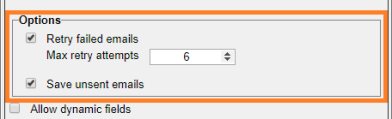
- Added a retry limit and draft cleanup on errors to prevent inbox clutter caused by repeated send failures, in Microsoft 365 Email Output. (95805)
- Fixed a false positive activation validation in the PDF/A-3 plugin. (96066)
- Added support for LDAPS (secure) protocol in the NodeJS Input plugin. (96216)
- Better handling for URLs entered into Microsoft 365 Sharepoint Input and Output plugins. The HTTP:// and HTTPS:// prefixes are now filtered out of the Site property, with the remaining string becoming the Site name. (96253)
- Fixed an issue where using double byte characters in the DataMapper configuration file and then attempting to run it in Workflow would leading to Workflow hanging. (96451)
- When adding JS scripts to the Workflow preferences, updating Workflow would override and remove those preferences thereafter. This has been fixed. (96556)
- Fixed incorrect behavior of the DataMapper runtime parameter when the name of the runtime parameter is identical to that of the local and global variables of the Workflow. (96620)
- Fixed resource loading time delays in HTTP Service for OL Connect resources requested over HTTP connections to Connect Server. (96816)
- Fixed issue with the Input FTP plugin not finding any files when trying to get files from older FTP servers. (96996)
OL Connect Automate 1.1
A new version of OL Connect Automate will be made available shortly after the OL Connect 2026.1 release. This is the first update since the initial release and it introduces enhancements that move Automate closer to feature parity with OL Connect Workflow. The release also adds new connectors and introduces an offline installer to simplify deployment in gated environments.
FileBound nodes
A new FileBound connector enables integration with Upland Software’s FileBound platform.
This connector simplifies storing and retrieving documents generated with OL Connect, while supporting the addition of metadata. It streamlines document management processes, reduces manual intervention, and ensures secure and efficient access to business-critical documents. This marks the first formal integration between OL Connect Automate and another product within the Upland portfolio.
MariaDB node
This release introduces an officially supported MariaDB node for OL Connect Automate, enabling database connectivity without relying on third-party components.
It allows flows to store and manage data in MariaDB schemas, supporting scenarios such as job tracking and lifecycle management. This provides a more scalable and structured approach and offers a flexible alternative to the legacy Data Repository in OL Connect Workflow.
Offline installer
A new offline installer is available for OL Connect Automate, enabling installation without an internet connection.
This simplifies deployment in secure or restricted environments by removing the need for manual installation of individual components. It reduces setup time, minimizes errors, and ensures a more consistent installation experience.
Known Issues
The Known Issues can be found