Standard Variables
Standard Variables, also known as "system variables", are variables that are created and managed directly by PlanetPress Workflow. Those variables are read-only and cannot be modified. They provide information about the job, process, and PlanetPress Workflow environment.
Available Standard Variables
|
Variable |
Name |
Example value when interpreted |
|
%c |
Content of your job file in its original format. |
n/a |
|
%F |
Job File Path and Name |
C:\Program Files\PlanetPress Suite 7\PlanetPress Watch\Spool\job1D80328.dat |
|
%f |
Job File Name including the file extension. |
job1D80328.dat |
|
%z |
Job File Size in bytes. |
34134 |
|
%o |
Original File Name |
invoice_june2nd.txt |
|
%O |
Original File Name Without Extension |
invoice_june2nd |
|
%y |
Current Year |
2010 |
|
%m |
Current Month (numeric) |
06 |
|
%M |
Current Month (text) |
June |
|
%L |
Current Month (short text) |
JUN |
|
%d |
Current Day (numeric) |
16 |
|
%D |
Current Day (text) |
Monday |
|
%l |
Current Day (short text) |
MON |
|
%h |
Current Hour |
18 |
|
%n |
Current Minute |
03 |
|
%s |
Current Second |
41 |
| %v | Current Millisecond | 24 |
|
%u |
Unique 13-char string (will be different every time it is used) |
0ZIS4CW8U47VI00 |
|
%t |
Current Temporary Folder |
C:\Documents and Settings\All Users\Application Data\Objectif Lune\PlanetPress Suite 7\PlanetPress Watch\Spool\6.tmp\ |
|
%e |
Current Metadata Filename |
job00ZAIZ2C4FXON16CE6C566.dat.meta |
|
%E |
Current Metadata Path and Filename |
C:\Documents and Settings\All Users\Application Data\Objectif Lune\PlanetPress Suite 7\PlanetPress Watch\Spool\5.tmp\job00ZAIZ2C4FXON16CE6C566.dat.meta |
| %w | Current process name. | My Process |
| %i | Current Loop Iteration Index (always the innermost loop) | 2 |
The %i Loop Count Variable
In version 7.4, the %i variable is introduced. Its value is equivalent to the current iteration of loops inside of a process. It always contains the value of the innermost loop, and only certain tasks trigger the counter to start. Here is an example process and the value of %i during this process:
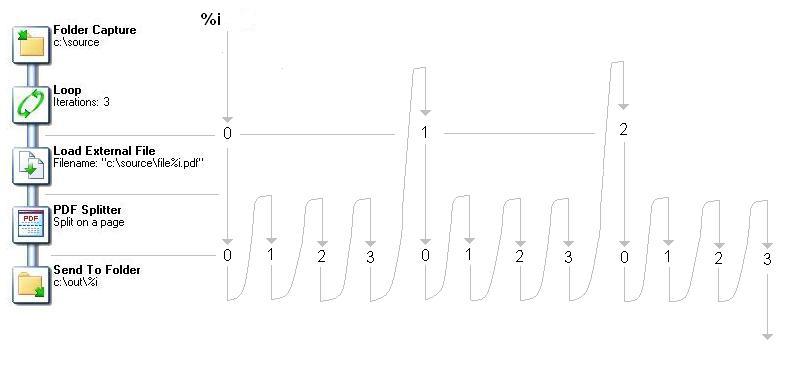
Initial input tasks do not modify the value of %i. However, the following tasks do trigger the variable:
- Barcode scan
- Capture Field Processor
- All Splitters (Including the Metadata Sequencer)
- Get Capture Document
- Loop
- Capture PGC Splitter
- PrintShop Mail