Manage Time Overview
The Manage Timesheets page contains Timesheets that have been submitted for your review. From here, they can be approved or rejected.
This page can be accessed by selecting Review  → User Management → Manage Time from the Navigation Menu.
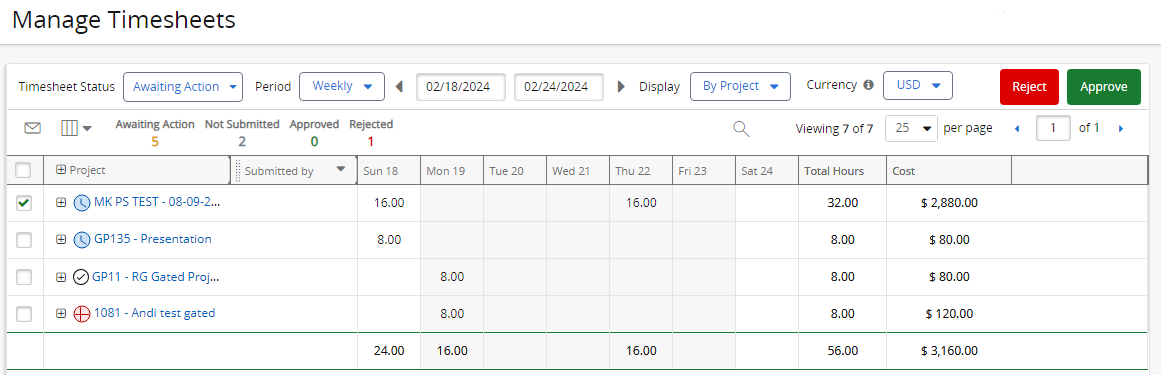
Submitted Timesheets will appear on the page for users with the following permissions:
-
"Approve/Reject Time" Project Task permission: Users with this permission on a work item can see and interact with any Timesheets that were submitted toward that work item.
-
"Approve/Reject Timesheets" Manage Time permission: Users with this permission can see and interact with any submitted Timesheets regardless of the work items they were entered toward.
Note: Approved Timesheets can result in Actual Costs on work items. See Actual Labor Costs for more information.
Tip: Use the "Timesheet Approval Notification preferences" drop-down menu on the Preferences page to subscribe to email summaries of Timesheets awaiting your approval. Timesheets can be approved/rejected directly from these emails.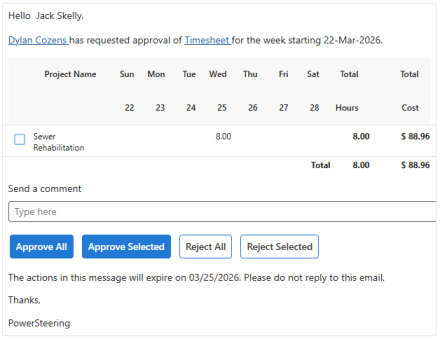
See the following pages for more information on the Manage Time page: